21
Fingerprint (RD300-FH1 only)
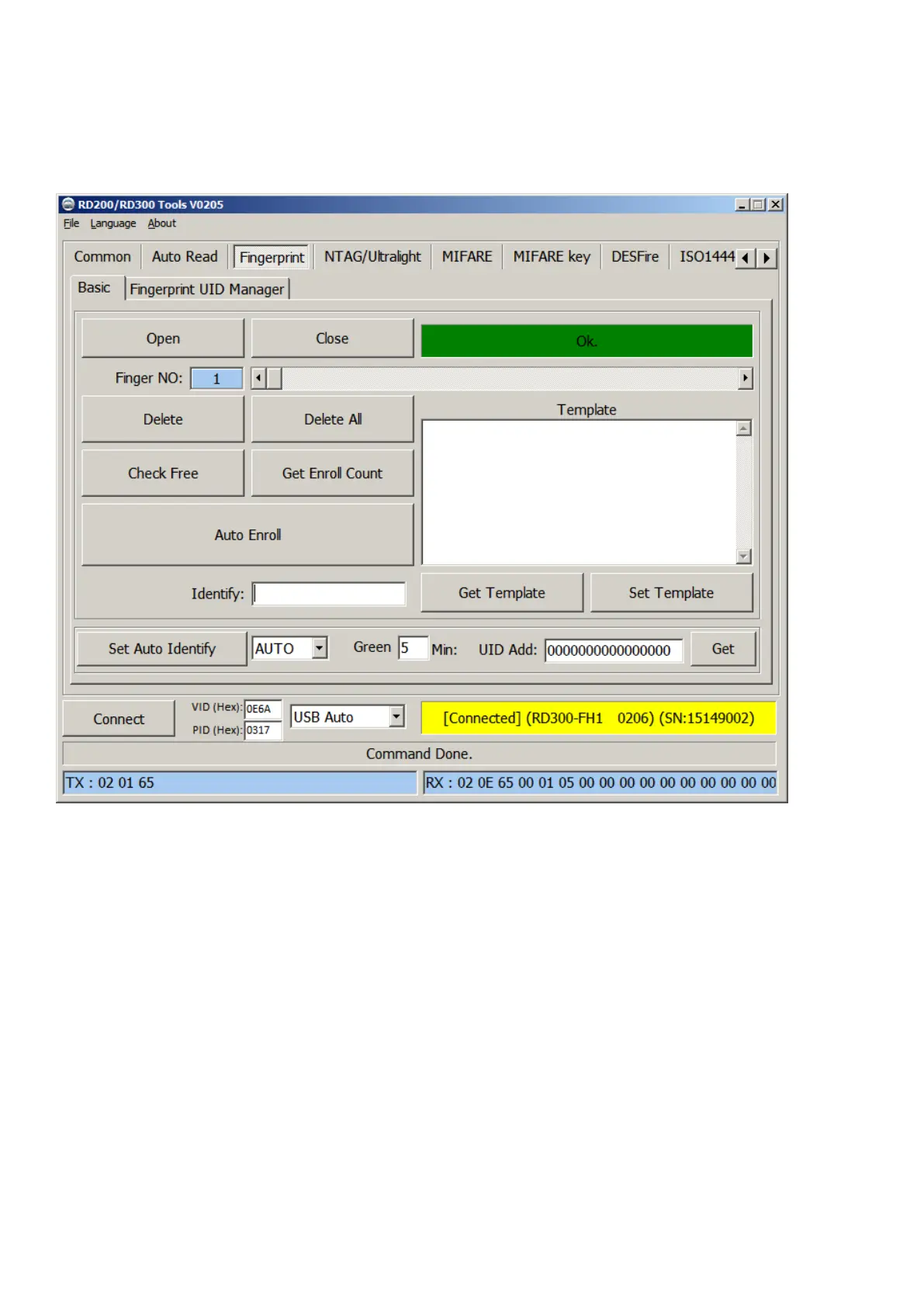
A. Basic
1. Open / Close : Setup fingerprint sensor enable/ disable.
2. Finger No: RD300-FH1 support 2000 fingerprints. Select from 0 to 1999 to config fingerprint.
3. Delete: Delete selected fingerprint number (Finger No).
4. Delete all: Delete all fingerprints.
5. Check Free: Check selected fingerprint number is in use or free.
6. Get Enroll Count: Check how many fingerprint numbers was used.
7. Auto Enroll: Select fingerprint number and click auto Enroll to save fingerprint to reader.
8. Template: Fingerprint’s template. Every fingerprint have unique template.
9. Identify: Identification of the capture fingerprint with database number.
10. Set Auto Identify: Default is auto, set to off will disable fingerprint recognition.
11. Green: Setup fingerprint sensor auto sleep timing. Default is 5 minutes.
12. UID Add: Change prefix to fingerprint numbers.


 To Next Page