The document describes the Bluetooth Low Energy (BLE) Tire Pressure Monitoring System (TPMS) Retrofit Kit, Model: BSE-02, manufactured by SYSGRATION. This system allows drivers to monitor tire pressure and temperature in real-time via a smartphone application.
Function Description
The BLE TPMS Retrofit Kit provides accurate tire pressure and temperature data to the driver's smartphone through a dedicated application (APP). When the system detects an abnormal status, it actively alarms the driver and displays the abnormal data along with the affected tire's location on the APP. The system utilizes wireless signal transmission from sensors installed in each tire. It also includes a "Voice Dongle" for audible warnings.
Important Technical Specifications
BLE Sensor Specification:
- Operating Voltage: 3V
- Operating Humidity: 95% MAX
- Operating Current: < 15 mA at DC 3V
- Storage Temperature: -40°C to 85°C
- Operating Temperature: -20°C to 85°C
- Monitored Pressure Range:
- Passenger: 0 to 92 psi (0 to 640 kPa)
- Truck: 0 to 185 psi (0 to 1280 kPa)
- Monitored Temperature Range: -20°C to 85°C
- Operating Frequency: 2.4GHz
- Transmission Power: 4 dBm MAX
- Battery Life: 1 year (under normal operating condition)
- Battery Capacity: 130 mAh (CR1632)
- Weight: 9.5 g ± 0.5 g (including battery)
Voice Dongle Specification:
- Operating Voltage: 5V
- Operating Humidity: 95% MAX
- Operating Current: < 900 mA at DC 5V
- Storage Temperature: -40°C to 85°C
- Operating Temperature: -20°C to 85°C
- Sound Pressure (min.): 80dB@30cm
- Operating Frequency: 2.4GHz
- Transmission Power: 4 dBm MAX
- Weight: 10 ± 1 g
APP Compatibility:
- iOS: iOS 7.1.2 or later (iPhone 4S, 5, 5S, 6, 6 Plus or later)
- Android: Standard Android 4.3 or later (Android Smart Phone)
- Bluetooth: Requires Bluetooth 4.0
Usage Features
Installation:
The kit includes 4 BLE TPMS sensors, 4 CR 1632 batteries, 4 anti-theft parts, 4 lock-nuts, 1 voice dongle, 1 spanner, and a user manual.
- Sensor Assembly: The battery (CR1632) is inserted into the tire sensor, which is then secured with an anti-theft part and lock-nut.
- Tire Valve Preparation: The tire valve is prepared for sensor attachment.
- Sensor Attachment: The assembled sensor is screwed onto the tire valve, and the lock-nut is tightened with the spanner to prevent theft.
APP Download and Installation:
The APP can be downloaded from the APPLE APP Store or Android Google Play Store by searching for "BLE" or "TPMS". After installation, users must ensure Bluetooth and Location Services are enabled on their smartphone.
Device Setting and Learning:
The APP offers three methods for learning sensor IDs:
- Manual Learning: Users manually input the five-character sensor ID (e.g., "0-9", "A-F") for each tire (LF, RF, RR, LR) into the APP.
- Rapid Deflation Setting: Users select a tire in the APP, then deflate that tire. The APP detects the deflation signal and automatically learns the new ID. This process takes approximately 120 seconds per tire.
- QR Code Setting: Users scan the QR code on each sensor using the APP to automatically learn the ID.
System Settings:
The APP allows users to customize various settings:
- Unit Setting: Change temperature units (°C/°F) and pressure units (Bar/kPa/psi).
- Warning Audio Setting: Select from default, piano 1, piano 2, piano 3, bird, fantasy, or impromptu alarm sounds.
- System Alarm Setting: Configure monitored pressure and upper temperature values.
- Mail TPMS Data: Send log data via email (iOS supports system email only; Android allows filling in an email address).
Settings are unlocked and saved by clicking a lock icon. A "Default Value" option resets all settings.
Tire Exchange Setting:
This feature allows users to update tire positions in the APP after tire rotation. Users drag and drop tire icons to their new locations on the virtual car display and then save the changes.
Voice Dongle Setting:
The voice dongle provides audible warnings. It is recommended to use a 5V/2A car USB power charger adapter.
- Pairing: Press the red button on the dongle for 1.5 seconds until it beeps and the LED (Red and Blue) flickers, indicating pairing mode.
- Connection: In the APP, select "Dongle" from the menu, then click "TPMS_Dongle_sn" (random serial number) to connect. Once connected, "TPMS_Dongle_sn Connected" will appear in blue color.
- Functionality: The APP automatically downloads settings. "Voice Dongle Setting OK" will be displayed. The dongle provides voice warnings for tire status. A mute/un-mute button is available in the APP.
Alarms and Warnings:
The system provides visual and audible warnings for:
- High Tire Pressure / Low Tire Pressure: Displayed in red when pressure exceeds maximum or falls below minimum.
- Rapid Deflation: Indicates a quick drop in tire pressure.
- No Signal: Symbolizes loss of signal from a sensor.
- High Tire Temperature: Displayed in red when temperature exceeds maximum.
- Low Battery Power: Warning for a TPMS sensor with low battery.
Maintenance Features
Troubleshooting (Frequently Asked Questions):
- No Value Displayed After Sensor ID Input: TPMS sensors transmit data only when the car is moving over 20 km/h, has started after being parked for over ten minutes, or if there's a 30 kPa tire pressure difference. Users can check sensor function by increasing or deflating tire pressure.
- No Data Shown While Driving: Restart the smartphone and verify Bluetooth is enabled.
- No Alarm Sound/Voice Warning: Check if the smartphone is in silent mode or if the volume is at its lowest.
- Alarm Sound but No Voice Warning: Some Android smartphones may not support voice services; contact the smartphone manufacturer.
Product Warning:
- Safe Operation: Do not operate the APP while driving. The company disclaims responsibility for driver carelessness.
- Signal Interference: Wireless signals can be affected by frequency interference, faulty operation, installation, or metallic materials in the windshield. If alarms sound due to abnormal data, move the vehicle or seek professional inspection.
- Low Battery Sensor: If a TPMS sensor's battery is low, replace it as soon as possible at a service station. Continuous abnormal conditions can shorten battery life.
- Chemical Exposure: Avoid contact between TPMS sensors and chemicals, as they can damage the sensor.
- APP Performance: Close other unused APPs or web pages to optimize data reception by the BLE APP.
Warranty Policy:
A one-year warranty is provided from the date of purchase, covering faulty products under normal operation. The company will repair or replace defective products. Warranty conditions include:
- Providing defective products to a local dealer with proof of purchase date and cause of defect.
- Operating products correctly as per the user manual.
- No self-disassembly of the product.
- Product failure due to manufacturing issues.
Disclaimer:
The product is intended as a precautionary warning and secondary safety equipment. Installation should be performed by a qualified tire shop. The company is not responsible for any civil or criminal liabilities resulting from improper driving behavior or tire damage/traffic accidents.
Warranty Certificate (Model: SBT-20):
Includes sections for serial numbers (LF, RF, LR, RR), sensor ID stickers, warranty period (One (1) Year), purchase date, and distributor stamp. A QR code links to http://www.sysgration.com/.

 Need help?
 General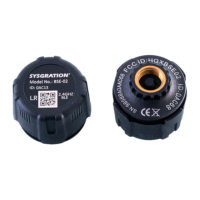

 To Next Page