EasyManua.ls Logo

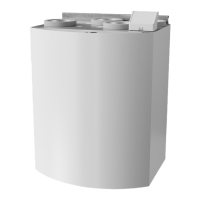
SystemAir SAVE VTR 150/K - User Manual

SystemAir SAVE VTR 150/K
22 pages
Print Icon
To Next Page IconTo Next Page
Loading...
Document in original language | 254493 · v01
SAVE VTR 150/K
User Manual
GB

Other manuals for SystemAir SAVE VTR 150/K

Questions and Answers

  • T
    tanya29Aug 17, 2025
    How to troubleshoot SystemAir Air Handlers when the fans do not start?
    • G
      Gregory AndrewsAug 17, 2025
      If the fans in your SystemAir Air Handlers aren't starting, begin by checking the HMI for any alarms. Next, verify that all fuses and fast couplings are properly connected, including the main power supply and the fast couplings for both supply and extract air fans. Also, ensure that the week schedule is turned ON and running in AUTO mode, as it might be in OFF mode with the airflow set to OFF.
  • D
    David MunozAug 23, 2025
    What to do if my SystemAir Air Handlers have low supply air temperature?
    • J
      Jennifer LongAug 23, 2025
      If you're experiencing low supply air temperature with your SystemAir Air Handlers, check the display for any alarms. Also, verify if the Defrosting function is active in the HMI screen. Ensure the set supply air temperature in the HMI is correct and that ECO mode is not activated. Check if user modes like HOLIDAY, AWAY, or CROWDED are activated in the HMI or via a hardwired switch. Verify that the temperature sensors are functioning correctly by checking the analogue inputs in the service menu. If you have an electrical re-heater, check if the overheat protection thermostat is active and reset it if necessary. Also, check if the extract filter needs to be changed. If the unit has a re-heater battery connected, consider that very cold outdoor conditions might require it.
  • R
    rhonda56Aug 30, 2025
    How to reduce noise and vibrations in SystemAir Air Handlers?
    • M
      masonjamesAug 30, 2025
      To address noise and vibrations in your SystemAir Air Handlers, start by cleaning the fan impellers. Ensure that all screws holding the fans are properly tightened. Check that the anti-vibration lists are correctly fitted to the mounting bracket and the back of the unit. If your unit has a rotating heat exchanger, verify that the rotor belt is not slipping.
  • A
    Anthony MitchellSep 4, 2025
    What to do if SystemAir Air Handlers unit cannot be controlled?
    • S
      Steven StephensonSep 4, 2025
      If your SystemAir Air Handlers unit's control functions are stuck, try resetting them by unplugging the unit for 10 seconds. Additionally, check the modular contact connection between the HMI and the main printed circuit board.
  • B
    Brenda MaddoxNov 10, 2025
    Why is there reduced airflow in my SystemAir Air Handlers?
    • D
      Dr. Jessica NorrisNov 11, 2025
      If you're experiencing reduced airflow in your SystemAir Air Handlers, there are several potential causes: * The unit might be in defrost mode, which reduces fan speed or shuts down the supply air fan. * The outdoor airflow compensation function might be active if the outdoor air temperature is below 0°C. * A temporary user mode like AWAY or HOLIDAY could be activated, or digital inputs like CENTRAL VACUUM CLEANER and COOKER HOOD might be in use. Additionally, make sure to check the HMI for alarms, the airflow settings in the HMI, and the week schedule settings. It's also important to ensure that the filters, diffusers/louvres, fans, and heat exchange block are clean. Furthermore, check the building's air intake and exhaust for clogs, and inspect duct runs for damage or dust buildu...

SystemAir SAVE VTR 150/K Specifications

General IconGeneral
ModelSAVE VTR 150/K
Airflow150 m³/h
Supply Voltage230 V
Phase1~
Frequency50 Hz
Filter Class Supply AirG4
Filter Class Extract AirG4
Filter ClassG4
Heat Exchanger TypeCounterflow
TypeHeat Recovery Ventilation

Related product manuals