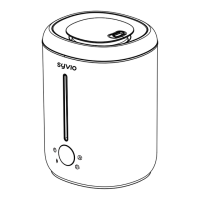
This document describes the SYVIO SA3300296 Cool Mist Humidifier, an ultrasonic humidifier designed to add moisture to the air and diffuse essential oils.
Function Description:
The humidifier operates by generating a cool mist to increase humidity levels in a room. It features multiple control options for mist volume, humidity settings, and a timer function. An integrated atmosphere light adds to its aesthetic appeal. The device is also equipped with safety features such as waterless protection and an intelligent constant humidity mode.
Important Technical Specifications:
- Power: 25W
- Voltage: 110V~
- Mist Volume: 200±40 ml/h
- Working Time: 24H (low mist), 12H (high mist)
- Capacity: 2.8L
- Timer Settings: 2H, 4H, 8H
- Size: 195×182×263mm
Usage Features:
- 1st Press: Turns on the humidifier with medium mist (two mist icon indicators lit) and the blue LED atmosphere light on.
- 2nd Press: Turns off the humidifier.
- Waterless Protection: If the water tank is empty, the display shows "E2" and the waterless icon flashes with a buzzer warning (3 times, ~7 seconds) before powering off. Pressing the button again will repeat this warning sequence.
- 1st Press (from medium mist state): Sets to high mist (three mist icon indicators lit).
- 2nd Press: Sets to low mist (one mist icon indicator lit).
- 3rd Press: Sets back to medium mist (two mist icon indicators lit).
- The mist button cycles through these settings.
Sleeping Mode:
- Long Press (3 seconds) Mist Button: Enters sleeping mode. The sleeping mode icon lights up, the water tank light and other display icons turn off, and the mist volume switches to low mist mode. In this mode, if the unit becomes waterless, it will auto-turn off without buzzer beeps.
- Short Press Any Button: Exits sleeping mode, retaining the previously set mist volume and light mode.
- 1st Press (on working state): Displays the current timer setting. If no timer is set, it shows "--"H.
- 2nd Press: Sets a 2-hour timer. The display shows "02" with the timer icon "H" lit. The unit will power off after 2 hours.
- 3rd Press: Sets a 4-hour timer. The display shows "04" with the timer icon "H" lit. The unit will power off after 4 hours.
- 4th Press: Sets an 8-hour timer. The display shows "08" with the timer icon "H" lit. The unit will power off after 8 hours.
- 5th Press: Clears the timer setting. The display shows "--" with the timer icon "H" lit.
- The timer button cycles through these settings.
- 1st Press (on working state): Displays the current humidity setting. If no humidity is set, it shows "--"%.
- 2nd Press: Sets humidity to 40%. The display shows "40" with the humidity icon "%" lit.
- 3rd Press: Sets humidity to 50%. The display shows "50" with the humidity icon "%" lit.
- 4th Press: Sets humidity to 60%. The display shows "60" with the humidity icon "%" lit.
- 5th Press: Sets humidity to 70%. The display shows "70" with the humidity icon "%" lit.
- 6th Press: Sets humidity to 80%. The display shows "80" with the humidity icon "%" lit.
- 7th Press: Clears the humidity setting. The display shows "--" with the humidity icon "%" lit.
- The humidity button cycles through these settings.
- Note on Humidity Control: After setting the humidity, the display will show the real-time humidity. If the real-time humidity is lower than the set humidity, the humidifier will operate in its current mist mode. If the real-time humidity is higher than the set humidity, the humidifier will stop misting.
Additional Features:
- Touch Button Sound: Each button press produces a buzzer beep.
- Stand-by Stage: The buzzer beeps when the unit is powered on.
- Humidity Display: Displays the current humidity and a humidity icon. If humidity is ≥85%RH, it shows "H%RH". If humidity is ≤30%RH, it shows "L%RH". An "E3" error code indicates poor contact of the humidity detector.
- Intelligent Constant Humidity Mode: Automatically adjusts the mist spray state based on the set humidity value.
Instructions for Use:
- Place the unit on a flat, water-resistant surface to prevent moisture damage to carpets, floors, furniture, or walls.
- Remove the top cover from the water tank.
- Fill the water tank with tap water up to the Max Water Level Line, being careful not to overfill. For essential oil diffusion, add approximately 10 drops of essential oil per 1 liter of water into the tank.
- Replace the top cover onto the water tank.
- Plug the power cord into an electrical wall outlet. Allow a few minutes for the essential oil to blend with the water before fragrance begins diffusing.
Maintenance Features:
General Care:
- Only use cold water; do not add hot water.
- Always use the original power cord.
- Unplug the power cord from the electrical outlet before filling or performing maintenance.
- Essential oil should not come into contact with the exterior surface of the unit.
- Do not submerge the unit in water to avoid damage to the exterior surface or risk of electric shock.
- Do not put fingers, hands, or any objects into the unit while operating.
- Do not attempt to adjust or repair the unit yourself.
- Do not touch the water while the unit is operating.
- Do not fill water through the Mist Outlet or the Air Outlet.
- Do not place the unit near heat sources or direct sunlight.
- Use two hands when moving the humidifier.
- Always follow the instruction manual for operation.
Easy to Clean:
- Pour water out of the tank, ensuring not to pour it out from the air outlet side.
- The ceramic disc should not come into contact with any hard or sharp objects.
- To remove possible buildup, rinse the tank with a white vinegar and water solution.
- Dry thoroughly with a soft cloth. Do not use strong cleaning agents.
- Recommendation: Clean the humidifier once a week.
Troubleshooting:
- Will not turn on or turn off?
- Possible Factor: Not enough water in the tank.
- Solution: Add enough water, not exceeding the 2.8L MAX water line.
- Possible Factor: The power cord is not connected properly.
- Solution: Disconnect the cord, check the cables, and reconnect carefully.
- Will not put out mist?
- Possible Factor: Not enough water or too much water in the tank.
- Solution: Add enough water, not exceeding the 2.8L MAX water line.
- Possible Factor: The "Mist Outlet" has dirt.
- Solution: Clean the "mist outlet," place it in a cool spot, and allow it to dry naturally before use.
- Possible Factor: The "Air Intake" port under the base has dirt.
- Solution: Clean the "air intake" with a dry brush.
For further assistance or warranty registration, contact support@mysyvio.com.


 To Next Page
 General