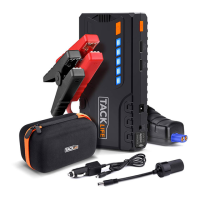
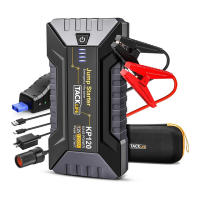
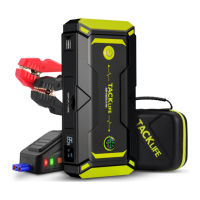
This document describes the TACKLIFE T8 Pro smart car jump starter, a versatile device designed to assist with vehicle starting and provide portable power for various electronic devices. The jump starter is engineered for ease of use and safety, featuring an intelligent detection system and multiple protection mechanisms.
Function Description
The primary function of the TACKLIFE T8 Pro is to jump start 12V gasoline and diesel vehicles. It connects directly to the car battery using smart jumper clamps, providing a powerful boost to start the engine. The device incorporates an LCD screen that displays the remaining power, charging status ("IN"), and output status ("OUT") when powering other devices.
Beyond jump starting, the T8 Pro serves as a portable power bank. It offers several output ports:
- USB 5V/2.1A Output: For charging cell phones, tablets, and other USB-powered devices.
- Quick Charge Output (5V/9V): Provides faster charging for compatible devices.
- 12V/10A Output: Designed to power other 12V car accessories, such as portable tire air pumps, via a cigarette adapter.
The device also includes integrated lighting features:
- LED Flashlight: Offers stable, strobe, and SOS modes for various lighting needs.
- Emergency Light: A red emergency light for signaling in critical situations.
- Compass: A built-in compass for navigation.
Usage Features
Charging the T8 Pro:
The T8 Pro can be recharged using either a wall charger or a car charger.
- Wall Charger: Plug the wall charger into a universal socket, then connect the charger's end to the 15V input port of the T8 Pro.
- Car Charger: Plug the car charger into the cigarette lighter socket, then connect the charger's end to the 15V input port of the T8 Pro.
The LCD screen will display "IN" during charging and "100%" when fully charged.
Jump Starting 12V Vehicles:
- Connect Clamps: Plug the blue end of the smart jump clamps into the 12V smart jumper socket on the T8 Pro. Ensure it is fully inserted to prevent melting.
- Connect to Battery: Connect the red clamp to the positive (+) battery terminal and the black clamp to the negative (-) battery terminal.
- Check Indicator Light: The smart jumper cable has an indicator light that provides feedback on the connection status:
- Green Light (ON), Red Light (OFF): Connection is correct and ready to start the car.
- Green Light (Blinking), Red Light (OFF): Car battery power is too low or dead. Press the "BOOST" button; the green light will turn on, allowing engine start within 30 seconds.
- Green Light (OFF), Red Light (OFF): Internal battery is too hot, T8 Pro is at low power capacity, or clamps are not connected tightly. Allow the unit to cool, recharge, or reconnect.
- Green Light (OFF), Red Light (ON): Overcurrent protection activated. Wait at least 30 seconds.
- Green Light (Blinking), Red Light (Blinking): Temperature protection initiated. Wait 10 minutes for automatic resume.
- Red Light (ON) with Buzzing: Reverse battery connections. Reconnect the poles correctly until the green light turns on.
- Start Engine: Once the connection is correct (green light on), start the engine.
- Disconnect: After starting the engine, immediately disconnect the clamps from the car battery within 30 seconds and remove the T8 Pro.
Important Jump Starting Notes:
- Ensure the power of the T8 Pro is above 75% before jump starting.
- Do not use the device to start the car while it is being charged.
- Avoid continuously starting the car more than 3 times. Allow a two-minute interval between each start to prevent overheating and damage.
- Do not charge the device immediately after a successful jump start.
- Only use the provided jump clamps. If the clamps are damaged, discontinue use.
- Ensure there is no rust or foreign matter at the interface before connecting the clamps.
Charging Cell Phones and Tablets:
- Plug a USB cable into the USB quick charge output or 5V/2.1A output.
- Connect the Micro-USB (or appropriate) end to your cell phone or tablet.
- Press the power button to begin charging.
Powering Other Car Equipments:
- Plug the cigarette adapter into the 12V/10A output port.
- Connect the power cable of the 12V car equipment to the cigarette adapter.
- Press the power button to supply power to the equipment.
LED Flashlight Instructions:
- Turn On/Cycle Modes: Hold the power button for a few minutes to turn on the flashlight. Press it again to cycle through Stable, Strobe, and SOS modes, then OFF.
- Red Emergency Light: Press the power button twice quickly to turn on the red emergency light. Press it again to turn it OFF.
Maintenance Features
General Care and Storage:
- Temperature: Do not place the product in environments where the temperature exceeds 60°C or in extremely hot environments/fire. Charge the device in temperatures between 0°C and 45°C.
- Water Exposure: Do not submerge the product in water.
- Impact: Do not drop the product. If it is impacted or damaged, it should be repaired by a qualified technician.
- Battery Packs: Do not use damaged or modified battery packs, as this increases the risk of fire, explosion, and injury.
- Cleaning: Ensure interfaces are free of rust and foreign matter before use.
Battery Life and Charging:
- The T8 Pro can hold a charge for up to 12 months due to its scientific circuit design.
- To extend the service life of the lithium battery, it is suggested to charge the device every three months.
- The device is equipped with an intelligent detection system and will automatically shut down after 30 seconds if there is no load or if it is fully charged.
Safety Precautions:
- Read the instruction manual carefully before use.
- Keep the device away from children.
- Do not operate the product in an explosive environment (flammable liquids, gases, dust).
- Do not use the device as a toy.
- Do not use this device for charging a car battery directly.
- Remove metal accessories (rings, bracelets, necklaces) before use to prevent short circuits.
- In case of battery leakage, do not touch the liquid directly. Rinse with soap and water if skin contact occurs. If it gets into eyes, rinse with cold water for at least 10 minutes and seek medical attention.
- Recycle the product battery with appropriate equipment at the end of its life, following local regulations.
Troubleshooting:
If the device does not respond when the power button is pressed, it might be due to very low voltage triggering low power protection. In this case, plug the wall charger into the T8 Pro to recharge it. If problems persist, contact customer support.


 To Next Page
 General