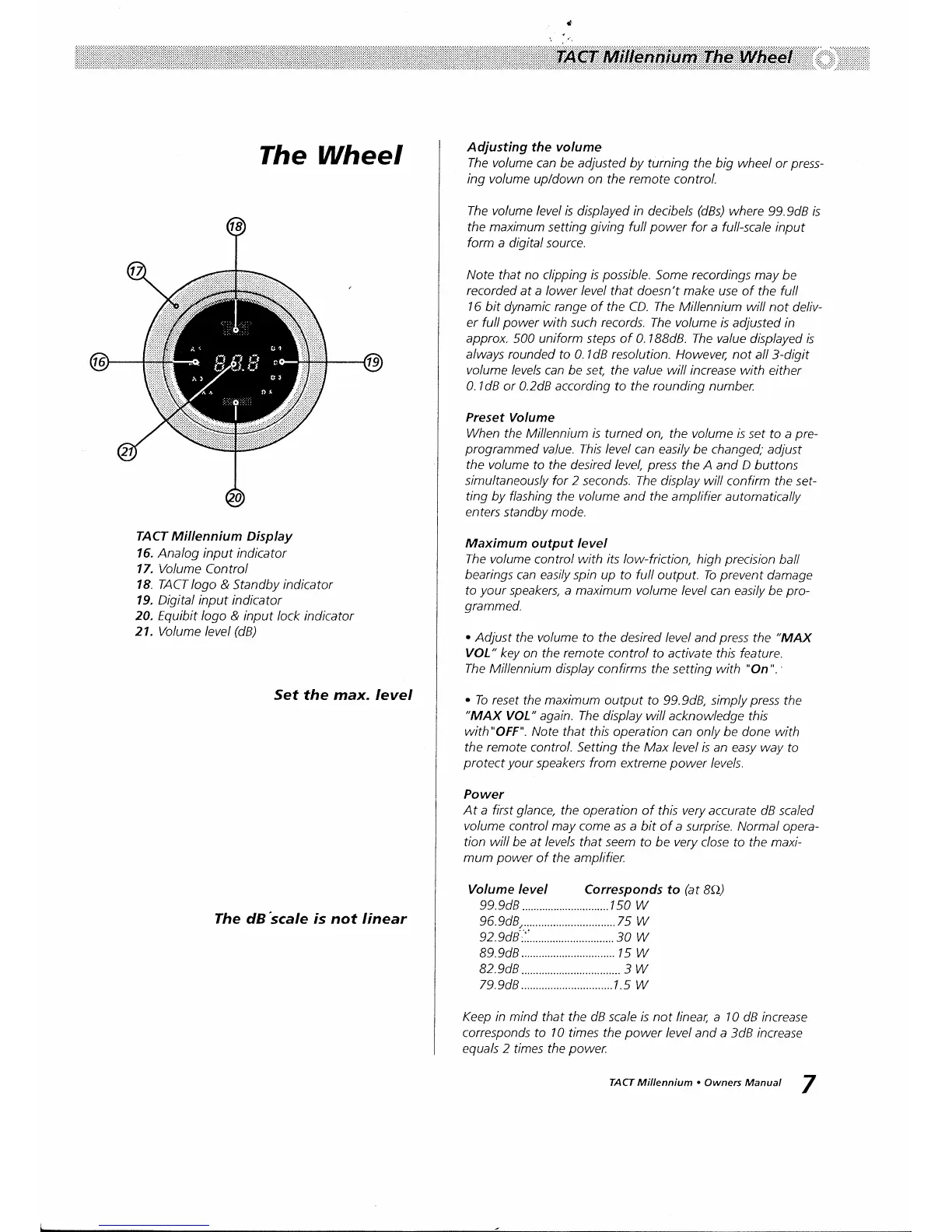
The Wheel
TACT Mil lenniu
m Display
16.
Analog input indicator
17. Volume
Control
18.
TACT logo &
Standby
indicator
19. Digital input
indicator
20. Equibit logo
& input lock indicator
21. Volume level
(dB)
Set
the max. Ievel
The dB'scale is not linear
Adjusting
the
volume
The volume
can be adjusted by turning
the big wheel or
press-
ing volume
up/down on the
remote
control.
The volume level is
displayed in decibels
(dBl
where
99.9d8 is
the maximum
setting
giving
full
power
for a full-scale input
form
a digital
source.
Note that no
clipping
is
possible.
Some recordings may
be
recorded
at a lower
level
that doesn't make use of the full
16
bit dynamic range of the CD. The Millennium will
not
deliv-
er full
power
with such records.
The
volume
is adjusted in
approx.
500 uniform steps of 0.1BBdB.
The
value displayed is
always
rounded to 0.1d8 resolution. Howeve4
not all
3-digit
volume
levels can be set, the
value
will increase with
either
0.1d8 or 0.2d8 according to the rounding number.
Preset Volume
When
the Millennium
is
turned on, the volume /s
sef to a
pre-
programmed
value. This level
can easily be changed;
adjust
the volume
to the desired level,
press
the A and D buttons
simultaneously for 2 seconds. The display will
confirm the sef-
ting by flashing the volume and the
amplifier automatically
enters standby mode.
Maximum
output level
The volume
control
with its low-friction,
high
precision
ball
bearings
can easily spin up to full output. To
prevent
damage
to
your
speakers, a maximum volume
level can easily
be
pro-
grammed.
.
Adjust
the
volume
to the desired level
and
press
the
"MAX
VOL"
key on the remote
control to activate this feature.
The Millennium display confirms
the setting with
"On".
.
Io reset
the
maximum
output to 99.9d8,
simply
press
the
"MAX
VOL'
again.
The
display will acknowledge
this
with"OFF".
Note that
this
operation can
only
be done with
the remote
control.
Setting the Max
level is an easy way to
protect your
speakers from extreme
power
levels.
Power
At a first
glance,
the operation
of this very accurate
dB scaled
volume
control may come as a
bit of a
surpilse.
Normal
opera-
tion will be at levels
that seem to be verv
close to
the maxi-
mum
power
of the
amplifier.
Volume level
Corresponds to
(at
BA)
99.9d8
..........1s0
W
96.9d8,.....
......75
W
92.9d8:.'....
......30
W
89.9d8 ls W
B2.9dB
..............3
W
79.9d8
l.s W
Keep
in mind that the dB
scale
is not linear,
a
10
dB increase
corresponds to 10 times the
power
level and a
3dB
increase
equals 2
times the
power.
TACT Mittennium.
Owners Manual
7


 To Next Page
 Loading...