EasyManua.ls Logo

Talkaphone AOR Series - User Manual

Talkaphone AOR Series
27 pages
Print Icon
To Next Page IconTo Next Page
Loading...
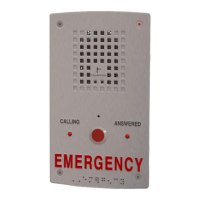
AOR Series Analog Stations
Installation & Operation Manual
Page 1 of 27 Rev. 1/7/2022
Copyright 2021-2022 Talk-A-Phone, LLC • 7530 North Natchez Avenue • Niles, Illinois 60714 • Phone 773.539.1100 • info@talkaphone.com • www.talkaphone.com.
All prices and specifications are subject to change without notice. Talk-A-Phone, Talkaphone, bAlert, Scream Alert, WEBS, and WEBS Contact are registered trademarks of Talk-A-Phone,
LLC. All rights reserved. All other trademarks mentioned in this document or website are the property of their respective owners and does not imply or indicate any approval, endorsement,
sponsorship, or affiliation with such owners unless such approval, endorsement, sponsorship, or affiliation is expressly indicated.
AOR Series Analog Stations
Installation & Operation Manual
v1.0
Question and Answer IconNeed help?

Do you have a question about the Talkaphone AOR Series and is the answer not in the manual?

Summary

1. Getting Started

1.1 Introduction

Provides an overview of the AOR Series Analog Station and the manual's purpose.

1.2 Whats In the Box

Lists the components included with the AOR Series Analog Station.

1.3 Technical Requirements

Details the necessary technical specifications for connecting the unit.

2. Hardware Installation

3. Auxiliary Inputs;Outputs

3.1 Auxiliary Input

Explains the function and connection of the auxiliary input for remote call activation.

3.2 Auxiliary Output

Describes the optional auxiliary output for triggering external devices.

4. Speaker and Microphone Volume

5. Mode Configuration DIP Switches

6. Software Programming

6.1 Quick Programming Guide

Provides a concise guide for programming the AOR Series Analog Station.

6.2 Accessing Programming Mode

Details the methods to enter programming mode using security codes or DIP switches.

6.3 Security Code

Explains how to use, change, and recover the unit's security code for programming.

6.4 Summary List of Programming Codes

Lists all available programming codes, their function, and memory slots.

6.5 Autodial Phone Numbers for the Pushbutton

Instructions for programming up to five autodial numbers for pushbutton activation.

6.6 Autodial Phone Numbers for the Auxiliary Input

Instructions for programming up to three autodial numbers for auxiliary input activation.

6.7 Talk-A-Lert Identification (ID) Number

How to program a 6-digit ID number for location identification.

6.8 Timing;Dialing Codes

Defines codes to set call length, silence timeouts, and dialing parameters.

6.9 Voice Message Codes

Configures pre-recorded messages for automatic playback upon call answering.

6.10 Recording the Voice Message

Step-by-step guide to record a custom voice message for the unit.

6.11 Assisted Programming

Configures the unit to automatically call Talkaphone support for assistance.

6.12 Operation Codes

Codes used to perform functions during an active phone call.

7. Operation

7.1 Pushbutton Operation

Describes how the unit operates when the pushbutton is pressed.

7.2 Auxiliary Input Operation

Explains the unit's operation when activated via a dry contact closure.

7.3 Calling the AOR Series Analog Station from the Remote Side

Instructions for initiating a call to the AOR Series Analog Station.

7.4 Answering a Call from the AOR Series Analog Station at the Remote Side

How the remote attendant answers and terminates calls from the unit.

7.5 Auxiliary Output Operation

Details how the auxiliary output can trigger external devices.

8. Frequently Asked Questions

9. Basic Troubleshooting

10. Talkaphone Terms of Use and Limited Warranty

11. Federal Communications Commission (FCC) Information

12. Part 15 Limitations

13. Maintenance

13.1 Testing

Recommendations for periodically testing the unit's functionality.

13.2 Cleaning

Guidelines for cleaning the unit's faceplate and components.

13.3 Preventative Maintenance

Instructions for maintaining the stainless steel finish to prevent corrosion.

14. AOR Series Analog Station Installation Information Sheet

Talkaphone AOR Series Specifications

General IconGeneral
MaterialStainless Steel
AudioFull Duplex
CommunicationAnalog or VoIP
Operating Temperature-40°C to 60°C
Housing MaterialStainless Steel
Mounting OptionsWall or Pole Mount
ComplianceADA, FCC, UL

Related product manuals