Need help?
Do you have a question about the Tandberg Data RDX QuikStor and is the answer not in the manual?
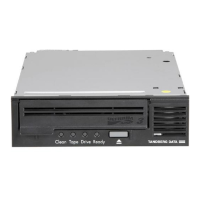
Step-by-step guide for installing the internal RDX QuikStor drive, including pre-installation checks.
Instructions for installing the external RDX QuikStor drive, including connection and placement recommendations.
Troubleshooting steps for when the RDX QuikStor unit's power indicator is off.
Diagnosing issues when the power indicator shows a steady amber light, indicating a fault.
Resolving problems when the power indicator blinks amber, often related to host access or ejection.
Troubleshooting steps for when the cartridge indicator is steady amber, indicating a cartridge issue.
Procedure to safely remove a stuck RDX cartridge when it cannot be ejected normally.
Steps to help the RDX QuikStor unit appear in Windows Device Manager after hardware rescans.
Steps to resolve write errors, including checking the write-protect switch and cartridge status.
 General
| Burst transfer rate | 480 MB/s |
|---|---|
| Seek time | 15 ms |
| Dimensions (WxDxH) | 109.8 x 177.5 x 51.8 mm |
| Power supply | 6.6 W |
| Interface | USB 2.0 |
| Media type | Tape Cartridge |
| Product type | Storage array |
| Compatible operating systems | Microsoft Windows 2000, Windows XP Professional, Windows XP Home, Windows 2003 Server, Windows Vista, Linux (Fedora Core 5), Linux (RHEL 4 update 3), Suse Linux Enterprise Server 9.0 and 10.0, Mac OSX |
| Mean time between failures (MTBF) | 500000 h |
| Storage temperature (T-T) | 5 - 45 °C |
| Storage relative humidity (H-H) | 10 - 90 % |
| Product color | Black |
 Weight and Dimensions
| Weight | 540 g |
|---|


 To Next Page