DVI-I Pin-out
Pin Assignment Pin Assignment Pin Assignment
1 T.M.D.S. Data 2– 9 T.M.D.S. Data 1– 17 T.M.D.S. Data 0–
2 T.M.D.S. Data 2+ 10 T.M.D.S. Data 1+ 18 T.M.D.S. Data 0+
3 T.M.D.S. Data 2/4
Shield
11 T.M.D.S. Data 1/3
Shield
19 T.M.D.S. Data 0/5
Shield
4 T.M.D.S. Data 4– 12 T.M.D.S. Data 3– 20 T.M.D.S. Data 5–
5 T.M.D.S. Data 4+ 13 T.M.D.S. Data 3+ 21 T.M.D.S. Data 5+
6 DDC Clock 14 +5 V power 22 T.M.D.S. Clock
Shield
7 DDC Data 15 GND
(return for +5 V,
HSync and Vsync)
23 T.M.D.S. Clock+
8 Analogue Vertical
Sync
16 Hot plug detect 24 T.M.D.S. Clock–
C1 Analogue Red C2 Analogue Green C3 Analogue Blue
C4 Analogue
Horizontal Sync
C5 Analogue GND
(analogue
R, G & B return)
DVI-I pin-out
Note: TANDBERG supports
DVI-D Single-Link, DVI-A and DVI-I
Single-Link format cables.
DVI-D cables transmit digital
T.M.D.S. signals, DVI-A cables
transmit analogue VGA signals and
DVI-I cables can transmit either
digital or analogue signals.
If your DVI cable is not long
enough, use extension cables. Ob-
serve, however, that the maximum
cable length should not exceed
5 m to avoid quality loss.
Formats supported on DVI-I out:
SVGA (800 × 600) 75 Hz
XGA (1024 × 768) 60 Hz
SXGA (1280 × 1024) 60 Hz
HD720p (1280 × 720) 50 Hz, 60 Hz
WXGA (1280×768) 60 Hz
Formats supported on DVI-I in:
SVGA ( 800 × 60 0) 60 Hz, 72 Hz, 75 Hz, 85 Hz
XGA (1024 × 768) 60 Hz, 70 Hz, 75 Hz
SXGA (1280 × 1024) 6 0 Hz
HD720p (1280 × 720) 50 Hz, 60 Hz
WXGA (1280x768, 1280x800, 1360x768,
1366x768 (@ 60 Hz))
Levels
Composite: 1 Vpp, 75 W
S-Video (Y/C):
Y: 1 Vpp, 75 W
C ( PAL) : 0.3 Vpp, 75 W
C (NTSC): 0.28 Vpp, 75 W
Do as follows to get WXGA:
1 VGA Out Quality must be set to Auto.
2 VGA Monitor Format must be set to Wide.
3 PC Picture Format must be set to Normal.
If you are using TANDBERG supplied monitors this will give WXGA out
when displaying graphics.
If non-TANDBERG provided displays are used, you must in addition
execute the command:
xConfiguration Video Outputs AllowWXGA: On
GND
RCA pin-out
External view of socket
Signal
S-video Mini-DIN pin-out
External view of socket
Pin 1: Ground (Luminance)
Pin 2: Ground (Chrominance)
Pin 3: Luminance (Y)
Pin 4: Chrominance (C)
1
3
4
2
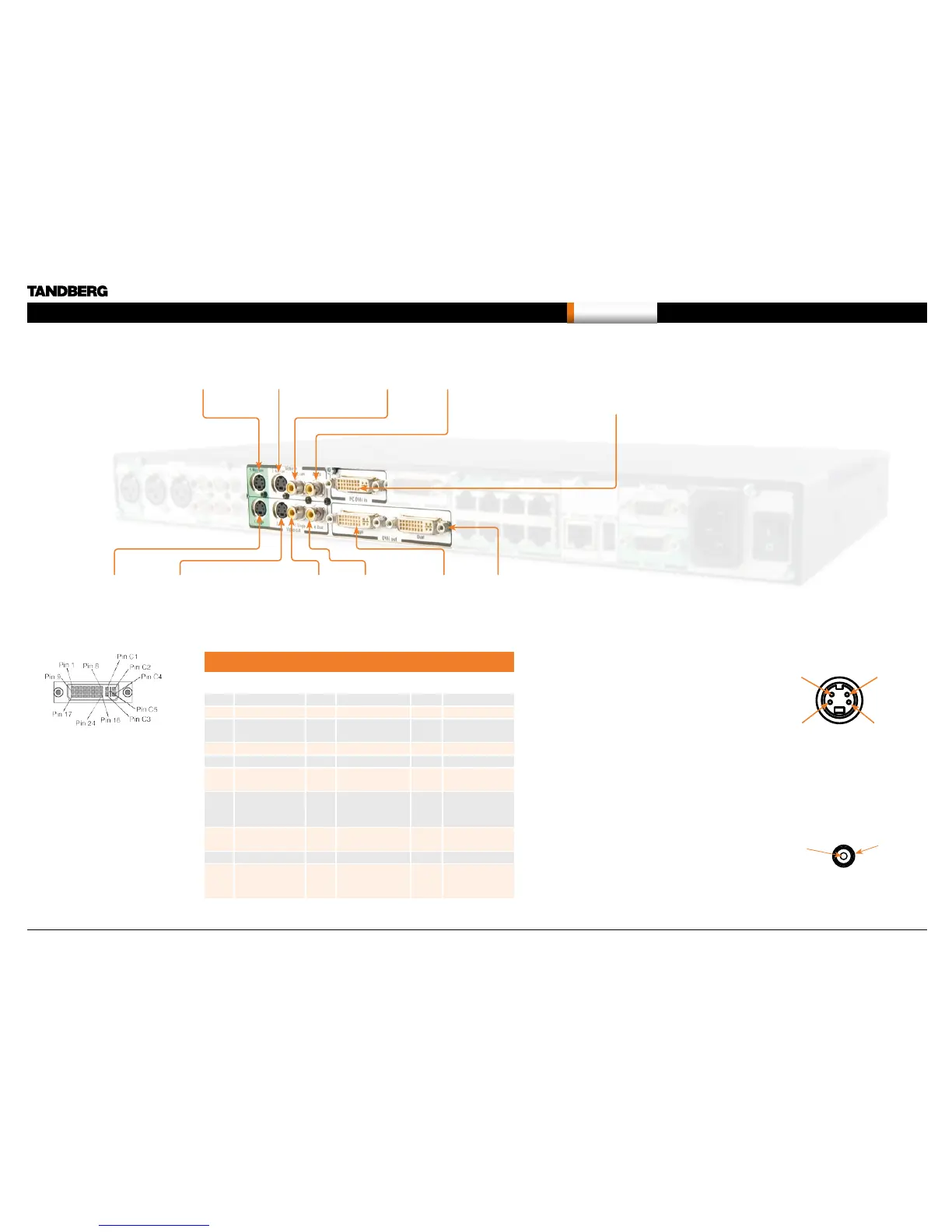
Single Dual
S-video output
Mini-DIN sockets
S-video input Mini-DIN sockets
Main camera Aux. camera
Single Dual
Composite video output
RCA sockets
Composite video input RCA sockets
Doc. camera VCR
PC DVI-I input sockets
(Digital Visual Interface,
Integrated digital
and analogue)
Single Dual
DVI output
sockets
The system will automatically
adapt to a PAL or NTSC
input.
Note that the S-Video/Composite outputs on the Co-
dec 6000 MXP are by default turned off from factory.
Codec 6000 MXP Interfaces and sockets, cont...
Video sockets
D14033.06—AUGUST 2010
261
MXP Administrator Guide
Contents Introduction Getting started The menu structure The settings library Using the system Physical interfaces Peripheral equipment Contact usAppendices


 To Next Page