EasyManua.ls Logo

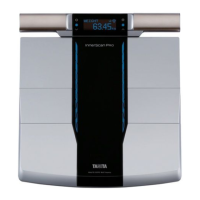
Tanita InnerScan Pro RD-545PRO - User Manual

Tanita InnerScan Pro RD-545PRO
31 pages
Print Icon
To Next Page IconTo Next Page
Loading...
RD-545PRO
Multi Frequency Body Composition Monitor
with integrated Bluetooth technology
Instruction Manual
Please read this Instruction Manual carefully and keep it for future reference.
en

Questions and Answers

  • M
    Marcus VanceSep 10, 2025
    Why doesn't the app work with my Tanita Scales?
    • J
      James GarzaSep 10, 2025
      If the “Measure body composition” or “Enter data” button in the app does not work with your Tanita Scales, ensure that “Bluetooth” is turned on in the smartphone settings. Also, the connection between the app and device is only enabled when the device power is off. Check that the device power is off, then try again.
  • T
    Tiffany CooperAug 22, 2025
    Why is the weight on my Tanita InnerScan Pro RD-545PRO Scales clearly wrong?
    • K
      Kevin NguyenAug 22, 2025
      If the displayed weight measurement on your Tanita Scales is clearly wrong, make sure to place the device on a hard, flat, and stable floor for measurement.
  • J
    Joe RamosAug 25, 2025
    How to fix Tanita Scales when nothing is displayed?
    • A
      amycohenAug 25, 2025
      If nothing is displayed on your Tanita Scales, verify that the batteries are inserted correctly, are not worn out, and that there is no plastic or dirt covering the battery terminals.
  • C
    claireperezAug 26, 2025
    What to do if my Tanita Scales display “ ” repeatedly?
    • K
      Kelly PowellAug 26, 2025
      If your Tanita Scales display “ ” a number of times, delete the device registration from the “Settings” > “Bluetooth” settings on the smartphone, then try pairing the device with the smartphone again.
  • P
    pearsonthomasAug 27, 2025
    What to do if nothing is displayed when I step on my Tanita Scales?
    • J
      Jennifer EatonAug 27, 2025
      If nothing is displayed when you step on the measuring platform of your Tanita Scales, turn the power on before stepping on the measuring platform.
  • W
    William HendersonAug 29, 2025
    Why do my Tanita InnerScan Pro RD-545PRO display “ ”?
    • J
      james80Aug 29, 2025
      If your Tanita Scales display “ ”, check the orientation of the batteries and insert them correctly. Also, the batteries may be worn and need to be replaced as soon as possible.
  • J
    Joshua WallSep 18, 2025
    Why can't I measure body composition on my Tanita InnerScan Pro RD-545PRO Scales?
    • Y
      yvaughnSep 18, 2025
      If you cannot measure body composition even when individual data is set on your Tanita Scales, it may be because the individual data settings are incomplete. You need to measure body composition once after entering individual data.
  • M
    Mark BlackSep 12, 2025
    Why do my Tanita Scales turn on by themselves?
    • J
      Jennifer HaydenSep 12, 2025
      If your Tanita Scales switch on even though the power has not been switched on, it might be due to a device with a communication function, microwave oven, or other device emitting radio waves being used near the scales.
  • A
    Ashley BellSep 8, 2025
    Why does the text disappear immediately on my Tanita InnerScan Pro RD-545PRO?
    • N
      Nathaniel PatrickSep 8, 2025
      If the text disappears immediately after being displayed on your Tanita Scales, it indicates that the batteries have become worn and need to be replaced as soon as possible.
  • N
    Nathan GlassSep 5, 2025
    What does “ ” mean on my Tanita Scales during measurement?
    • R
      Rachel HoweSep 5, 2025
      If your Tanita Scales display “ ” during measurement, it means that the 200kg measurement range was exceeded, and measurement is not possible in this case.

Summary

Instruction Manual Overview

Introduction to the Body Composition Monitor

Safety Precautions

Key safety warnings and precautions to follow before using the device.

For Your Safety

General Warning and Cautionary Measures

Covers prohibited actions, warnings for medical implants, and general safety advice.

Operational Safety and Best Practices

Getting Accurate Readings

Measurement Preparation and Technique

Steps for ensuring accurate measurements, including body preparation and hand grip usage.

Preparations Before Use

Initial Setup via Smartphone (Type 1)

App Download and Device Pairing

Steps to download the 'Healthy Edge Mobile' app and prepare for pairing.

Measurement Process via App

Instructions for performing measurements using the smartphone app connection.

Initial Setup From Monitor (Type 2)

ID Number and Personal Data Registration

Steps for registering a personal ID and entering basic personal information.

Body Composition Measurement

Procedure for performing the first body composition measurement after setup.

Taking Measurements

Smartphone Measurement Procedure

How to take measurements when connected to a smartphone via Bluetooth.

Measurement Without Smartphone

Procedure for taking measurements when not connected to a smartphone.

Taking Measurements with Auto-Recognition

Auto-Recognition Measurement Steps

Step-by-step guide to performing measurements using the auto-recognition feature.

Measuring with an ID Number (Call Measurement)

Taking Measurements Without Registering

Reviewing Measurement Results (Whole Body)

Navigating Whole Body Results

How to view and switch between different whole body measurement metrics.

Reviewing Measurement Results (By Body Part)

Body Part Result Navigation

How to switch between whole body and body part results and interpret assessment colors.

Reviewing Measurement Results (Abnormal)

Changing Personal Data

Erasing Personal Data

Body Composition Guide

Understanding Body Fat Percentage

Understanding Physique Rating

Understanding Muscle Quality Score

Troubleshooting

Common Problems and Solutions

A guide to identifying and resolving common issues with the device.

Specifications

Tanita InnerScan Pro RD-545PRO Specifications

Operating Environment IconOperating Environment
normal temperature23 ℃ ± 5 ℃
humidity50% ± 20%
applicable age range for muscle mass measurement18-99 years
Power IconPower
power supply4×AA Alkaline batteries
power consumption120 mA Maximum
measuring current50 kHz, 6.25 kHz, 100 µA
Weight and Dimensions IconWeight and Dimensions
weight capacity200 kg
weight increments0-100 kg/0.05 kg, 100-200 kg/0.1 kg

Related product manuals