EasyManua.ls Logo

Tanita TBF-310 - Page 15

Tanita TBF-310
37 pages
Print Icon
To Next Page IconTo Next Page
To Previous Page IconTo Previous Page
Loading...
‘hange
printer
paper
when
red
lines
appear
along
the
sides.
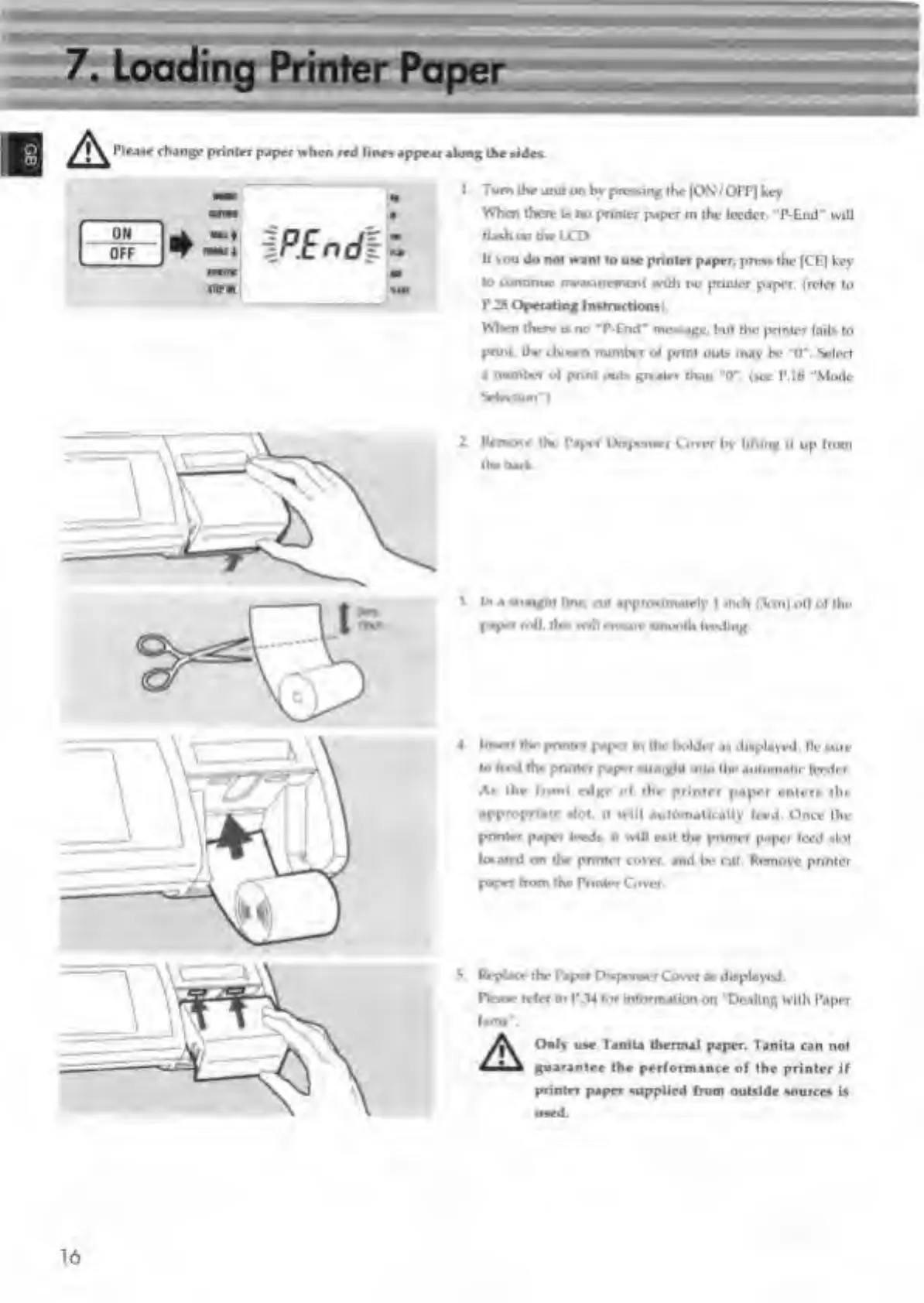
Tum
the
amt
on
by
preying
the
|ON
/OFF]
hey
When
there
a
no
printer
paper
in
the
feeder.
P-End*
will
fUd.
on
the
LCD
II
you
do
not
want
to
use
printer
paper,
press
the
ICE]
key
to
continue
measurement
with
no
printer
paper,
(refer
to
P2»
Operating
Instructions:.
When
there
n
no
*P-End*
message,
but
the
printer
fails
to
pnnt.
the
.lunm
number
of
print
outs
may
be
“O'.
Select
a
number
of
pnnt
out*
greater
than
"O',
(see
P.18
“Mode
5*4r»uun‘)
2
Remove
the
Tapei
IX^sniwr
Cover
by
lifting
it
up
from
ihr
txach
\
In
a
straight
line,
ait
appnmmately
I
inch
(Vm|
off
of
the
paper
roll,
thn
will
ensure
smooth
fitting.
I.
Insert
the
print,
r
paper
Mi
the
holder
as
displayed.
Dc
sure
to
Ired
the
pnnlrr
paper
straight
into
tin-
automatic
feeder
A*
the
front
edge
of
the
printer
paper
enters
the
appropriate
slot.
It
will
automatically
feed.
Once
the
pnnlrr
paper
feeds,
it
will
exit
the
pnnlrr
paper
feed
slof
loraird
or
the
printer
cover,
and
be
nit.
Remove
pnntcr
paper
from
the
Printer
Cover
V
Replace
the
Paper
Dispenser
Cover
as
displayed.
Draw
refer
to
P
.14
for
information
on
“Dealing
with
Paper
Ouly
use
laniU
thermal
paper.
Tanita
can
not
guarantee
the
performance
of
the
printer
if
printer
paper
supplied
from
outside
sources
is
16

Related product manuals