EasyManua.ls Logo

Tanita TBF-310 - TBF-300 A: Setting Print Options and Language

Tanita TBF-310
37 pages
Print Icon
To Next Page IconTo Next Page
To Previous Page IconTo Previous Page
Loading...
TBF-300A
_
For
the
TBF-300A:
A.
Setting
the
Number
of
Pnnt
Out*
and
Printing
language
B
Setting
the
Mode
C.
Setting
the
Original
Mode
01
0
A.
Setting
the
Number
of
Print
Outs
and
Select
the
number
ot
print
outs
(0
-
9)
and
the
printing
langi
MM
.
-
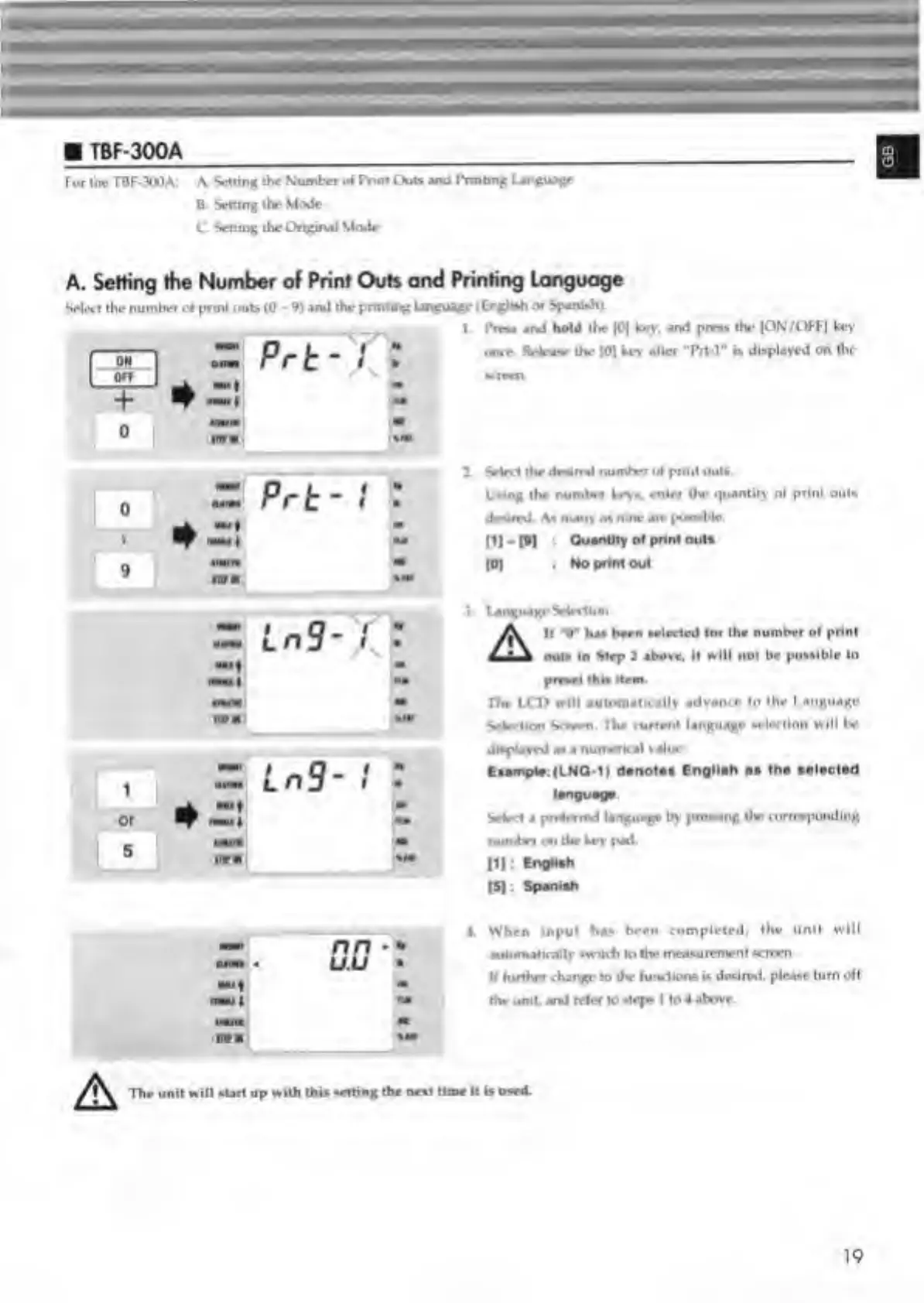
Prt-T]
t
+
0
mm
Printing
language
age
(English
or
Spanish).
I.
Pram
and
hold
the
|0|
Ley.
and
press
the
|ON/OFF|
ke>'
on»e
Release
the
|0)
Ley
alter
Trt-l"
displayed
on
the
1
Select
the
desired
numln
ot
print
out*.
Using
the
number
Leys,
enter
the
quantity
ot
print
out*
desired.
A*
many
as
nine
air
possi
b
l
e
.
|1|-n
*
Quantity
of
print
outs
(0)
:
No
prim
out
language
Sdrrtkm
ifik
II
*•*
ha*
been
selccled
(or
the
number
ol
print
\
out*
In
Step
2
abosr,
it
will
not
be
possible
to
preset
thi*
item.
The
I.CD
will
automatically
advance
to
the
I
anguage
Selection
Screen.
The
current
language
selection
will
be
displayed
an
a
numerical
value.
Eiample
(LNQ-1)
denote*
English
aa
lha
aalaclad
i
Select
a
preferred
language
by
presung
Ihr
corresponding
number
on
the
Ley
pad
(I):
English
IS)
:
Spanish
nn
*
u.u
mm
imirc
m
mm
%m
>
A
4.
When
input
has
been
completed,
the
unit
will
automatically
switch
to
the
measurement
•crccn
It
further
change
to
the
functions
is
desired,
please
turn
oft
the
unit,
and
refer
to
steps
I
to
4
above.
The
unit
will
start
up
with
this
setting
the
nest
time
It
Is
used.
19

Related product manuals