How to Use
Light On / Light Off
Tap on the Brightness Control Button to turn on / off the light.
Brightness Control
Press and hold down on the Brightness Control Button to adjust the brightness of the
light. The brightness will increase / decrease accordingly.
Charging
When charging, the charging status indicator will turn red. When fully charged, the
indicator will turn blue. When the battery level is low, the indicator will ash red.
Caution
• Please do not repair the product by yourself, always ask a professional electrician or
authorized technician for repairs.
• If you smell a bad odor or anything unusual, please turn off the unit immediately.
• Please do not remove the charging cable with wet hands as it may
cause electrical shock.
• Do not put this unit near extreme heat source, moisture, or corrosive substance.
• Regularly clean the lamp.
• Please store the lamp in a dry and shady place if it is not being used for a
long period of time.
03/04
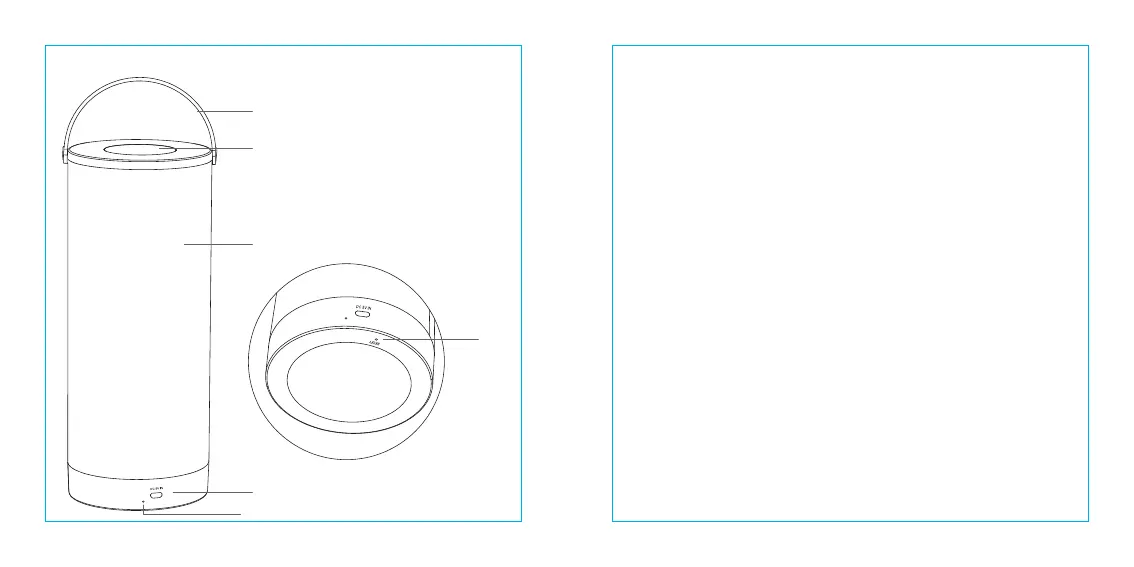
Product Diagram
①
②
③
④
⑤
⑥
Handle
Brightness Control Button
Lamp Body
Charging Input Port
Charging Status Indicator
Reset Button
①
②
③
④
⑥
⑤



 To Next Page