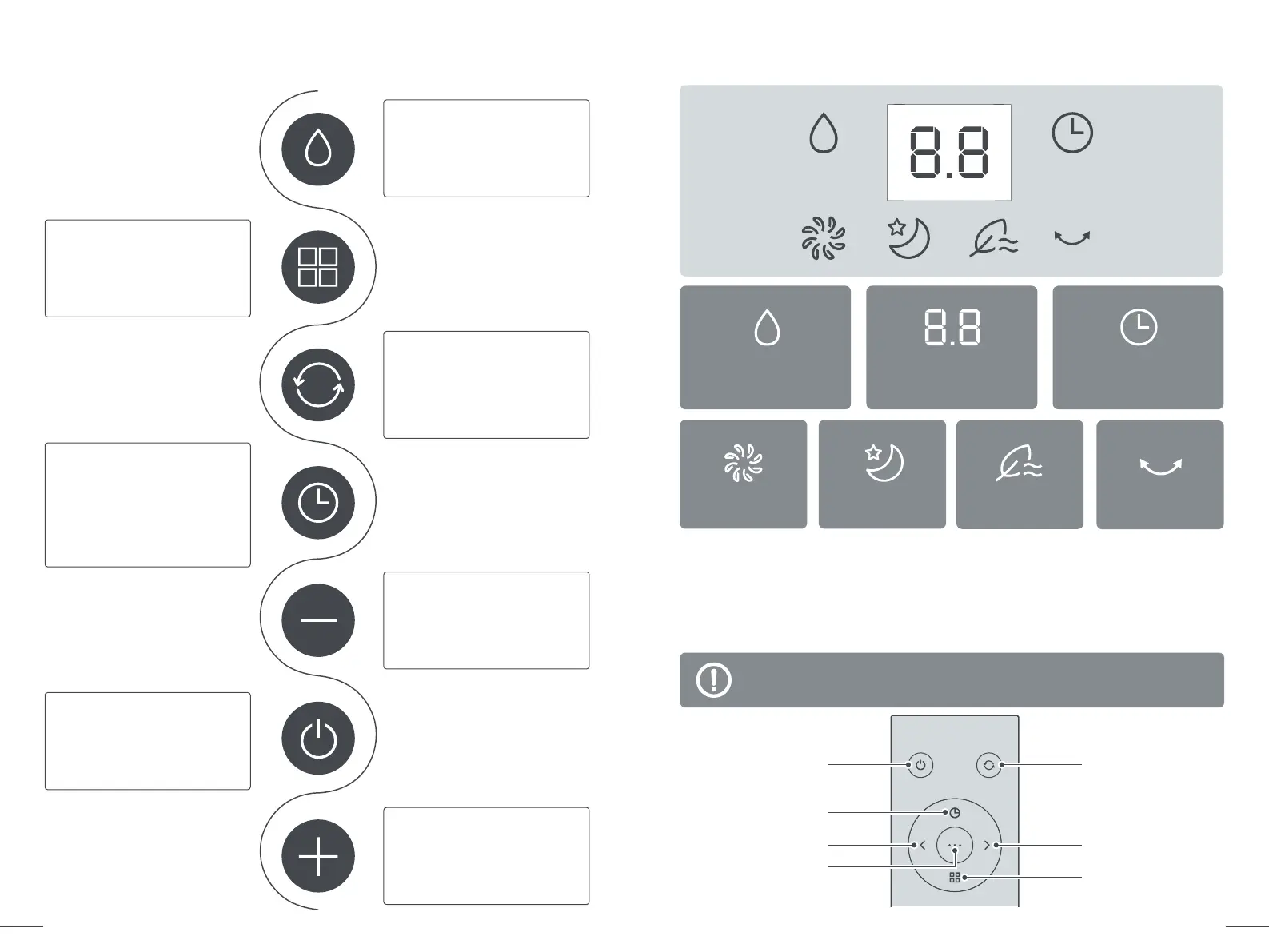
Control Panel
Cooling / Humidifying
Press to turn on or off
cooling / humidifying.
Fan Mode
Press to select
Normal / Sleep / Natural mode.
Oscillation
· Short press to start/stop
oscillating.
· Long press to restore to
factory setting.
Auto ON/OFF Timer
· Press once then -/+ to
select 0.0-10h timer.
· Press once again to
confirm setting.
· Long press to cancel.
Fan Speed / Timer -
Short press to decrease fan
speed or timer.
Power ON/OFF
Turn on/Standby mode
Fan Speed / Timer +
Short press to increase fan
speed or timer.
LED Display
06
Air Cooler
07
Air Cooler
Cooling /
Humidifying
Fan Speed / Timer
/ Error Code
Auto ON / OFF
Timer
Normal Mode
Sleep Mode
Natural Mode
Oscillation
Remote Control
For added convenience, the same control buttons can be found
on the remote control.
Oscillation
Fan Speed / Timer +
Fan Mode
Power ON/OFF
Auto ON/OFF Timer
Fan Speed / Timer -
Cooling / Humidifying


 To Next Page