Need help?
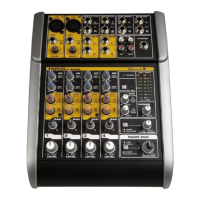
Do you have a question about the Tapco 8201B and is the answer not in the manual?
Explains the input transformer's role and center tap for +48V Phantom power.
Describes the 1/4" phone jack symbol and its uses for inputs and outputs.
Details the XLR connectors used for low impedance balanced mic inputs on the rear panel.
Explains the summing buss as a mix point for signals from various functions, like effects mixing.
Describes the Tapco-engineered AutoPad feature for controlling distortion by reducing gain.
Explains the "switched" function, using mic EQ and rumble filter as examples.
Explains the VU meters and their associated switches for viewing different signal outputs.
Explains the Pan pot's function in creating a stereo image and its effect on individual channels.
Explains the monitor system as a separate mixer, independent of the main mix, and its use of AutoPad®.
Provides details on input impedance and compatibility for various microphones.
 General
| Channels | 8 |
|---|---|
| Frequency Response | 20Hz-20kHz |
| Type | Analog |
| Inputs - Line | 8 x 1/4" |
| Outputs - Main | 2 x 1/4" |
| Aux Sends | 1 |
| Phantom Power | Yes |

 To Next Page