Diagnostic Data Transfer
16
Please Remember – Only use Tablet or Pellet Salt in Your Softener!
Tapworks Water Softeners come fitted with our unique diagnostic data
transfer system.
Our Automated Service Evaluation System enables your water softener to
'talk' directly to the Service Centre and communicate data which otherwise
might only be accessed by a site visit to your home.
The data received is reviewed by a technician and if there is a problem
it may be possible to correct it by telephone. If a service call is necessary,
the engineer will be likely to know in advance what parts and repairs
are required.
DIAGNOSTIC DATA TRANSFER
• Can provide you with information on the efficiency and performance
of your water softener.
• Can save you the cost and inconvenience of an unnecessary call-out.
• Can save time and money in the event of a call-out.
USING THE DIAGNOSTIC DATA TRANSFER
• You Will need a portable telephone.
• Have your softener service number to hand. This is found under the
salt lid.
• Dial the Service Centre Dedicated telephone number 09068 615355.
• When connected, the Service Centre will ask you to follow
a simple procedure.
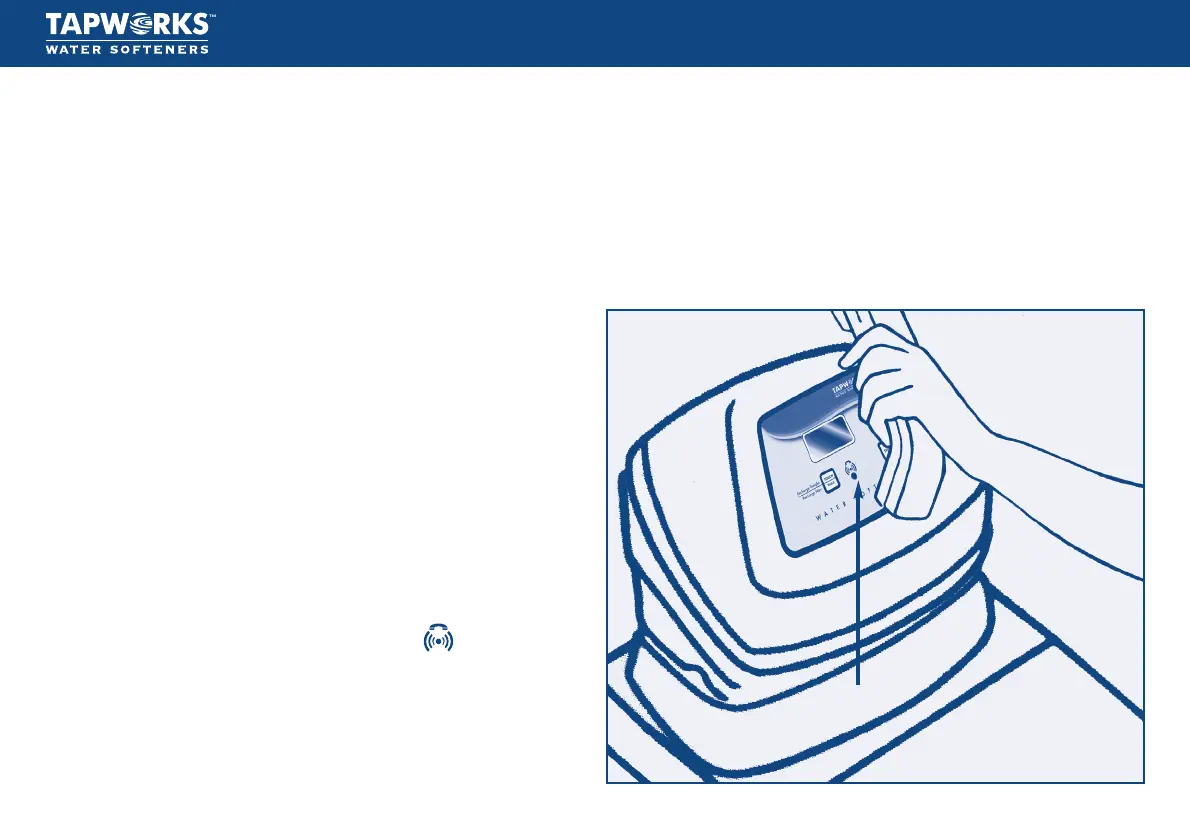
• Hold the telephone mouthpiece about 1" from the symbol
on the faceplate below the screen. (see illustration opposite).
• Simultaneously press the UP and DOWN buttons.
• A constant beeping pattern is emitted.
• Release the buttons, the data message will continue to transmit for about
20 seconds.
• When the beeping stops finish your call.
Your call will then be processed by the Service Centre.
Don’t forget to leave your details if you expect a reply!
Speaker


 To Next Page