10
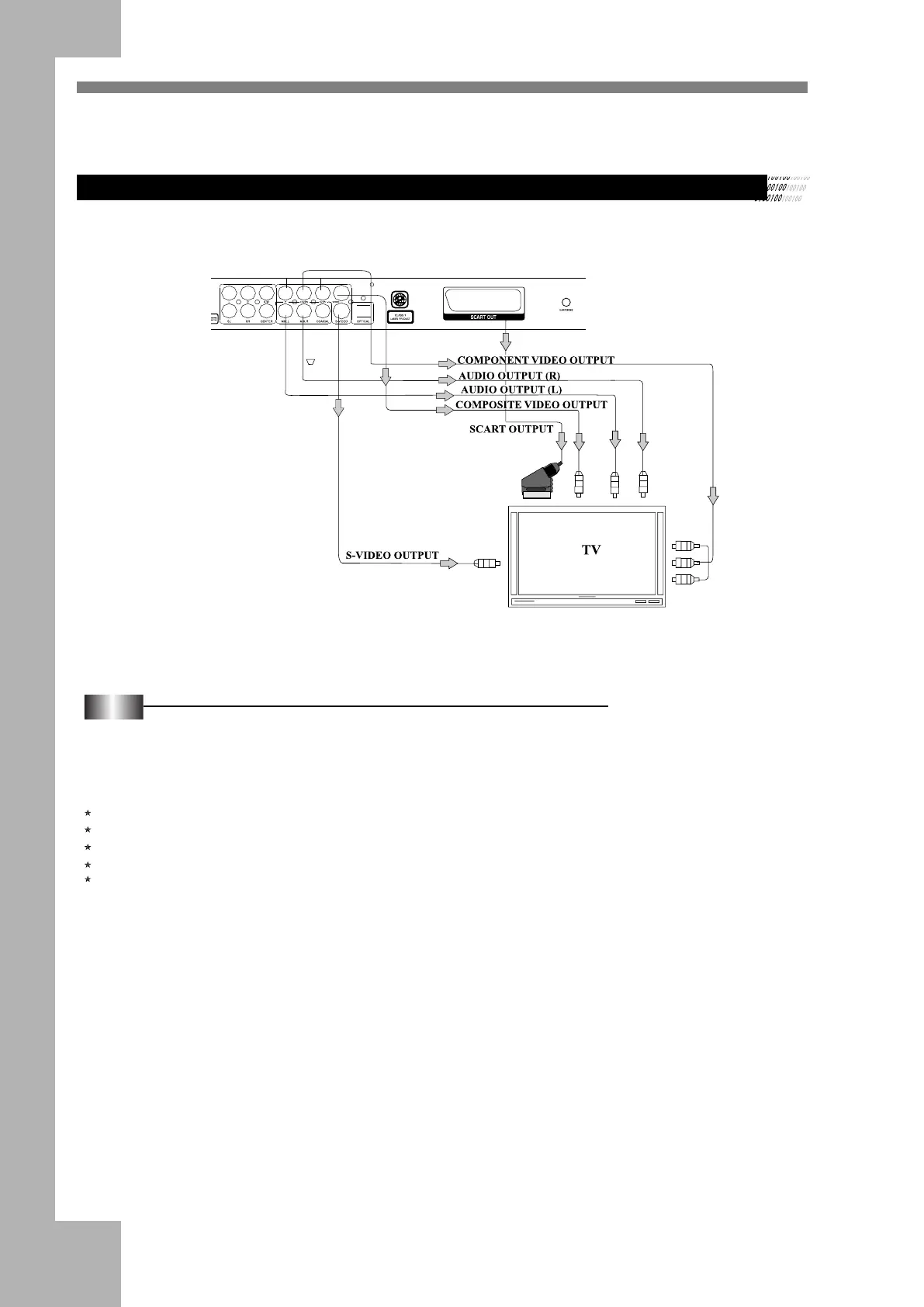
Connecting to a TV Connect the DVD player to a TV.
Connecting to an Interlaced Scanning TV
Notes:
(1) If your TV has a SCART input connector, connect the out jacks on the DVD player to the corresponding input on the TV.
(2) If the TV has component video input (YCbCr/YPbPr) jacks, you can connect them to the YcbCr/YPbPr jacks of the DVD
player to get a clearer picture, and use these jacks rather than the OUTPUT jack.
(3) DVD player setup: (Setup the DVD player according to the connected TV.)
If the TV system is PAL, select PAL output.
If the TV system is NTSC, select NTSC output.
Set "Video" to the Cable connection you used (Scart, S-Video, or YUV)
Connect the DVD player to the wide screen TV, set the «TV TYPE» as «16:9» in FUNCTION SETUP.
If the DVD player is connected to an ordinary TV, set the «TV TYPE» to «4:3PS» or «4:3 LB» in FUNCTION SETUP. (For
the setup method, please refer to Function Setup.)


 To Next Page