Targa NDAS 500 eSATA English
19
Select the menu item "NDAS Device 1" (or whatever name you selected during
registration) with the mouse to open the second window. Here you can integrate the
drive to the system as "Read Only" or "Read/Write".
Read Only
You may only read data from the hard disk, but not delete, rename, move or write
new data on it.
Read/Write
You may read all data from the hard disk, as well as delete, rename, move or write
new data on it.
This menu item is only available if you have entered the write access key during
setup.
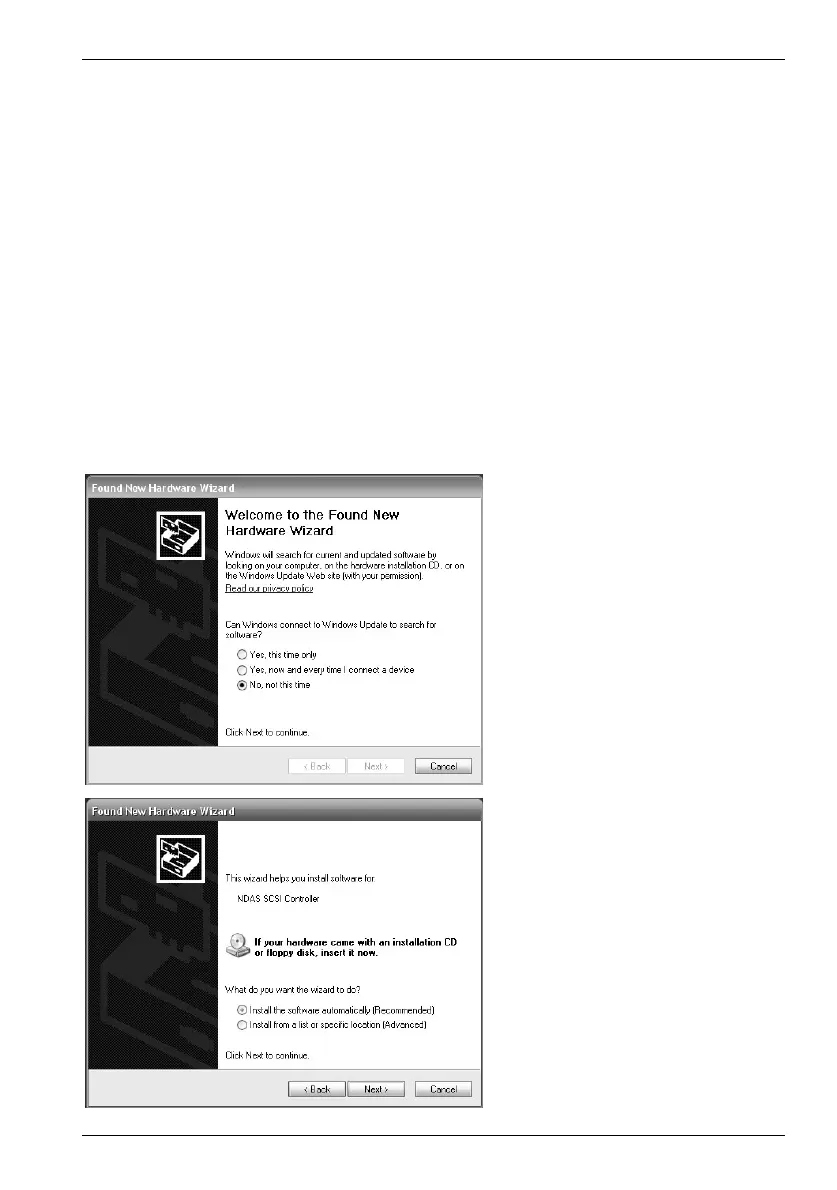
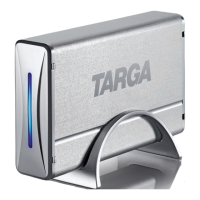
On first setup of the hard disk, your computer will need to install the driver. This
happens automatically: you only need to confirm the messages.
A connection to "Windows
Update" is not necessary. You
can check "No, not this time"
and click Next.
Select "Install the software
automatically", and click
Next.


 To Next Page