English Targa NDAS 500 eSATA
36
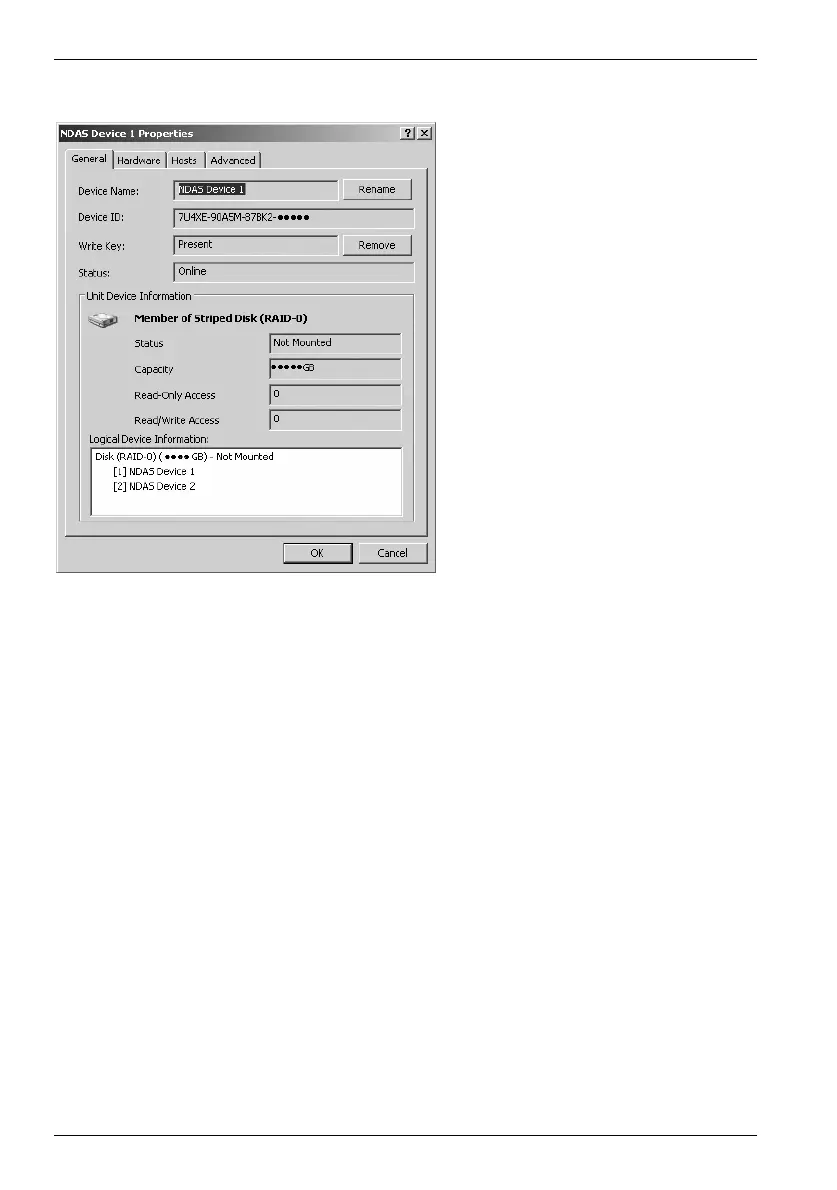
From the second menu, select "Properties…" to display this window:
The first tab "General" allows you to rename your Targa DataBox NDAS 500 eSATA by
clicking "Rename". You can see whether the write access key has been entered and
remove it by clicking "Remove". In this case you will only be able to mount the device
with read access rights (see page 18 – Mounting the Targa DataBox NDAS 500
eSATA).
The tabs Hardware and Hosts show hardware information on the Targa DataBox NDAS
500 eSATA as well as on the connected hard disk drive and the users that have
established a connection.
The last tab, "Advanced", allows you to disable or to reset the Targa DataBox NDAS
500 eSATA. These functions will only be available when the device has not been
mounted.


 To Next Page