Targa Mini Keyboard MK20
English - 7
Getting started
Thank you for purchasing the Targa Mini Keyboard MK20. Its components
feature a SmartLink technology that makes manual synchronisation obsolete.
The keyboard includes a built-in touchpad with scroll bar for vertical scrolling,
similar to a mouse wheel. The device is perfect to control, for example, your
multimedia PC in your living room. Using this keyboard for normal computer
workstations is not recommended.
Overview
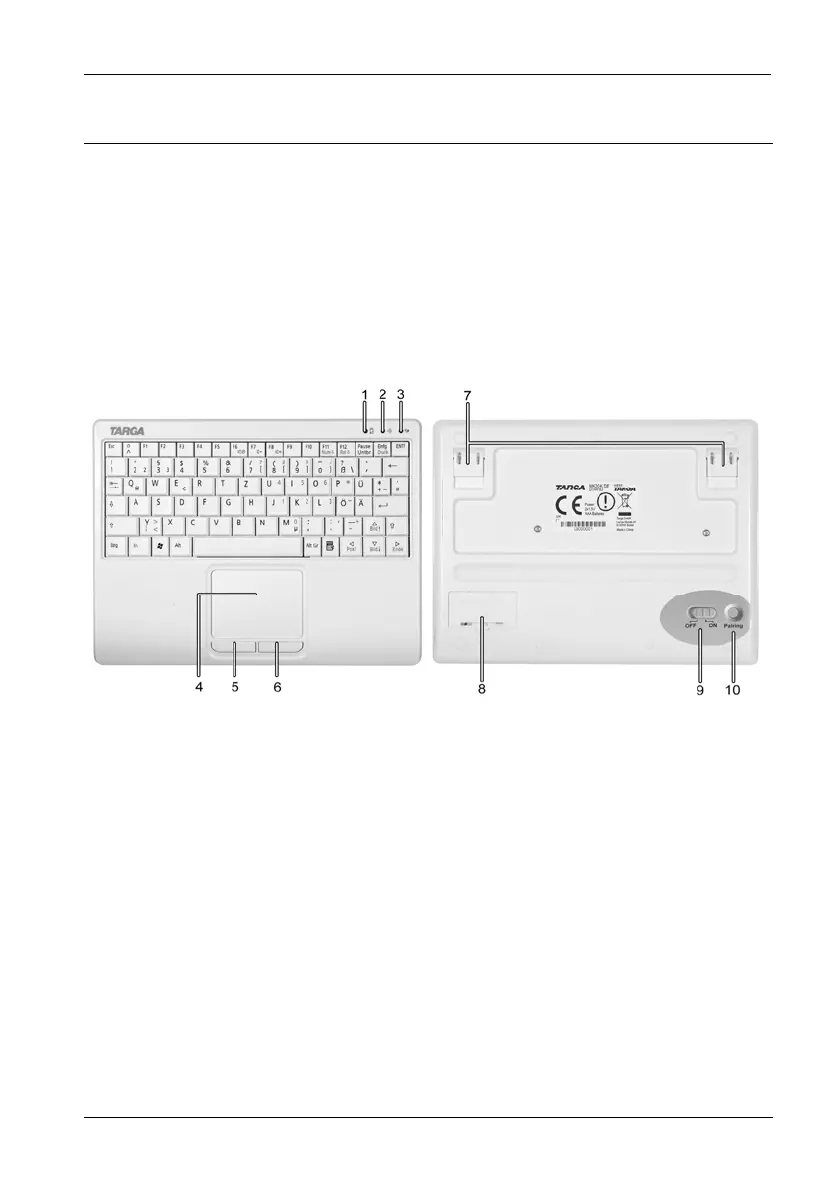
1 Battery status indicator
2 RF link status indicator
3 USB receiver pairing indicator
4 Touchpad
5 Left button
6 Right button
7 Retractile clip
8 Battery compartment
9 On/Off button (figure slightly enlarged)
10 Pairing button (figure slightly enlarged)


 To Next Page