1 2
folding line
2 staples here (saddle stitching)
folding line
2 staples here (saddle stitching)
AKM610BT-A (50)_410-3815-001A, Open size: 9”W x 4.5”H, Material: 80gsm woodfree paper, Color: Grayscale
Diecut
Contents
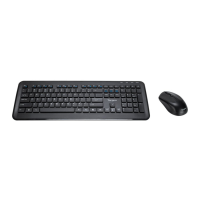
• Wireless Optical Mouse
• Wireless Keyboard
• USB nano receiver
• AA alkaline battery x 2
• User manual
Installing the battery
System requirements
• Windows
®
10, Windows
®
8.1, Windows
®
8, Windows
®
7
• Mac OS
®
X 10.6 – 10.12.4
“ON/OFF” switch
User may turn o the wireless mouse by using the “ON/OFF” switch to save battery power.
Low-voltage alarming function
When the battery has been used for a long time and the battery power is low, the indicator
light on the top right corner of the keyboard will icker to remind the user to change the
battery.
Wake-up
The wireless mouse will enter Sleep Mode if no usage is detected. The mouse will be
awakened when keypress is detected. If the wireless mouse is in Sleep Mode for over
10 minutes or your computer has been restarted, you have to click the mouse in order to
wake it up.
Targus KM610 Wireless Mouse & Keyboard Combo Targus KM610 Wireless Mouse & Keyboard Combo
1
2
4
3
+
-
AA
+
-
AA


 To Next Page