EasyManua.ls Logo

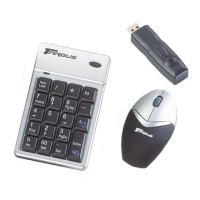
Targus PAKP003U - User Manual

Targus PAKP003U
12 pages
Print Icon
To Next Page IconTo Next Page
Loading...
USER GUIDE
wireless
keypad and
opitcal mouse
combo
PAKP003U / 410-0015-001A
Visit our Website at www.targus.com Features and
specifications subject to change without notice.
© 2006 Targus Group International, Inc. and Targus, Inc.
30
Question and Answer IconNeed help?

Do you have a question about the Targus PAKP003U and is the answer not in the manual?

Summary

Introduction

Contents

System Requirements

Hardware

Specifies required PC hardware: Pentium processor or equivalent and USB 1.1 interface.

Operating System

Lists compatible operating systems: Windows 98SE/Me/2000/XP.

Installing the Batteries

Optical Mouse

Instructions for installing batteries in the optical mouse, including cover removal and polarity.

Battery Warnings

Warnings about battery types, mixing new/used batteries, and polarity.

Wireless Keypad Setup

Connecting the Receiver

Setting the Identification Code

Optical Mouse ID Setup

Steps to set the ID code between the receiver and the mouse using setup keys.

Wireless Keypad ID Setup

Using the Keypad

Activate Num Lock

Shows key definitions when Num Lock is active.

Deactivate Num Lock

Shows key definitions when Num Lock is deactivated.

Power Management

Operating Hints

RF Reception Tips

Tips for optimal performance and RF reception, including placement and surface choice.

Ergonomic Usage Precautions

Battery Management Reminders

Reset ID After Battery Change

Reminder to reset the ID code after changing batteries.

Power Saving Mode Details

Troubleshooting Mouse Issues

Mouse Not Working

Troubleshooting steps for a non-functional mouse, including battery, connection, and driver checks.

Troubleshooting Wireless Interference

Troubleshooting Mouse Performance

Troubleshooting Mouse Conflicts

Technical Support Contact

Product Registration Information

Product Warranty Information

Regulatory Compliance

FCC Statement

Declaration of Conformity

Targus PAKP003U Specifications

General IconGeneral
BrandTargus
ModelPAKP003U
CategoryComputer Accessories
LanguageEnglish

Related product manuals