10
TASCAM DR-05X
2 – Names and Functions of Parts
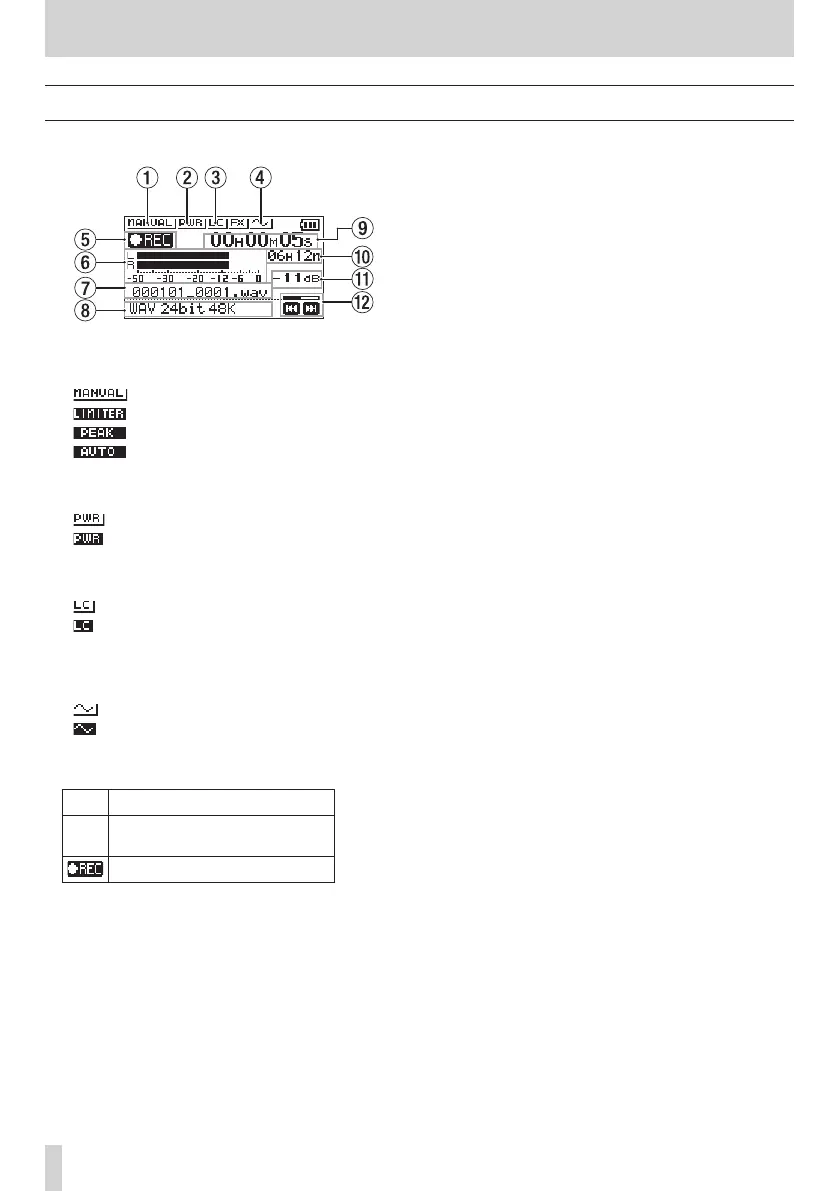
Recording screen
The recording screen shown below appears when recording
or in recording standby.
1 Level mode setting status
This icon shows the level mode function setting.
: MANUAL
: LIMITER
: PEAK REDUCTION
: AUTO
2 Plug-in power status
This shows whether plug-in power is on or off.
Plug-in power off
Plug-in power on
3 Low cut filter status
This shows whether the low cut filter is on or off.
Low cut filter off
Low cut filter on
4 AUTO TONE setting status
This icon shows whether the AUTO TONE function is on or
off.
: AUTO TONE off
: AUTO TONE on
5 Recording status
This icon shows the recorder operation status.
Icon Explanation
09
Recording paused (recording
standby)
Recording
6 Recording level meters
These show the input signal levels.
When overdubbing, the levels of the mixed input and
playback sounds are shown.
7 Recording file name
The file name that will automatically be given to the
recorded file is shown.
8 Recording format
This shows the file recording format and sampling
frequency.
9 Elapsed recording time
The elapsed recording time of the file appears as hours:
minutes: seconds.
0 Remaining recording time
When stopped, this shows the remaining time (hours:
minutes) of the microSD card. When the remaining
recording time becomes less than one minute, only
seconds will be shown.
q
Peak value in decibels (dB)
Peak input level values are shown in decibels.
w Recording level status
This shows the recording level status.



 To Next Page