EasyManua.ls Logo

Tascam UH-7000 - User Manual

Tascam UH-7000
36 pages
Print Icon
To Next Page IconTo Next Page
Loading...
D01205220A
UH-7000
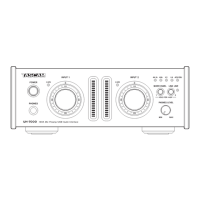
HDIA Mic Preamp / USB Audio Interface
OWNER'S MANUAL
Before connecting this unit to a computer, you must download and install a dedicated driver.

Table of Contents

Question and Answer IconNeed help?

Do you have a question about the Tascam UH-7000 and is the answer not in the manual?

Summary

IMPORTANT SAFETY PRECAUTIONS

IMPORTANT SAFETY INSTRUCTIONS

General Operating Safety Guidelines

Essential safety guidelines for operating the apparatus, including handling, placement, and cleaning.

2 - Names and Functions of Parts

Front Panel Controls and Indicators

Identifies and explains the controls and indicators on the front panel of the UH-7000.

Unit Components Description

Rear Panel Connectors

Details the various input and output connectors located on the rear panel of the unit.

3 - Installation

Driver Installation Procedures

Step-by-step guide for installing the TASCAM driver on Windows operating systems.

Driver Installation for Mac OS X

Installing the TASCAM Driver on Mac

Step-by-step guide for installing the TASCAM driver on Mac OS X operating systems.

4 - Connections

Audio and Digital Connections

Connecting Microphones and Audio Equipment

Covers connecting microphones, line inputs, and analog equipment, including phantom power.

5 - Mixer Panel Settings

5 - Mixer Panel Settings: EFFECTS Page

Saving Mixer Panel Settings

6 - Standalone Mode

8 - Troubleshooting

Installation and Power Issues

Troubleshoots driver installation, computer recognition, and unit power-on problems.

Audio Signal Problems

Sound Breakup, Noise, and Volume Issues

Provides methods to reduce computer load and resolve audio breakup, noise, and volume control issues.
9 - Specifications

Summary

IMPORTANT SAFETY PRECAUTIONS

IMPORTANT SAFETY INSTRUCTIONS

General Operating Safety Guidelines

Essential safety guidelines for operating the apparatus, including handling, placement, and cleaning.

2 - Names and Functions of Parts

Front Panel Controls and Indicators

Identifies and explains the controls and indicators on the front panel of the UH-7000.

Unit Components Description

Rear Panel Connectors

Details the various input and output connectors located on the rear panel of the unit.

3 - Installation

Driver Installation Procedures

Step-by-step guide for installing the TASCAM driver on Windows operating systems.

Driver Installation for Mac OS X

Installing the TASCAM Driver on Mac

Step-by-step guide for installing the TASCAM driver on Mac OS X operating systems.

4 - Connections

Audio and Digital Connections

Connecting Microphones and Audio Equipment

Covers connecting microphones, line inputs, and analog equipment, including phantom power.

5 - Mixer Panel Settings

5 - Mixer Panel Settings: EFFECTS Page

Saving Mixer Panel Settings

6 - Standalone Mode

8 - Troubleshooting

Installation and Power Issues

Troubleshoots driver installation, computer recognition, and unit power-on problems.

Audio Signal Problems

Sound Breakup, Noise, and Volume Issues

Provides methods to reduce computer load and resolve audio breakup, noise, and volume control issues.

9 - Specifications

Tascam UH-7000 Specifications

General IconGeneral
BrandTascam
ModelUH-7000
CategoryAmplifier
LanguageEnglish

Related product manuals