English
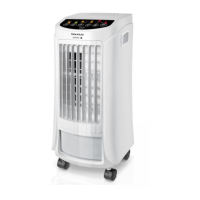
MINI AIR COOLER
SNOWFIELD MINI
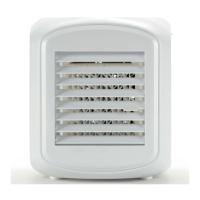
DESCRIPTION
A Light indicator
B On/off button
C Speed selector
D Ambient light
E Adjustable ns
F Water tank cover
G Water tank
H Absorvent panel
I Water tank lid
If the model of your appliance does not have the
accessories described above, they can also be
bought separately from the Technical Assistance
Service.
USE AND CARE:
- Fully extend the appliance's USB cable before
each use.
- Do not use the appliance if its accessories are
not properly tted.
- Do not use the appliance if the accessories
attached to it are defective. Replace them
immediately.
- Do not use the appliance if the on/off switch
does not work.
- Do not move the appliance while in use.
- Use the appliance handle/s, to catch it or move
it.
- Do not use the appliance if it is tipped up and
do not turn it over.
- Do not turn the appliance over while it is in use
or connected to the mains.
- Disconnect the appliance from the mains when
not in use and before undertaking any cleaning
task.
- Store this appliance out of reach of children
and/or persons with physical, sensory or
reduced mental or lack of experience and
knowledge.
- Never leave the appliance connected and un-
attended if is not in use. This saves energy and
prolongs the life of the appliance.
- Do not use the appliance to dry pets or an-
imals.
- Do not use the appliance to dry textiles of any
kind.
INSTALLATION
- Be sure to remove all packaging material from
inside the appliance.
INSTRUCTIONS FOR USE
BEFORE USE:
- Make sure that all products’ packaging has
been removed.
USE:
- Extend the cable completely before plugging
it in.
- Fill up both tanks with cold water. It is recom-
mended to put the water tanks in the refrige-
rator for a few hours to maximize the cooling
effect.
- Connect the appliance to the mains.
- Turn the appliance on, by using the on/off
button (B).
- Select the desired speed pressing the speed
selector button (C).
AMBIENT LIGHT:
- Press the ambient light button (D) to select the
desired color or the color-changing mode. For
every press, the color will change once.
ONCE YOU HAVE FINISHED USING THE
APPLIANCE:
- Turn the appliance off, using the on/off button
(B).
- Clean the appliance.
CLEANING
- Disconnect the appliance from the mains and
allow it to cool before undertaking any cleaning
task.
- Remove the absorvent panel to facilitate the
cleaning process. To remove it, the tanks must
be removed rst.


 To Next Page
 Loading...