EasyManua.ls Logo

Tavool TH250 - User Manual

Tavool TH250
3 pages
Print Icon
To Next Page IconTo Next Page
Loading...
Stud Center Finder, Metal and
AC Live Wire Detector (TH250)
This stud finder is designed to find the wooden or metal stud and avoid
the metal and AC wires. This item features four scanning modes:
Stud scan: Locates the center and edges of wood and metal studs up
to 0.75 in. (19 mm) deep.
Deep mode: Locates the center and edges of wood and metal studs up
to 1.5 in. (38 mm) deep.
Metal scan: Detects metal (such as 1⁄2 inch rebar) up to 2.36 in. (60
mm) deep.
AC scan: Detects live unshielded AC wires up to 2 in. (51 mm) deep.
INSTALLING THE BATTERY
There is no battery in the tool. Please install the battery firstly
Push the battery cover at the bottom of the tool and open it. Insert a new
9-volt battery. Snap the battery into place and close battery cover.
Low Battery Indicator: The Low Battery Indicator icon displays when the
battery level is getting low.When the low battery indicator icon appears on
the screen, the battery level is too low and not sufficient to power the tool
for proper operation. Please replace the 9-volt battery with a brand new
battery immediately.
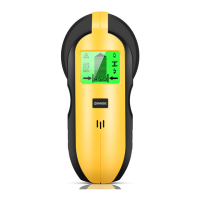
PRODUCT DISPLAY
1. The Marking Point
2. AC Wire Warning
3. Stud Mode Indicator
4. Low battery Indicator
5. Metal Mode Indicator
6. AC Mode Indicator
7. Stud Deep Mode Indicator
8. Moving Direction Indicator
9. Stud Edge Indicator
10. Stud Center Indicator
11. Power Button/Mode Switch Button
12. Scan Button
13. Battery (Back of Unit
Please note:
1. Press the mode button (NUMBER 11) to choose the mode.
2. Press the scan button on the side of the tool (NUMBER 12) to calibrate
the tool. After calibrate it, you don’t have to pressing the scan button
all the time when scanning the wall
Stud Scan Mode
Use this stud scan mode to find the center and edges of wood or metal
studs up to 3/4 inches (19 millimeters) deep. For best results, always start
in this mode when looking for studs.
Step 1: Press the mode button to choose the “stud mode”
Step 2Put the scanner on the wall and Press the Scan Button on the
side of the tool to calibrate. After a short beep sounds, confirming
calibration is complete.
Note: Be sure not to move the scanner while calibrating.
Calibrate the tool on the wall before every scan.
Step3: Move it flat against the wall to scan.
Note: If it finds metal or wooden stud, the screen will show as the picture
and it beeps.
If it finds nothing, please repeat the above steps ( calibrate it and move it
to scan)
Step4: Find the edge and center of the stud and mark it.
Note:
1. WireWarning detection works in all modes. The indicator flashes on
the screen when detecting a live, unshielded wire.
2. Factors like humidity, temperature, and even the minor electric
readings from your hand, which all have an impact on the readings from
the wall.
3. If Stud Scan Mode provides irregular readings, the wood or studs
might be behind deeper than 0.75 in. (19 mm). Slide the Mode Selector
Switch to Deep Scan Mode.
Deep Scan Mode
Deep scan mode doubles the scanning depth of wood stud and metal
stud to 1.5 in. (38 mm) deep and allows for increased accuracy on deeper
targets.
Step 1: Press the mode button to choose the “Deep mode”
Step 2: Put the scanner on the wall and Press the Scan Button on the
side of the tool to calibrate. After a short beep sounds, confirming
calibration is complete.
Note: Be sure not to move the scanner while calibrating.
Calibrate the tool on the wall before every scan.
Step 3: Move it flat against the wall to scan.
Note: If it finds metal or wooden stud, the screen will show as the picture
and it beeps .If it finds nothing, please repeat the above steps ( calibrate it
on a new place on the wall and move it to scan)
Step4: Find the edge and center of the stud and mark it.
Note:
1. WireWarning detection works in all modes. The indicator flashes on the
screen when detecting a live, unshielded wire.

Question and Answer IconNeed help?

Do you have a question about the Tavool TH250 and is the answer not in the manual?

Summary

Installing the Battery

Low Battery Indicator

Displays when the battery level is low, indicating the tool needs a new battery for proper operation.

Product Display

Stud Scan Mode

Deep Scan Mode

Confirming Stud Material

Metal Scan Mode

AC Wire Scan Mode

Frequently Questions and Answers

Scanning Different Surfaces

General Warnings

Overview

This document describes the TH250 Stud Center Finder, Metal and AC Live Wire Detector, a versatile tool designed to locate various objects behind walls. It offers four distinct scanning modes to cater to different detection needs: Stud Scan, Deep Scan, Metal Scan, and AC Scan.

Function Description

The TH250 is engineered to help users identify the presence of wooden or metal studs, as well as live unshielded AC wires, while minimizing the risk of encountering hazards during construction or renovation tasks.

  • Stud Scan Mode: This mode is primarily used to find the center and edges of wood or metal studs up to 0.75 inches (19 mm) deep. It's recommended as the starting point for most stud-finding tasks.
  • Deep Scan Mode: Doubling the scanning depth of the Stud Scan mode, Deep Scan can detect wood and metal studs up to 1.5 inches (38 mm) deep. This mode is particularly useful for thicker walls or when studs are located further from the surface, offering increased accuracy for deeper targets.
  • Metal Scan Mode: This mode is dedicated to detecting metal materials, such as 1/2 inch rebar, up to 2.36 inches (60 mm) deep. It's valuable for identifying pipes, conduits, or other metallic objects behind walls, helping users avoid drilling into them.
  • AC Scan Mode: Designed to detect live, unshielded electrical AC wires up to 2 inches (51 mm) deep, this mode helps prevent accidental contact with electrical lines, enhancing safety during wall penetration. The device senses magnetic field changes to indicate the presence of AC wires, though it does not pinpoint the exact center of the wire.

Usage Features

The TH250 is designed for ease of use, with clear instructions for calibration and scanning.

  • Mode Selection: Users can easily switch between the four scanning modes using the mode button (NUMBER 11).
  • Calibration: Calibration is a critical step before each scan to ensure accurate readings. For Stud and Deep Scan modes, calibration is performed by placing the scanner flat against the wall and pressing the Scan Button (NUMBER 12). A short beep confirms successful calibration. For Metal Scan, calibration can be done in the air for maximum sensitivity or on the wall to reduce sensitivity. AC Scan also requires calibration, typically in the air. It's crucial not to move the scanner during calibration.
  • Scanning Process: Once calibrated, the device is moved flat against the wall. The screen displays a signal bar and other indicators to show the presence and location of detected objects.
  • Stud Detection (Stud & Deep Scan): When a stud is detected, the screen will show a visual representation, and the device will beep. The "Moving Direction Indicator" and "Stud Center Indicator" help guide the user to the center and edges of the stud. Users are advised to mark the edges and center for precise location.
  • Metal Detection (Metal Scan): In Metal Scan mode, the signal bar will fill up as metal is approached. Users are instructed to mark the spot where the signal bar is full and then move in the same direction to find another spot where the signal is full. The metal object is located at the center of these two marked spots.
  • AC Wire Detection (AC Scan): The AC Scan mode indicates the presence of live unshielded AC wires. The "AC Wire Warning" indicator will flash on the screen. Users should mark where the strongest signal appears.
  • WireWarning Detection: This feature operates across all modes, flashing an indicator on the screen whenever a live, unshielded wire is detected, providing an additional layer of safety.
  • Scanning Different Surfaces: The manual provides specific guidance for scanning various wall types, including wallpapered walls, freshly painted walls, lath and plaster, extremely textured walls or acoustic ceilings, and wood flooring/subflooring over plywood sheathing. For textured surfaces, placing thin cardboard on the wall and scanning in Deep mode is recommended. For lath and plaster, switching to Metal Scan to locate nail heads is suggested.
  • Troubleshooting: The manual addresses common issues such as no readings, inconsistent results, or difficulty finding the exact center. It emphasizes the importance of proper calibration, noting that calibrating directly over a stud or too close to one can lead to unreliable readings.

Maintenance Features

The TH250 requires minimal maintenance, primarily focusing on battery management.

  • Battery Installation: The device requires a 9-volt battery. Users need to push open the battery cover at the bottom of the tool, insert a new battery, and snap the cover back into place.
  • Low Battery Indicator: The device includes a "Low Battery Indicator" icon on the screen. When this icon appears, it signifies that the battery level is too low for proper operation, and immediate replacement with a brand new 9-volt battery is necessary to ensure accurate readings and functionality.

Important Considerations and Warnings

The manual highlights several factors that can influence the device's performance and provides crucial safety warnings:

  • Environmental Factors: Humidity, temperature, and even minor electrical readings from a user's hand can impact the accuracy of readings.
  • Material Density: Stud finders detect changes in density, not specific materials. Therefore, in Stud and Deep Scan modes, metal studs may be detected similarly to wooden studs. Users are advised to use Metal Scan mode to differentiate between wood and metal after an initial stud detection.
  • Calibration Location: The location where calibration is performed is critical. Calibrating in the air or on a neutral section of the wall (away from studs or metal) is essential for accurate results.
  • AC Wire Detection Limitations: Electrical field locators may not detect live AC wires if they are deeper than 2 inches (51 mm), in concrete, encased in conduit, behind plywood shear walls or metallic wall covering, or if moisture is present.
  • Safety Precautions: Users are strongly warned to always turn off power to electrical wires, gas, and water supplies before penetrating any surface. Failure to do so can result in electric shock, fire, serious injury, or property damage. The detector should not be relied upon exclusively; other information sources like construction plans or standard stud spacing practices should also be consulted.

Tavool TH250 Specifications

General IconGeneral
Power Supply9V battery
TypeStud Finder
MaterialPlastic
Measuring Range (Wood)Up to 38mm
Operating Temperature0°C to 40°C

Related product manuals