Need help?
Do you have a question about the Taylor 7084 and is the answer not in the manual?
Guides through scale setup, language selection, volume adjustment, placement, and weighing steps.
Provides tips on consistent weighing, scale placement, and handling overload errors.
Details cleaning, avoiding damage, weight limits, storage, and battery disposal.
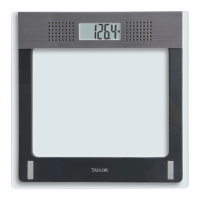
This document describes the Taylor Model 7084 Electronic Scale with Voice Feature, a precision instrument designed for weight measurement. It emphasizes accuracy, dependability, and convenient performance.
The Taylor Model 7084 is an electronic scale primarily used for measuring body weight. Its key distinguishing feature is the integrated voice function, which announces the measured weight in multiple languages. This makes the scale particularly user-friendly for individuals who may have difficulty reading the display or prefer an auditory confirmation of their weight. The scale is designed to provide consistent and accurate readings, contributing to healthy living by allowing users to track their weight and monitor their Body Mass Index (BMI). The manual includes a BMI chart to help users determine if they are overweight or obese based on their height and weight.
The scale is designed for straightforward operation. To begin, users must install three AAA batteries, ensuring all plastic wrap is removed and batteries are replaced simultaneously to maintain optimal performance. The battery compartment is located on the bottom of the scale, with clear polarity symbols for correct insertion. The scale indicates "LO" or "Low Battery" when batteries need replacement, or if the LCD readings become dim or the voice quality degrades.
Before initial use or after moving the scale, it's recommended to press firmly on the platform until it beeps and announces "Ready for operation." This calibrates the scale and prepares it for accurate measurement. For subsequent weigh-ins, users can simply step directly onto the platform.
A significant feature is the multi-language voice output. Users can select English, Spanish, German, Greek, or Croatian by pressing a button on the side of the scale. The selected language will be confirmed verbally. It's important to note that pound units are spoken in English, while kilograms are used for Spanish, German, Greek, and Croatian. The volume of the voice function can be adjusted to high, low, or turned off completely using a slide switch on the side of the scale.
To measure weight, users step onto the scale platform and remain still. The display will count up to the final weight, which will then flash twice to indicate it's locked. Simultaneously, the voice feature will announce the weight. After stepping off, the scale will announce "Ready for operation" and automatically turn off. If a user remains on the scale, it will beep twice before automatically turning off.
The scale is designed to be placed on a flat, hard surface for optimal accuracy; carpeted or uneven floors may affect readings. For consistent results, it's advised to weigh oneself at the same time of day, preferably without clothing, as clothing weight can vary. The scale has a maximum capacity of 440 lb / 200 kg. If "O-Ld" appears on the display, it indicates that the maximum capacity has been exceeded, and the weight should be removed immediately to prevent permanent damage. If an "Err" message is displayed, users should step off and repeat the measurement, ensuring they stand still.
The Taylor Model 7084 is designed to be maintenance-free, but proper care is essential for its longevity and performance. Exposed parts should be cleaned with a soft, slightly damp cloth and mild soap. Harsh cleaning agents, detergents, excess water, treated cloths, or sprays should be avoided. Users are cautioned against attempting to lubricate or open the scale casing, as it contains sensitive electronic parts.
The scale should be handled with care; dropping, kicking, or jumping on it can cause damage. It should not be stored where cleaning chemicals are present, as their vapors can affect electronic components. Storing the scale on its side is also discouraged. To prevent battery drain, nothing should be stored on the scale platform when not in use.
Regarding batteries, users are advised not to dispose of them in fire, as they may explode or leak. Mixing different types of batteries (Alkaline, carbon-zinc, or Nickel-Cadmium) is also prohibited. If the scale will not be used for an extended period, the batteries should be removed to prevent leakage and damage. Proper recycling or disposal of batteries according to local regulations is encouraged. The manual also warns that batteries can pose a choking hazard and should be kept away from children.
The device complies with FCC Rules, meaning it may not cause harmful interference and must accept any interference received. If interference occurs, users are advised to reorient the receiving antenna, increase the separation between the equipment and receiver, connect the equipment to a different circuit, or consult a radio/TV technician.
 General
| Capacity | 11 lb / 5 kg |
|---|---|
| Increments | 0.1 oz / 1 g |
| Auto Shut-Off | Yes |
| Tare Function | Yes |
| Display | LCD |

 To Next Page