7 Troubleshooting
dominant; switch the system via remote control to “Run”
4 System running, yellow warning
flashing, filter saturation indicator lit
(green+yellow)
Filter is partially saturated (depending on the system type,
the filter in question is displayed yellow additionally)
Green range – filter saturation OK
Yellow range – order replacement filter
Red range – filter completely saturated - replace
5 Speed cannot be changed on the
system
Remote control connected, external speed control (Pin
14,15)
Note: Interface is partly only available as an option.
External speed control is dominant over the manually set speed on
the device
6 Speed cannot be changed via the
interface
Speed setting on the system dominant
Note: Interface is partly only available as an option.
External speed control is dominant over the manually set speed on
the device
7 No/low extraction level, filter saturation
indicator does not indicate filter
replacement
Intake line blocked, defective, bent or not connected Clean or replace intake line
Extraction level not correctly set Increase extraction level at the speed dial (front) or via remote
control
Motor/control defective Contact regional representative office
8 System not running or vibrating heavily Motor bearing defective Replace motor or contact regional representative office
Contamination on impeller of the motor Check filter for leaks or contact regional representative office, if
necessary
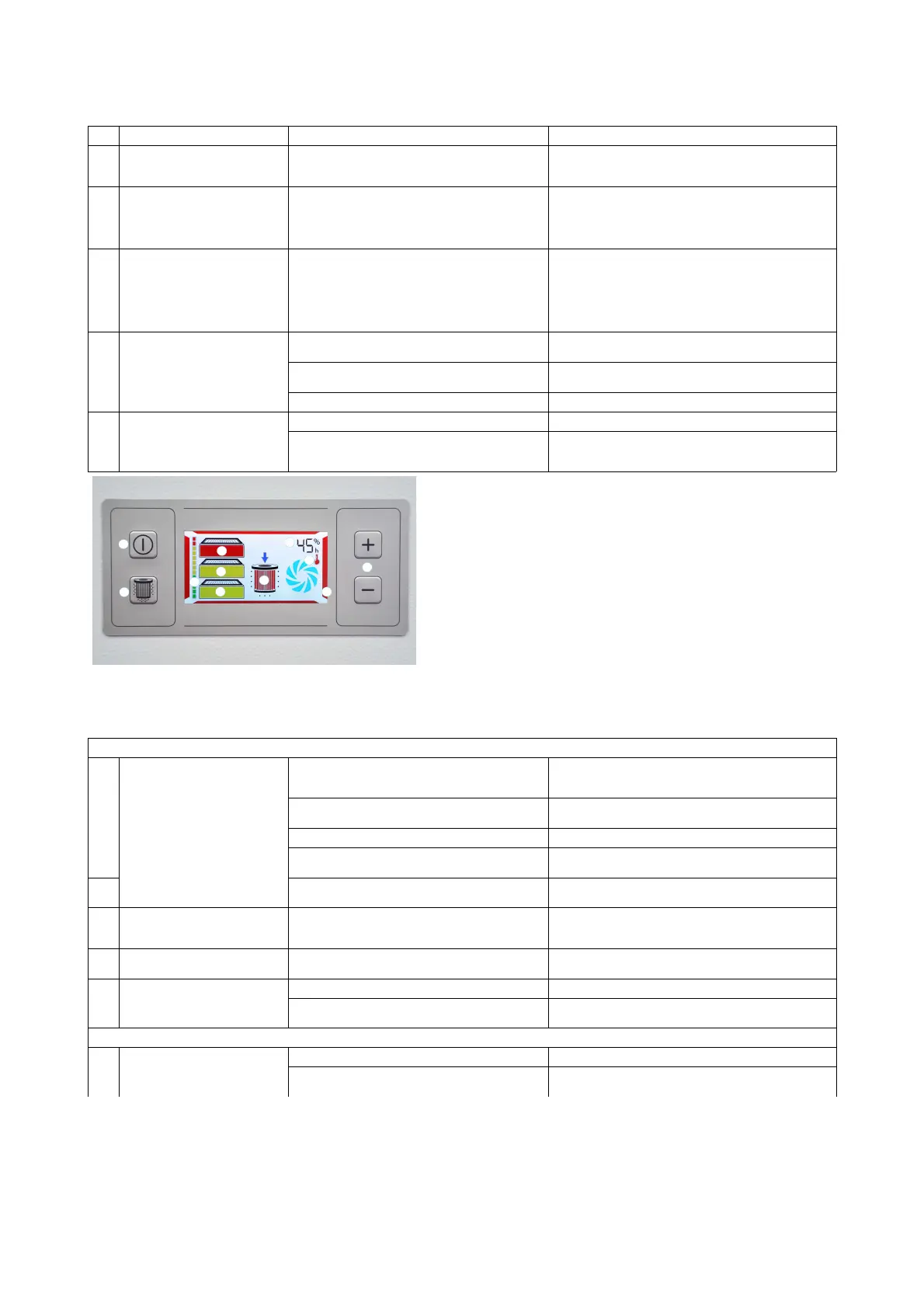
Pos. 1: Run/Standby button Pos.
5:
Filter status indicator
Pos. 2: Button for manual activation of filter
cleaning (only on systems with filter
cartridges)
Green: Filter OK
Yellow
:
Check filter status indicators (Pos. 6) –
place order for filter, if necessary
Red: Max. filter saturation reached – system
switches off - check filter status
indicator (Pos. 6)
Pos. 3: Extraction level control Pos.
6:
Status message for filter cleaning (only
on systems with filter cartridges)
Pos. 4: Filter saturation indicator (shows the
filter saturation for all filter installed in
the system together)
Pos.
7:
Display, motor/turbine fault message
Pos.
8:
Display, power setting / operating hour
meter
Pos.
9:
System fault indicator
FP 130/150 only
10 System does not clean Filter differential pressure not yet reached In the differential pressure monitoring mode, the system is in the
green range or at the beginning of the yellow range, everything is
OK
No compressed air at the line or compressed air line not
connected
Check pressure or connect compressed air line:
1.5 - 2 bar
Cleaning module not connected Connect the cable for cleaning to the socket under the interface
Cleaning module is defective Check the cable and solenoid valve for damage, or contact the
regional representative office
Incorrect cleaning settings The customer can set individual configurations via the interface; if
changes have been made here, check the settings for plausibility
11 System cleans continuously at short
intervals
Filter cartridges heavily contaminated / service life exceeded The system tries to reduce the differential pressure of the filter
cartridge using several cleaning cycles; when this fails, it means
that the filter is completely saturated and must be replaced
12 System cleans at very short intervals
and then switches off
Filter service life exceeded / filter completely saturated / can
no longer be cleaned
If a set number of cleaning attempts is exceeded, the filter is
completely saturated → replace the filter cartridges!
13 Dust escapes from the filter housing Dust collector is not inserted Open service door and insert dust collector
Dust collector leaking Open service door and check seals; is the dust collector properly
tensioned?
FPV200-202 only
14 System does not clean System is not switched on Switch the system on at the power switch
No compressed air at the line or compressed air line not
connected
Check pressure or connect compressed air line
max. 4 bar
82-236


 To Next Page
 Loading...