4 Installation, Initial Operation
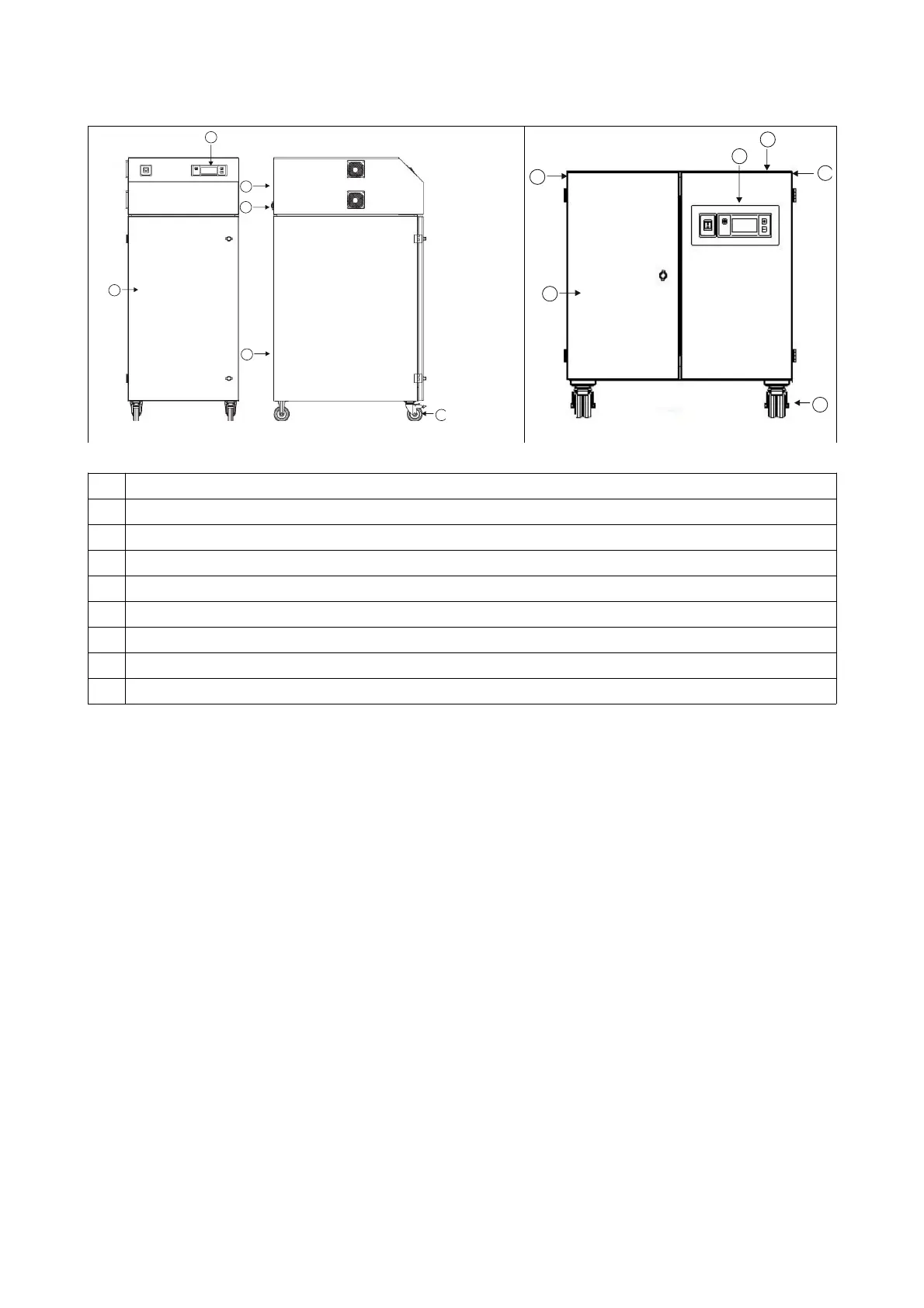
TFS500 / 1000
1 Inlet opening
2 Compressed air supply for filter cartridge cleaning (observe specification).
3 Control panel
4 Exhaust air opening (on FPV series systems: connection for the downstream extraction system)
5 Power supply, interface
6 Compressed air tank
7 Filter housing with saturation filter / filter cartridge
8 Dust collector
9 Wheels / machine foot / anti-tipping device depending on type of system
4.4 Startup
• First perform the steps in the “Installation” section.
• Make sure that the system is stably positioned, and check the piping.
• Check that the system is correctly connected to the power supply. The 400 V power supply must have a neutral
wire (because the system operates with 230 V control voltage). Pay attention to the rotary field when making the
connection.
• All filters in the system must be installed properly.
• Use the power switch to switch on the system.
• The display on the front of the system starts after a slight delay (self-test).
• The system starts automatically. When using the interface, the interface's signal takes precedence.
• The speed of the turbine or the fan can now be changed using the +/- buttons or via the interface.
• In case of problems when starting up the system, see Sections 5 and 7.
64-236



 To Next Page