6 Maintenance
6.2 Filter saturation indicator and filter replacement
Caution: Each filter stage must be checked regularly (at least once per week) and if necessary replaced to
ensure a constant extraction level and prevent damage to the system. Only replace filters with the
extractor switched off and while wearing appropriate protective clothing.
Note:
• Particle filters must not be cleaned! They are replaced only!
• Activated carbon/BAC filters must be inspected regularly and replaced. They are not monitored by the filter
monitoring of the system.
Filter saturation indicator:
Caution: Only replace filters using appropriate protective clothing and safety equipment.
LN, GL, TFS, FP, FPV202, BF, OEN series:
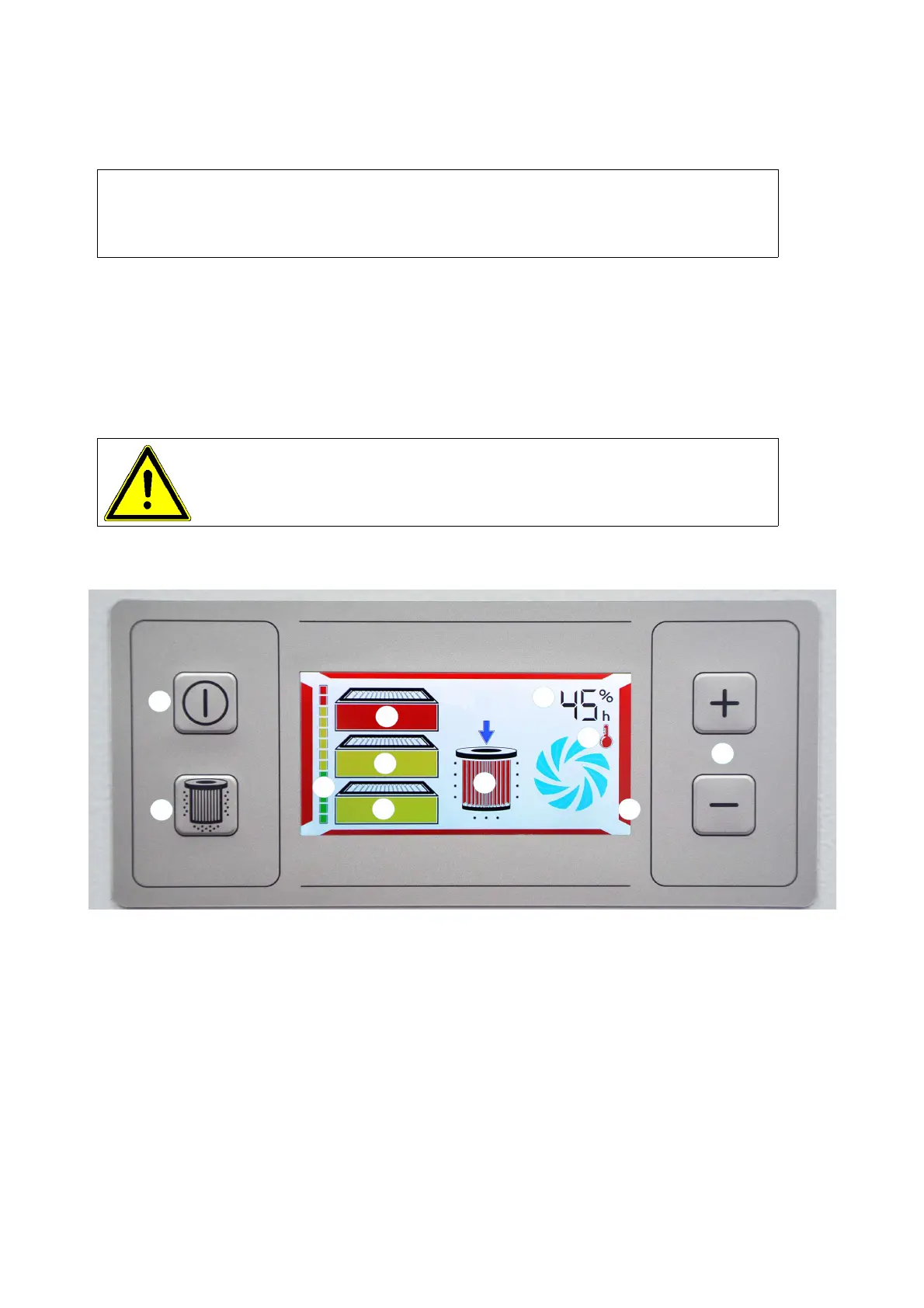
Filter saturation indicator (Pos. 4):
Shows the filter saturation for all filter stages installed in the system together
Green: All filters OK
Yellow: Check filter status indicators (Pos. 5) – place order for filter, if necessary
“Filtervll” (Filter full) message via interface once the last yellow stage has been reached
Red: Max. filter saturation reached – system switches off – replace filters
The filter status indicators (Pos. 5) show which filters have to be replaced:
Red → replace
Yellow → check, if necessary, replace
Green → OK
71-236



 To Next Page