Product instructions
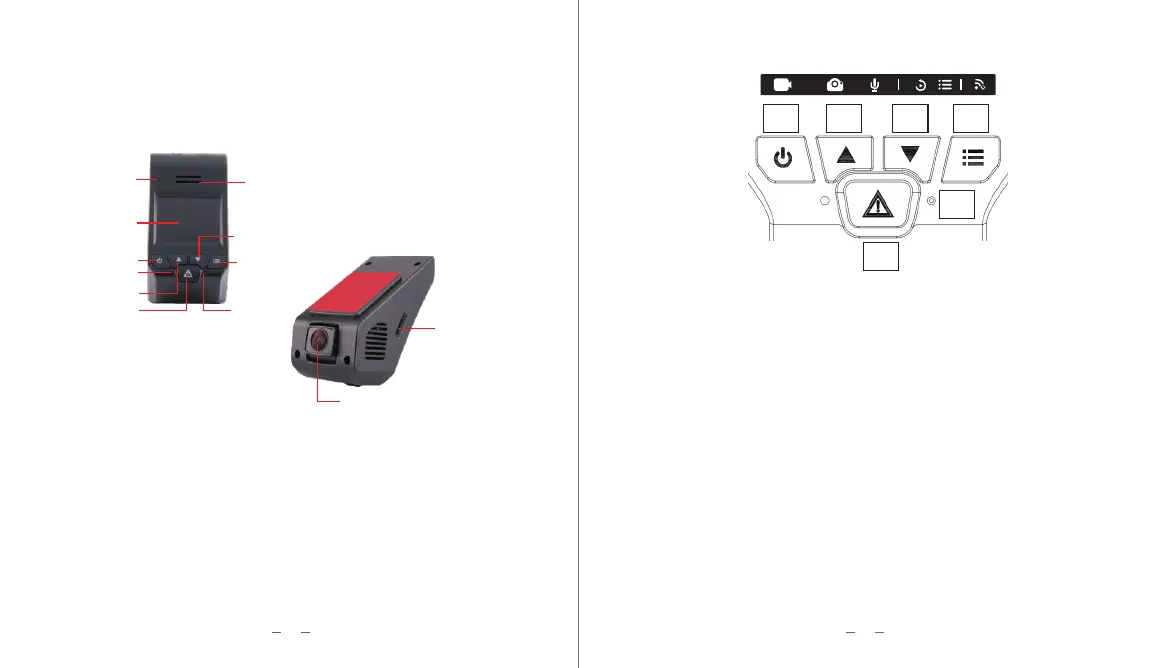
Light indications and Button Definitions
MIC
Speaker
LCD screen
Power
Down
Indicator Light
UP
SOS lock
Reset
Menu
Camera
TF Card Slot
Product status indicated by red or blue light. Red light when power on / stop recording.
Blue light flashing when recording, Red light flashing when without SD Card or
something wrong with SD card. Red light when stop recording.
4
3
Buttons Instructions
1 2
3
4
5
6
1.Power Switch:Short press to start /stop recording. Long press to power off. Short
press to power on when in the Power Off mode. It is the Enter key when it in the Menu
mode, it can start playing or stop playing in the Playback mode.
2.Up button: Short press to Capture picture when recording, it is the Up button in
the Menu mode.
3.Down button: Short press to power on/off the MIC when recording, it is the Down button
in the Menu mode. Press the down button to enter the file playback page without recording.
4.Menu: Short press to awaken/shut the back light of the screen when recording. Short
press to set the menu and long press to turn on/off the WiFi when no recording.
5.Reset: Short press to reset/restart the device.Long press reset button for 6 seconds to
restore the factory settings; press the power button & reset button at same time to restart
the device.
6.SOS Lock : Short press to lock the current recording video for 1 minute. To unlock the
file, enter the file playback list to manually unlock the files


 To Next Page