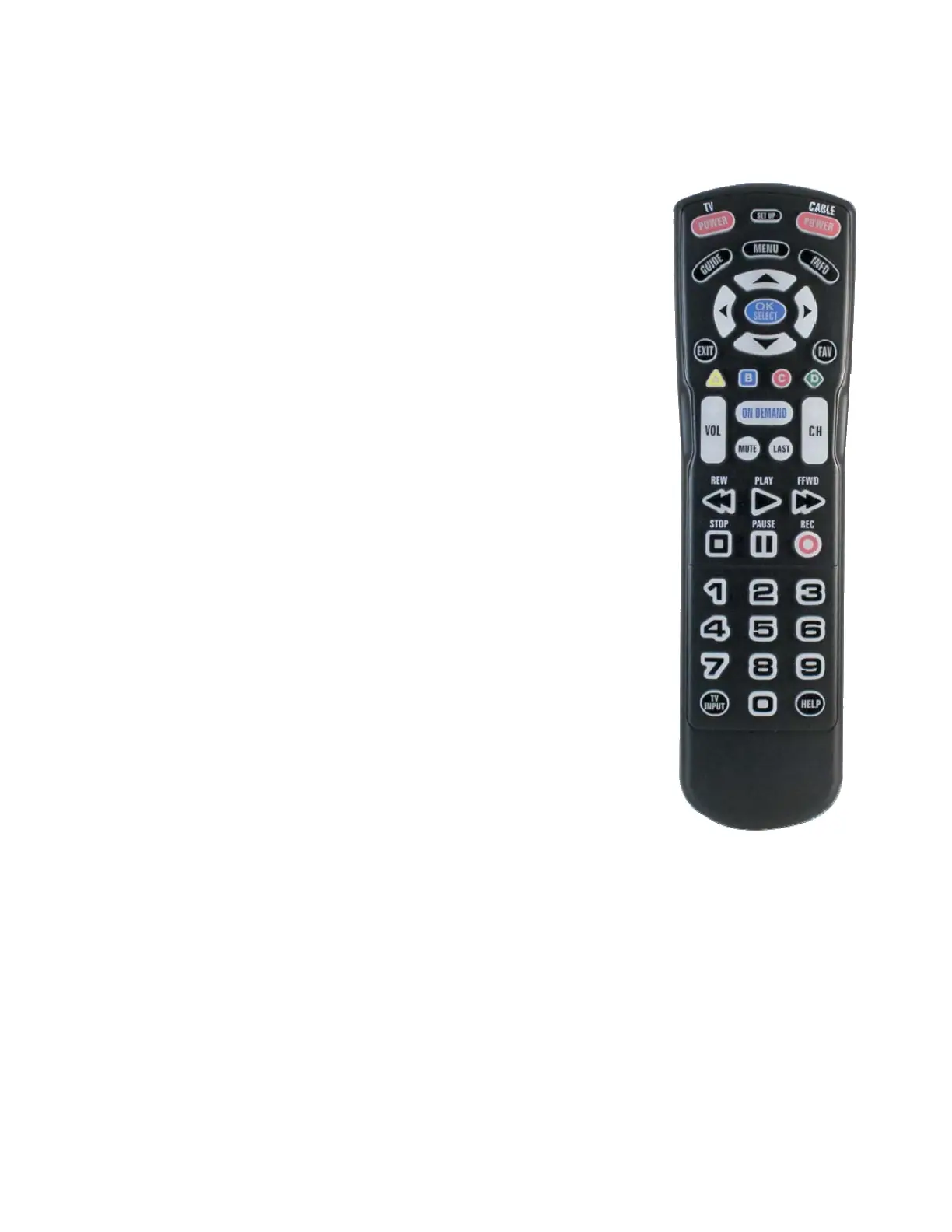
Quick Guide to Buttons on the Remote
POWERSETUP KEYS
* TV POWER turns your TV on and off
* CBL POWER turns your cable box on and off
* SETUP used for remote control programming
PLAYBACK CONTROLS
* FF/PAUSE/PLAY/REW/STOP used to control playback of live, recorded,
or On Demand programs
* RECORD press to record selected program
NAVIGATION KEYS
* GUIDE displays program guide
* MENU displays main cable menu
* INFO displays information on current selected program
* EXIT closes current menu
* FAV cycles through favorite channels set on your cable box
* A-D KEYS used for special functions displayed on your cable menus
* ON DEMAND used to access on demand program library
OTHER KEYS
* LAST returns to the previously selected channel
* INPUT cycles through video inputs on the TV or Audio Device
* HELP displays the HELP menu screen for your cable box
A COMPLETE LIST OF TV CODES ARE ON THE NEXT/LAST
PAGE. IF YOU HAVE ANY QUESTIONS OR PROBLEMS,
PLEASE CONTACT TCC AT 715-695-2691.


 To Next Page