
 Need help?
Do you have a question about the TCC URC2060 and is the answer not in the manual?
Press and hold the SETUP button until the LED indicator blinks twice.
Press the TV POWER button to turn on the television for setup.
Locate your TV brand in the list and press the corresponding digit key.
Release the pressed digit key once the TV turns off, indicating successful setup.
Turn on the TV and press the TV POWER key as the first step in code entry.
Press and hold the SETUP button until the LED blinks twice before entering codes.
Use the digit keys to enter the first code from the provided code list for your TV.
Test the remote's functionality and try the next code if it does not work.
Initiate autoprogramming by pressing and holding the SETUP button until the LED blinks.
Press the TV POWER button after initiating the SETUP process for autoprogramming.
Aim the remote at the TV and press and hold the OK key to scan for codes.
Release the OK key when the TV turns off, signaling the completion of autoprogramming.
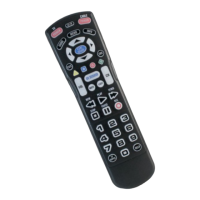
Overview of TV POWER, CBL POWER, and SETUP buttons for device control and programming.
Explanation of FF/PAUSE/PLAY/REW/STOP and RECORD buttons for media playback.
Details on GUIDE, MENU, INFO, EXIT, FAV, A-D KEYS, and ON DEMAND buttons.
Description of LAST, INPUT, and HELP buttons for channel, input, and menu access.
 General
| Brand | TCC |
|---|---|
| Model | URC2060 |
| Type | Universal Remote Control |
| Power Source | 2 x AAA batteries |
| Key Backlight | No |
| Compatible Devices | TV, DVD |

 To Next Page