Installation of the machine - Service Provider Manual
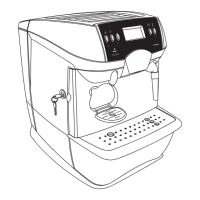
3.1 Description of control panel (Fig.02, pag. 2)
14 Espresso button When this button is pressed the machine will brew an
espresso coee (quantity programmed by the service pro-
vider).
15 Caè Crema button When this button is pressed the machine will brew a coee
(quantity programmed by the service provider).
16 Filter coee button When this button is pressed the machine will brew a long
coee (quantity programmed by the service provider).
17 LCD Display It displays the machine status and any alarms, and guides
the user in the operation of the machine.
18 Hot water button When this button is pressed for 1 second, the machine will
instantly dispense hot water.
19 Steam button When this button is pressed for 1 second, the machine will
instantly dispense steam.
20 Steam button AND hot
water button
By pressing these 2 buttons contemporarily, it is possible
to scroll the languages supported by the machine. To set a
language, release the 2 buttons when the desired language
is displayed.
11.1 Programming menu and service menu
To access the programming menu and the service menu, proceed as follows:
1 Turn o the machine by pressing the ON/OFF switch,
2 Press the espresso button and simultaneously turn the machine back on by pressing the
main switch.
11.2 Programming controls
When you access the machine programming or service menu, the keys take on dierent fun-
ctions.
“Page up/edit” key
This key enables you to:
1 browse the pages of a menu;
2 change parameters once they have been made editable with the “OK” key.
Sections 11.3 and 11.4 list all of the functions available in these menus.
The menus must be PASSWORD protected.
The preset PASSWORD (default 0000), must be modied during the machi-
ne initialisation phase to prevent access of unauthorised personnel. It is ne-
cessary to modify the password for both the service and the programming menu.
Using the appropriate controls, select:
1. Programming menu Access to the programming menu
(password is requested).
2. Service menu Access to the service menu
(password is requested).
3. Exit Allows exiting the machine programming
“Page down/edit” key
This key enables you to:
1 browse the pages of a menu;
2 change parameters once they have been made editable with the “OK” key.
“OK” (ENTER) key
This key enables you to:
1 select the function displayed;
2 make a parameter/value editable;
3 conrm a parameter/value once it has been made editable.
“ESC” key
This key can be pressed to exit without saving changes to the edited or selected parameter.
• 5 •





 To Next Page