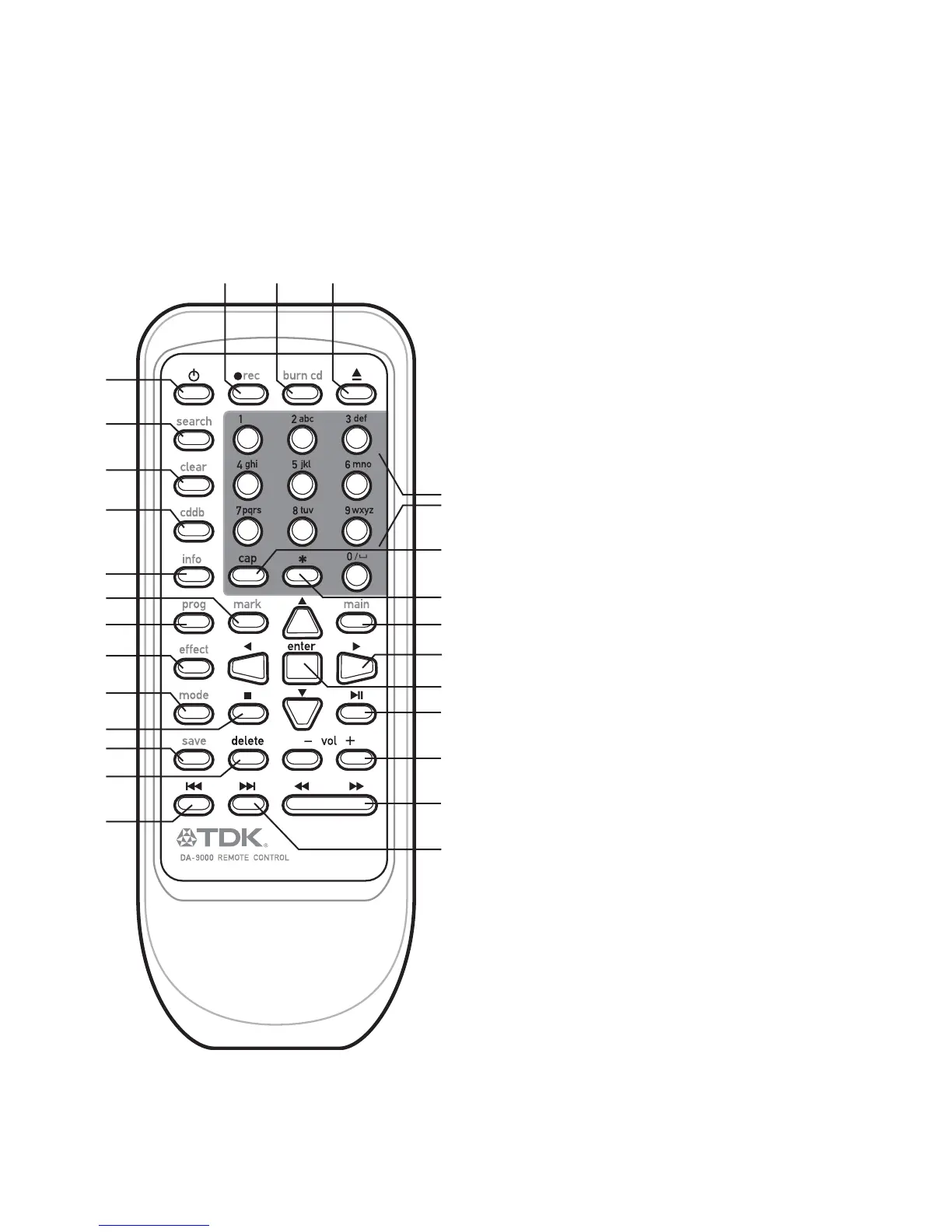
[1] POWER
Press to turn the power ON or OFF.
[2] SEARCH
Press to activate the track search feature.
[3] CLEAR
Press to clear editing information.
[4] CDDB
Press to activate Gracenote® CD database lookup for the current album.
[5] INFO
Press to view CDDB information that has previously been retrieved.
[6] PROG
Press to view the temporary list (includes marked songs).
[7] EFFECT
Press to adjust EQ presets.
[8] MODE
Press to change playback modes (normal, random, intro and repeat modes).
[9] SAVE
Press to save temporary list as a playlist, or to save edited information.
[10] MARK
Press to mark a selected track. Marked tracks appear in the temporary list.
[11] DELETE
Press to delete selected items.
[12] REC
Press to rip a CD to the internal hard drive.
[13] BURN CD
Press to burn a CD.
[14] TRAY OPEN/CLOSE
Press to open or close the disc tray.
[15] ALPHANUMERIC KEYS
Press to enter track information, search for tracks, etc.
[16] CAP
Press to toggle between upper case and lower case text entry.
[17] * (asterisk)
Press to enter special characters when editing information.
[18] MAIN
Press to load Main Menu.
[19] ARROW UP/ARROW DOWN/ARROW LEFT/ARROW RIGHT
Press to navigate menus and lists.
[20] ENTER
Press to confirm a selection.
[21] STOP
Press to stop playback.
[22] PLAY/PAUSE
Press to play or pause a track.
[23] VOLUME (-/+)
Press to adjust volume.
[24] PREVIOUS TRACK
Press to skip back to the previous track or to return to the beginning of the
track that’s currently playing.
[25] NEXT TRACK
Press to skip forward to the next track.
[26] TRACK SCAN BACK/FORWARD
Press to scan through a track that’s currently playing.
4 DA 9000: USER MANUAL



 To Next Page