EasyManua.ls Logo

Teac A-650 - Tape Speed and Wow;Flutter Tests; Tape Speed Measurement and Adjustment; Wow and Flutter Testing Methods

Teac A-650
36 pages
Print Icon
To Next Page IconTo Next Page
To Previous Page IconTo Previous Page
Loading...
5-5.
TAPE
SPEED/WOW
AND
FLUTTER
PLAYBACK
METHOD
4.
5.
1.
2.
OSCILLATOR
WOW
a
FLUTTER
METER
OVTPu
Il
I
3.
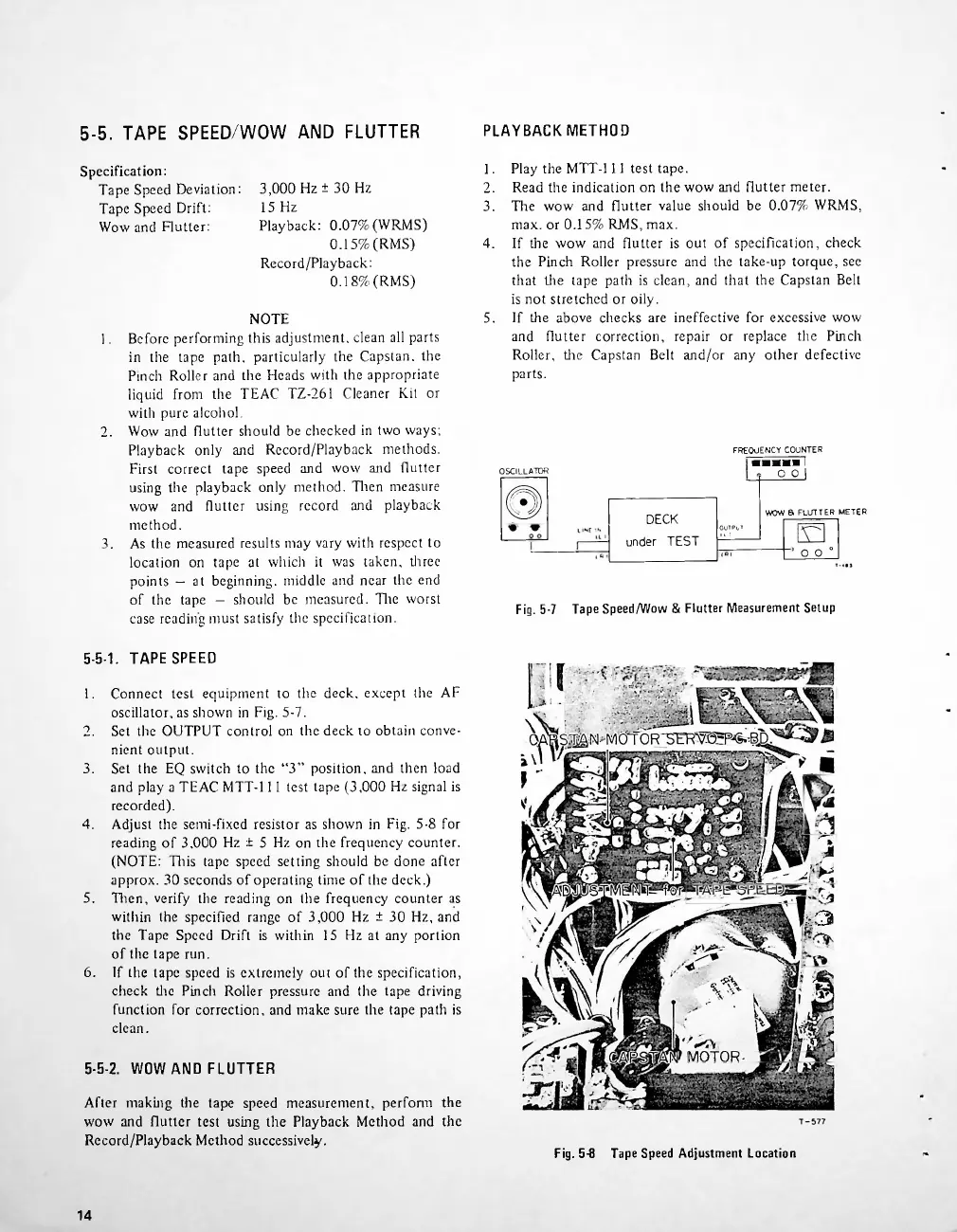
Fig.
5-7
Tape
Speed/Wow
&
Flutter
Measurement
Setup
5-5-1.
TAPE
SPEED
1.
2.
3.
4.
5.
6.
MOTOR-
5-5-2.
WOW
AND
FLUTTER
Fig.
5-8
Tape
Speed
Adjustment
Location
14
Specification:
Tape
Speed
Deviation:
Tape
Speed
Drift:
Wow
and
Flutter:
After
making
the
tape
speed
measurement,
perform
the
wow
and
flutter
test
using
the
Playback
Method
and
the
Record/Playback
Method
successively.
Connect
test
equipment
to
the
deck,
except
the
AF
oscillator,
as
shown
in
Fig.
5-7.
Set
the
OUTPUT
control
on
the
deck
to
obtain
conve
nient
output.
Set
the
EQ
switch
to
the
3
position,
and
then
load
and
play
a
TEAC
MTT-l
11
test
tape
(3,000
Hz
signal
is
recorded).
Adjust
the
semi-fixed
resistor
as
shown
in
Fig.
5-8
for
reading
of
3.000
Hz
±
5
Hz
on
the
frequency
counter.
(NOTE:
This
tape
speed
setting
should
be
done
after
approx.
30
seconds
of
operating
time
of
the
deck.)
Then,
verify
the
reading
on
the
frequency
counter
as
within
the
specified
range
of
3,000
Hz
±
30
Hz,
and
the
Tape
Speed
Drift
is
within
15
Hz
at
any
portion
of
the
tape
run.
If
the
tape
speed
is
extremely
out
of
the
specification,
check
the
Pinch
Roller
pressure
and
the
tape
driving
function
for
correction,
and
make
sure
the
tape
path
is
clean.
1.
2.
3.
Play
the
MTT-l
11
test
tape.
Read
the
indication
on
the
wow
and
flutter
meter.
The
wow
and
flutter
value
should
be
0.07%
WRMS,
max.
or
0.15%
RMS,
max.
If
the
wow
and
flutter
is
out
of
specification,
check
the
Pinch
Roller
pressure
and
the
take-up
torque,
see
that
tire
tape
path
is
clean,
and
that
the
Capstan
Belt
is
not
stretched
or
oily.
If
tire
above
checks
are
ineffective
for
excessive
wow
and
flutter
correction,
repair
or
replace
the
Pinch
Roller,
the
Capstan
Belt
and/or
any
other
defective
parts.
DECK
under
TEST
3,000
Hz
±
30
Hz
15
Hz
Playback:
0.07%
(WRMS)
0.15%
(RMS)
Record/Playback:
0.18%
(RMS)
FRE
QUENCY
COUN
TER
I
o
o
I
NOTE
Before
performing
this
adjustment,
clean
all
parts
in
the
tape
path,
particularly
the
Capstan,
the
Pinch
Roller
and
the
Heads
with
the
appropriate
liquid
from
the
TEAC
TZ-261
Cleaner
Kit
or
with
pure
alcohol.
Wow
and
flutter
should
be
checked
in
two
ways;
Playback
only
and
Record/Playback
methods.
First
correct
tape
speed
and
wow
and
flutter
using
the
playback
only
method.
Then
measure
wow
and
flutter
using
record
and
playback
method.
As
the
measured
results
may
vary
with
respect
to
location
on
tape
at
which
it
was
taken,
three
points
at
beginning,
middle
and
near
the
end
of
the
tape
should
be
measured.
Tire
worst
case
reading
must
satisfy
the
specification.
1.3
Q
O
0

Related product manuals