EasyManua.ls Logo

Teac A-650 - Page 15

Teac A-650
36 pages
Print Icon
To Next Page IconTo Next Page
To Previous Page IconTo Previous Page
Loading...
RECORD/PLAYBACK
METHOD
3.
1.
2.
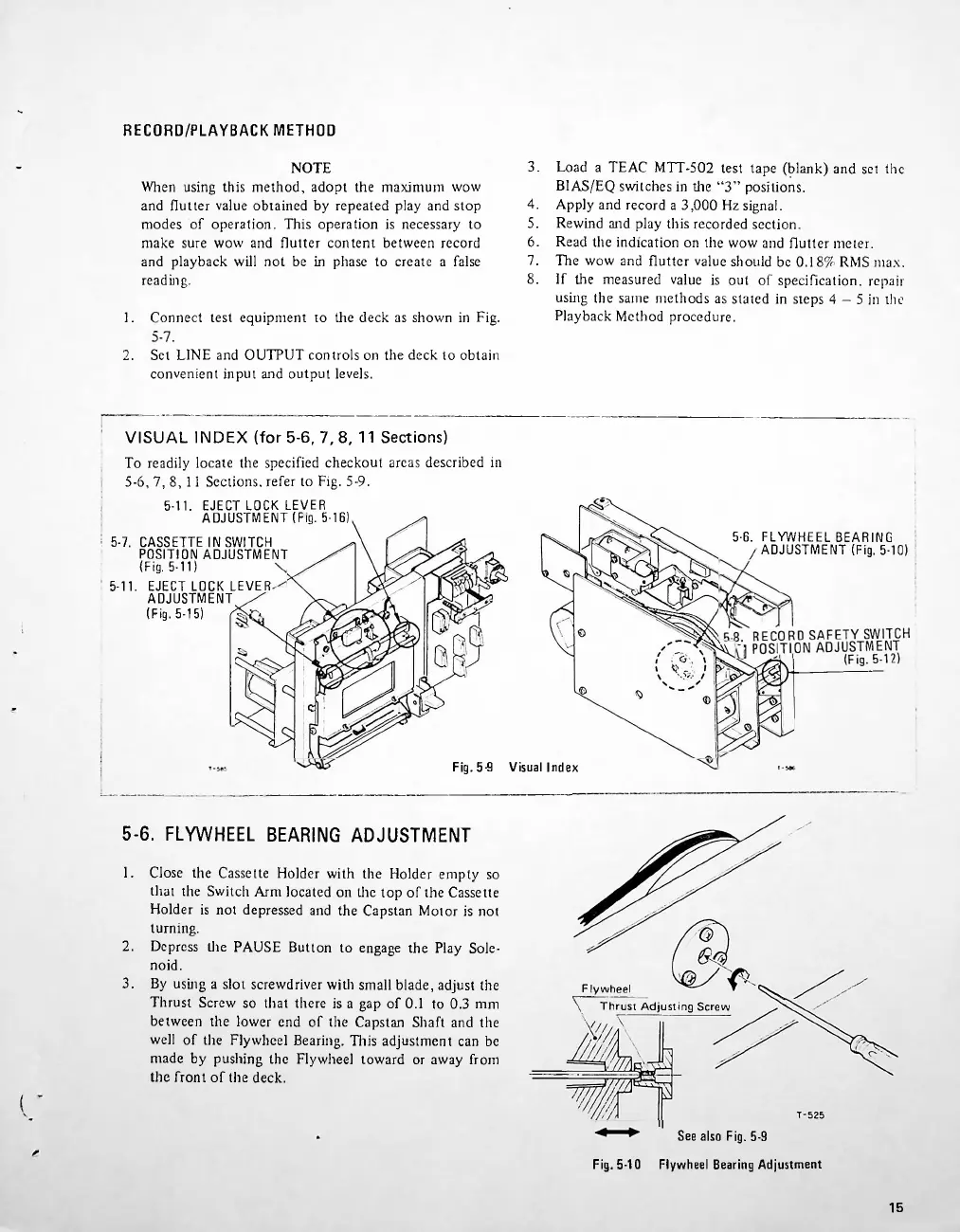
5-6.
FLYWHEEL
BEARING
ADJUSTMENT
1.
2.
3.
See
also
Fig.
5-9
Fig.
5-10
Flywheel
Bearing
Adjustment
15
4.
5.
6.
7.
8.
Load
a
TEAC
MTT-502
test
tape
(blank)
and
set
the
B1AS/EQ
switches
in
the
3
positions.
Apply
and
record
a
3,000
Hz
signal.
Rewind
and
play
this
recorded
section.
Read
the
indication
on
the
wow
and
flutter
meter.
The
wow
and
flutter
value
should
be
0.18%'
RMS
max.
If
the
measured
value
is
out
of
specification,
repair
using
the
same
methods
as
stated
in
steps
4
-
5
in
the
Playback
Method
procedure.
5-6.
FLYWHEEL
BEARING
/ADJUSTMENT
(Fig.
5-10)
NOTE
When
using
this
method,
adopt
the
maximum
wow
and
flutter
value
obtained
by
repeated
play
and
stop
modes
of
operation.
This
operation
is
necessary
to
make
sure
wow
and
flutter
content
between
record
and
playback
will
not
be
in
phase
to
create
a
false
reading.
Connect
test
equipment
to
the
deck
as
shown
in
Fig.
Set
LINE
and
OUTPUT
controls
on
the
deck
to
obtain
convenient
input
and
output
levels.
Flyw
heel
\
Thrust
Adjusting
Screw
Close
the
Cassette
Holder
with
the
Holder
empty
so
that
the
Switch
Arm
located
on
the
top
of
the
Cassette
Holder
is
not
depressed
and
the
Capstan
Motor
is
not
turning.
Depress
the
PAUSE
Button
to
engage
the
Play
Sole
noid.
By
using
a
slot
screwdriver
with
small
blade,
adjust
the
Thrust
Screw
so
that
there
is
a
gap
of
0.1
to
0.3
mm
between
the
lower
end
of
the
Capstan
Shaft
and
the
well
of
the
Flywheel
Bearing.
This
adjustment
can
be
made
by
pushing
the
Flywheel
toward
or
away
from
the
front
of
the
deck.
VISUAL
INDEX
(for
5-6,
7,
8,
11
Sections)
To
readily
locate
the
specified
checkout
areas
described
in
5-6,
7,8,11
Sections,
refer
to
Fig.
5-9.
5-11.
EJECT
LOCK
LEVER
ADJUSTMENT
(Fig.
5-16)
I
5-7.
CASSETTE
IN
SWITCH
POSITION
ADJUSTMENT
(Fig.
5-11)
5-11.
EJECT
LOCK
LEVER
ADJUSTMENT
(Fig.
5-15)
r
Fig.
5-9
Visual
index

Related product manuals