EasyManua.ls Logo

Teac A-650 - Monitor Performance Testing; Minimum Input Level Checks; Specified Line Control Setting; Record VU Meter Calibration

Teac A-650
36 pages
Print Icon
To Next Page IconTo Next Page
To Previous Page IconTo Previous Page
Loading...
6-3.
MONITOR
PERFORMANCE
6
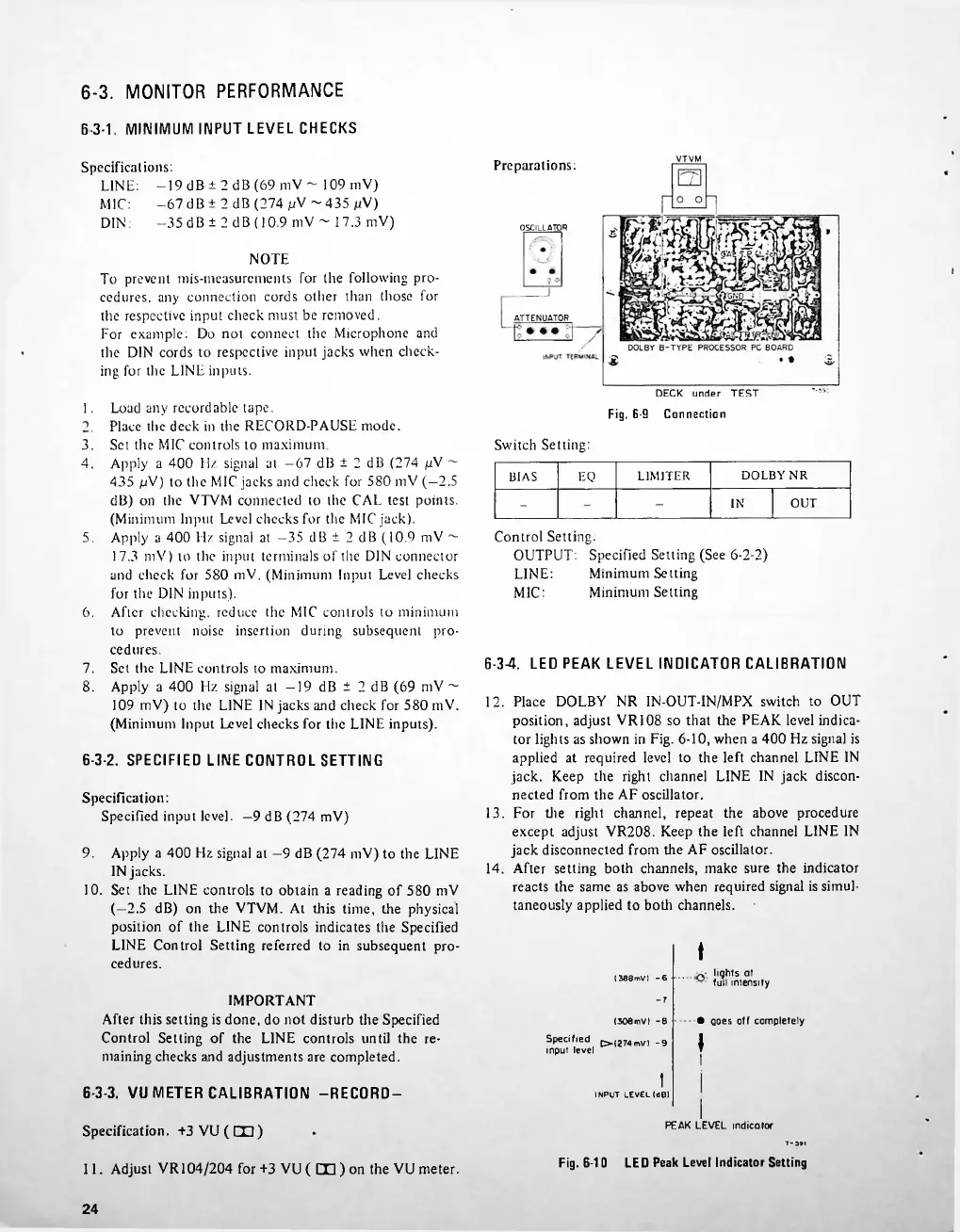
3-1.
MINIMUM
INPUT
LEVEL
CHECKS
Preparations;
OSCILLATO
R
1.
Switch
Setting:
DOLBY
NR
EQ
LIMITER
BIAS
OUT
IN
5.
6.
6-3-4.
LED
PEAK
LEVEL
INDICATOR
CALIBRATION
6-3-2.
SPECIFIED
LINE
CONTROL
SETTING
9.
IM8mV)
-6
(SOemvl
-s
O-(2Mmv>
-9
6-3-3.
VU
METER
CALIBRATION
-RECORD-
Specification.
+3
VU
(
CO)
LED
Peak
Level
Indicator
Setting
Fig.
6-1
0
11.
Adjust
VR
104/204
for
+3
VU
(
CD
)
on
the
VU
meter.
24
3.
4.
Specification:
Specified
input
level.
9
dB
(274
mV)
7.
8.
Apply
a
400
Hz
signal
at
9
dB
(274
mV)
to
the
LINE
IN
jacks.
10.
Set
the
LINE
controls
to
obtain
a
reading
of
580
mV
(-2.5
dB)
on
the
VTVM.
At
this
time,
the
physical
position
of
the
LINE
controls
indicates
the
Specified
LINE
Control
Setting
referred
to
in
subsequent
pro
cedures.
Load
any
recordable
tape.
Place
the
deck
in
the
RECORD-PAUSE
mode.
Set
the
MIC
controls
to
maximum
Apply
a
400
Hz
signal
at
-67
dB
±
2
dB
(274
pV
~-
435
pV)
to
the
MIC
jacks
and
check
for
580
mV
(
2.5
dB)
on
the
VTVM
connected
to
the
CAL
test
points.
(Minimum
Input
Level
checks
for
the
MIC
jack).
Apply
a
400
Hz
signal
at
-35
dB
±
2
dB
(10.9
mV
~
17.3
mV)
to
the
input
terminals
of
the
DIN
connector
and
check
for
580
mV.
(Minimum
Input
Level
checks
for
the
DIN
inputs).
After
checking,
reduce
the
MIC
controls
to
minimum
to
prevent
noise
insertion
during
subsequent
pro
cedures.
Set
the
LINE
controls
to
maximum.
Apply
a
400
Hz
signal
at
19
dB
±
2
dB
(69
mV
~
109
mV)
to
the
LINE
IN
jacks
and
check
for
580
mV.
(Minimum
Input
Level
checks
for
the
LINE
inputs).
lights
at
full
intensity
LINE:
MIC:
DIN
NOTE
To
prevent
mis-measurcments
for
the
following
pro
cedures.
any
connection
cords
other
than
those
for
the
respective
input
check
must
be
removed.
For
example:
Do
not
connect
the
Microphone
and
the
DIN
cords
to
respective
input
jacks
when
check
ing
for
the
LINE
inputs.
IMPORTANT
After
this
setting
is
done,
do
not
disturb
the
Specified
Control
Setting
of
the
LINE
controls
until
the
re
maining
checks
and
adjustments
are
completed.
LINE:
MIC:
t
I
INPUT
LEVEL(dB)
J
z
Z
j
Control
Setting.
OUTPUT:
Specified
Setting
(See
6-2-2)
Minimum
Setting
Minimum
Setting
12.
Place
DOLBY
NR
IN-OUT-IN/MPX
switch
to
OUT
position,
adjust
VR108
so
that
the
PEAK
level
indica
tor
lights
as
shown
in
Fig.
6-10,
when
a
400
Hz
signal
is
applied
at
required
level
to
the
left
channel
LINE
IN
jack.
Keep
the
right
channel
LINE
IN
jack
discon
nected
from
the
AF
oscillator.
13.
For
the
right
channel,
repeat
the
above
procedure
except
adjust
VR208.
Keep
the
left
channel
LINE
IN
jack
disconnected
from
the
AF
oscillator.
14.
After
setting
both
channels,
make
sure
the
indicator
reacts
the
same
as
above
when
required
signal
is
simul
taneously
applied
to
both
channels.
ATTENUATOR
Specified
input
level
Specifications:
-19
dB
±
2
dB
(69
mV
~
109
mV)
-67
dB
±
2
dB
(274
pV
~
435
pV)
-35dB±
2
dB
(10.9
mV
~
17.3
mV)
goes
off
completely
I
I
I
PEAK
LEVEL
indicator
Fig.
6-9
Connection

Related product manuals