EasyManua.ls Logo

Teac A-650 - Recording Performance Adjustments; Dolby NR Copy-Out-FM Switch Function Check; Bias Trap Adjustments

Teac A-650
36 pages
Print Icon
To Next Page IconTo Next Page
To Previous Page IconTo Previous Page
Loading...
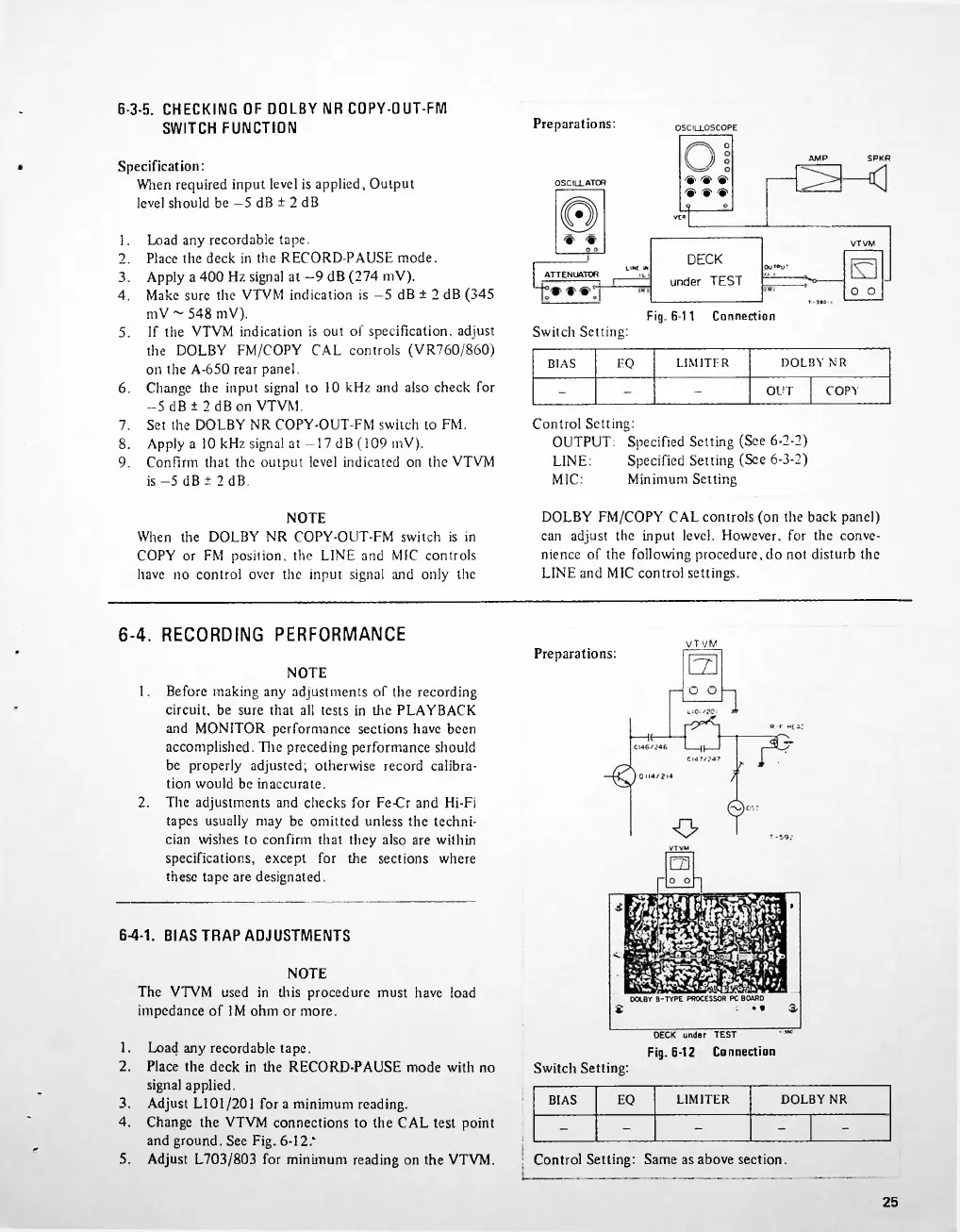
Preparations:
SPKR
AMP
OSCILLATOR
VTVM
LIKE
W
o
o
Connection
Fig.
6-11
Switch
Setting:
5.
DOLBY
NR
EQ
LIMITER
BIAS
6.
OUT
COPY
6-4.
RECORDING
PERFORMANCE
Preparations:
6-4-1.
BIAS
TRAP
ADJUSTMENTS
Switch
Setting:
EQ
LIMITER
DOLBY
NR
BIAS
5.
Control
Setting:
Same
as
above
section.
25
6-3-5.
CHECKING
OF
DOLBY
NR
COPY-OUT-FM
SWITCH
FUNCTION
7.
8.
9.
1.
2.
Load
any
recordable
tape.
Place
the
deck
in
the
RECORD-PAUSE
mode
with
no
signal
applied.
Adjust
L101/201
for
a
minimum
reading.
Change
the
VTVM
connections
to
the
CAL
test
point
and
ground.
See
Fig.
6-12?
Adjust
L703/803
for
minimum
reading
on
the
VTVM.
Control
Setting:
OUTPUT:
Specified
Setting
(See
6-2-2)
Specified
Setting
(See
6-3-2)
Minimum
Setting
DOLBY
FM/COPY
CAL
controls
(on
the
back
panel)
can
adjust
the
input
level.
However,
for
the
conve
nience
of
the
following
procedure,
do
not
disturb
the
LINE
and
M1C
control
settings.
3.
4.
1.
2.
3.
4.
NOTE
When
the
DOLBY
NR
COPY-OUT-FM
switch
is
in
COPY
or
FM
position,
the
LINE
and
MIC
controls
have
no
control
over
the
input
signal
and
only
the
NOTE
The
VTVM
used
in
this
procedure
must
have
load
impedance
of
IM
ohm
or
more.
Load
any
recordable
tape.
Place
the
deck
in
the
RECORD-PAUSE
mode.
Apply
a
400
Hz
signal
at
9
dB
(274
mV).
Make
sure
the
VTVM
indication
is
-5
dB
±
2
dB
(345
mV
548
mV).
If
the
VTVM
indication
is
out
of
specification,
adjust
the
DOLBY
FM/COPY
CAL
controls
(VR760/860)
on
the
A-650
rear
panel.
Change
the
input
signal
to
10
kHz
and
also
check
for
-5
dB
±
2
dBon
VTVM.
Set
the
DOLBY
NR
COPY-OUT-FM
switch
to
FM.
Apply
a
10
kHz
signal
at
-17
dB
(109
mV).
Confirm
that
the
output
level
indicated
on
the
VTVM
is
5
dB
±
2
dB.
LINE:
MIC:
DECK
under
TEST
4
OSCILLOSCOPE
o
j)
O
'S'
X
>
>
>
L
ATTENUATOR
VTVM
EZ1
Specification:
When
required
input
level
is
applied,
Output
level
should
be
5
dB
±
2
dB
NOTE
1.
Before
making
any
adjustments
of
the
recording
circuit,
be
sure
that
all
tests
in
the
PLAYBACK
and
MONITOR
performance
sections
have
been
accomplished.
Die
preceding
performance
should
be
properly
adjusted;
otherwise
record
calibra
tion
would
be
inaccurate.
2.
The
adjustments
and
checks
for
Fe-Cr
and
Hi-Fi
tapes
usually
may
be
omitted
unless
the
techni
cian
wishes
to
confirm
that
they
also
are
within
specifications,
except
for
the
sections
where
these
tape
are
designated.
DECK
under
TEST
**'
Fig.
6-12
Connection
O
utput

Related product manuals