EasyManua.ls Logo

Teac A-650 - Recording Performance Adjustments (Continued); Record Bias Setting for Various Tapes

Teac A-650
36 pages
Print Icon
To Next Page IconTo Next Page
To Previous Page IconTo Previous Page
Loading...
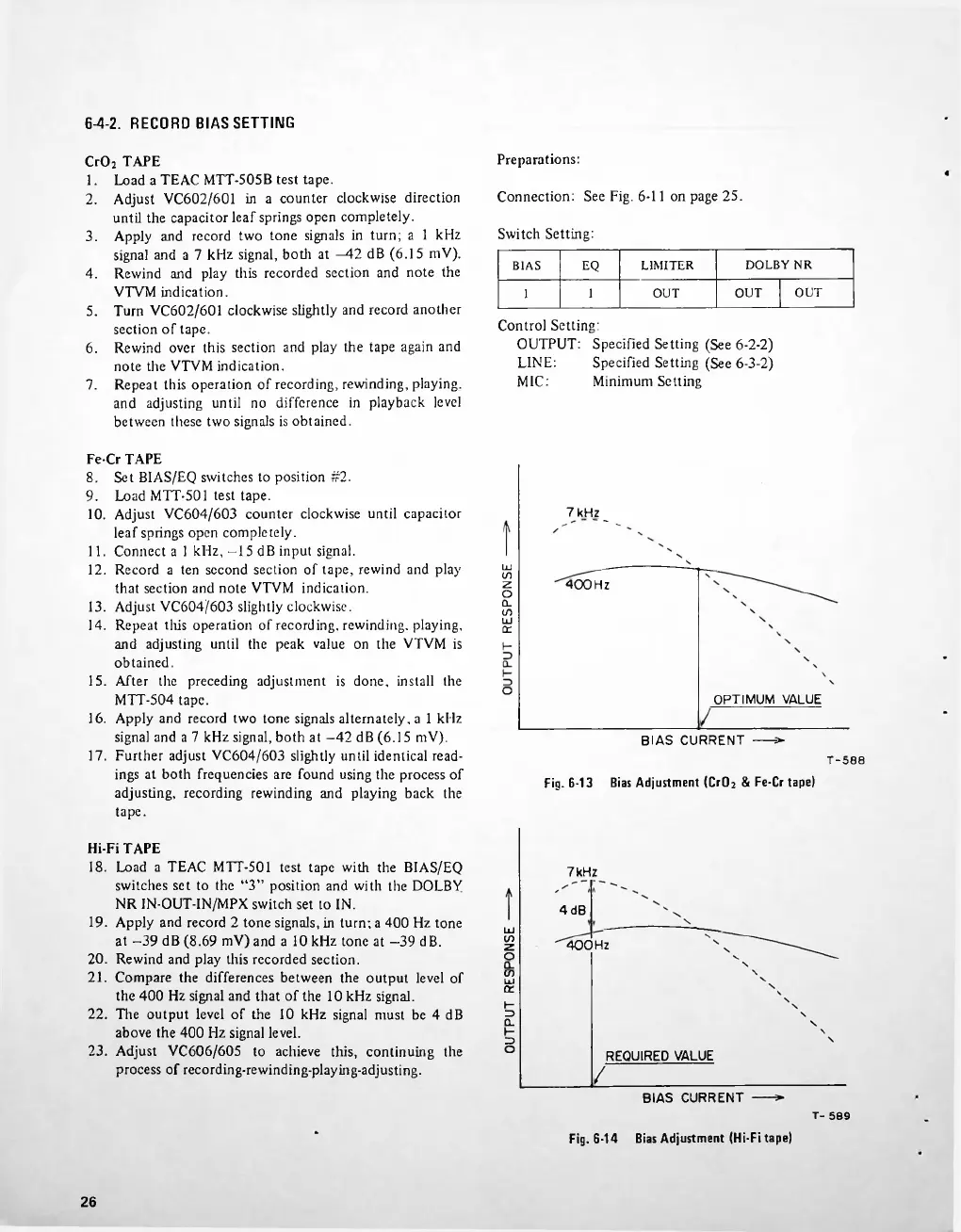
6-4-2.
RECORD
BIAS
SETTING
Preparations:
Connection:
See
Fig.
6-11
on
page
25.
Switch
Setting:
3.
DOLBY
NR
BIAS
EQ
LIMITER
4.
OUT
OUT
OUT
1
1
5.
6.
7.
7
kHz,
400Hz
OPTIMUM
VALUE
BIAS
CURRENT
----
=►
7
kHz
4dB
400
Hz
REQUIRED
VALUE
BIAS
CURRENT
T-
509
Bias
Adjustment
(Hi-Fi
tape)
Fig.
6-14
26
Load
a
TEAC
MTT-505B
test
tape.
Adjust
VC602/601
in
a
counter
clockwise
direction
until
the
capacitor
leaf
springs
open
completely.
Apply
and
record
two
tone
signals
in
turn;
a
1
kHz
signal
and
a
7
kHz
signal,
both
at
42
dB
(6.15
mV).
Rewind
and
play
this
recorded
section
and
note
the
VTVM
indication.
Turn
VC602/601
clockwise
slightly
and
record
another
section
of
tape.
Rewind
over
this
section
and
play
the
tape
again
and
note
the
VTVM
indication.
Repeat
this
operation
of
recording,
rewinding,
playing,
and
adjusting
until
no
difference
in
playback
level
between
these
two
signals
is
obtained.
LINE:
MIC:
O
Ld
CO
Z
o
Q.
CO
UJ
or
g
3
O
LxJ
CO
z
o
co
UJ
or
Hi-Fi
TAPE
18.
Load
a
TEAC
MTT-501
test
tape
with
the
BIAS/EQ
switches
set
to
the
3
position
and
with
the
DOLBY
NR
IN-OUT-IN/MPX
switch
set
to
IN.
19.
Apply
and
record
2
tone
signals,
in
turn;
a
400
Hz
tone
at
-39
dB
(8.69
mV)
and
a
10
kHz
tone
at
-39
dB.
20.
Rewind
and
play
this
recorded
section.
21.
Compare
the
differences
between
the
output
level
of
the
400
Hz
signal
and
that
of
the
10
kHz
signal.
22.
The
output
level
of
the
10
kHz
signal
must
be
4
dB
above
the
400
Hz
signal
level.
23.
Adjust
VC606/605
to
achieve
this,
continuing
the
process
of
recording-rewinding-playing-adjusting.
Control
Setting:
OUTPUT:
Specified
Setting
(See
6-2-2)
Specified
Setting
(See
6-3-2)
Minimum
Setting
CrO
2
TAPE
1.
2.
Fe-Cr
TAPE
8. Set
BIAS/EQ
switches
to
position
#2.
9.
Load
MTT-501
test
tape.
10.
Adjust
VC604/603
counter
clockwise
until
capacitor
leaf
springs
open
completely.
11.
Connect
a
1
kHz,
-15
dB
input
signal.
12.
Record
a
ten
second
section
of
tape,
rewind
and
play
that
section
and
note
VTVM
indication.
13.
Adjust
VC604/603
slightly
clockwise.
14.
Repeat
this
operation
of
recording,
rewinding,
playing,
and
adjusting
until
the
peak
value
on
the
VTVM
is
obtained.
15.
After
the
preceding
adjustment
is
done,
install
the
MTT-504
tape.
16.
Apply
and
record
two
tone
signals
alternately,
a
1
kHz
signal
and
a
7
kHz
signal,
both
at
-42
dB
(6.15
mV).
17.
Further
adjust
VC604/603
slightly
until
identical
read
ings
at
both
frequencies
are
found
using
the
process
of
adjusting,
recording
rewinding
and
playing
back
the
tape.
T-580
Fig.
6-13
Bias
Adjustment
(CrOj
&
Fe-Cr
tape)

Related product manuals