EasyManua.ls Logo

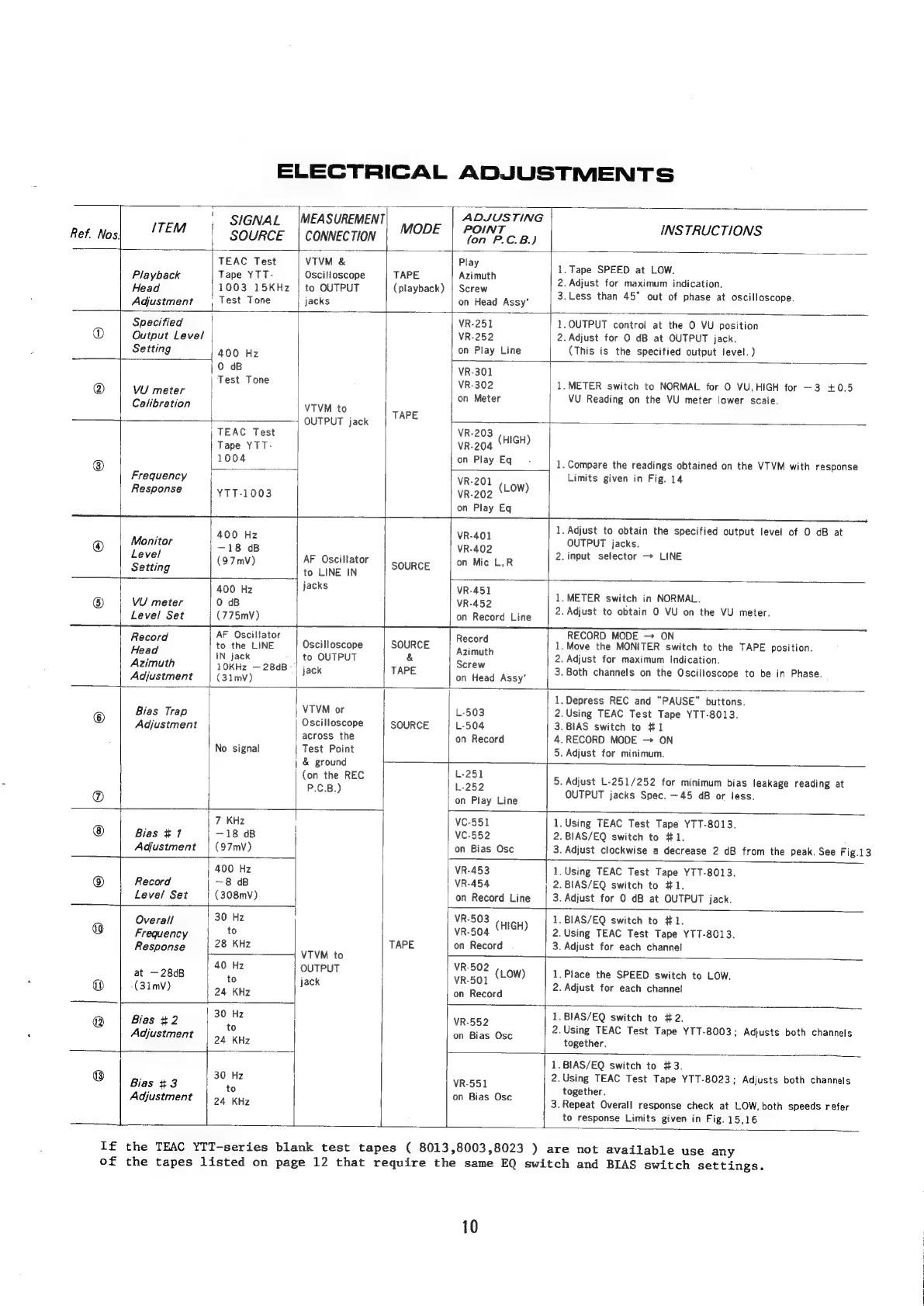
Teac A-7300 - ELECTRICAL ADJUSTMENTS; Playback Head Adjustment; Specified Output Level Setting; VU Meter Calibration

Teac A-7300
45 pages
Print Icon
To Next Page IconTo Next Page
To Previous Page IconTo Previous Page
Loading...
ELECTRICAL
ADJUSTMENTS
!
ADJUSTING
SIGNAL
|MEASUREMENT
MODE
|
POINT
INSTRUCTIONS
Ref
Nos|
‘TEM
SOURCE
|
CONNECTION
fon
F.C.B.)
TEAC
Test
VTVM
&
Play
Playback
Tape
YTT-
Osciloscope
TAPE
Azimuth
ee
Pace
-
Eee
dicati
1003
15KHz
|
to
OUTPUT
(playback)
|
Screw
POR
ear
anna
ance
Ol
Head
:
:
3.Less
than
45°
out
of
phase
at
oscilloscope.
Adjustment
|
Test
Tone
jacks
on
Head
Assy
Specitied
VR-251
1.QUTPUT
control
at
the
O
VU
position
®
Output
Level
VR-252
2.
Adjust
for
O
dB
at
OUTPUT
jack.
Setting
|
400
Hz
on
Play
Line
(This
is
the
specified
output
level.)
|
0
0B
VR-301
@
Wi
Test
Tone
VR-302
1.METER
switch
to
NORMAL
for
O
VU,HIGH
for
3
+0.5
meter
!
on
Meter
VU
Reading
on
the
VU
meter
lower
scale.
Calibration
VTVM
to
ape
+
OUTPUT
jack
;
TEAC
Test
VR-203
Tape
YTT-
vr-204
(HIGH)
®
1004
on
Play
Eq
1.
Compare
the
readings
obtained
on
the
VTVM
with
response
Frequency
VR-201
(Low)
Limits
given
in
Fig.
14
Response
YTT-1003
VR-202
on
Play
Eq
1.
Adjust
to
obtain
the
specified
output
level
of
O
dB
at
Monitor
400
Hz
Veal
OUTPUT
jacks.
@
Level
~18
oB
Wego?
2.
input
selector
>
LINE
exe
(97mV)
AF
Oscillator
|
source
|
on
Mic
LR
Setting
|
to
LINE
IN
jacks
:
bee.
2
yiniaiae
cae
eae
1.METER
switch
in
NORMAL.
Level
Set
(775mV)
on
Record
Line
2.
Adjust
to
obtain
0
VU
on
the
VU
meter.
AF
Oscillator
RECORD
MODE
ON
sae
q
to
the
LINE
|
Oscilloscope
|
SOURCE
eee
1.Move
the
MONITER
switch
to
the
TAPE
position.
As
math
IN
jack
to
OUTPUT
&
Screw
2.
Adjust
for
maximum
Indication.
10KHz
28dB
|
;
I
i
i
Adjustment
(31m)
jack
TAPE
on
Head
Assy’
3.
Both
channels
on
the
Oscilloscope
to
be
in
Phase.
1,
Depress
REC
and
“PAUSE”
buttons
©
Bias
Trap
|
VTVM
or
L-503
2.Using
TEAC
Test
Tape
YTT-8013.
Adjustment
Oscilloscope
SOURCE
L-504
3.
BIAS
switch
to
#1
across
the
on
Record
4.RECORD
MODE
ON
No
signal
|
Test
Point
5.
Adjust
for
minimum.
&
ground
7
(on
the
REC
eee
5.
Adjust
L-251/252
for
minimum
bias
leakage
reading
at
P.C.B.)
;
OUTPUT
jacks
Spec.
—45
dB
or
less.
on
Play
Line
+—
r
7
KHz
VC-551
1.Using
TEAC
Test
Tape
YTT-8013.
Bias
#1
—18
4B
VC-552
2.
BIAS/EQ
switch
to
#1.
Adjustment
|
(97mV)
on
Bias
Osc
3.
Adjust
clockwise
a
decrease
2
dB
from
the
peak.
See
Fig.13
400
Hz
VR-453
1.
Using
TEAC
Test
Tape
YTT-8013.
®
Record
~8
dB
VR-454
2.BIAS/EQ
switch
to
#1.
Level
Set
(308mV)
on
Record
Line
3.
Adjust
for
0
dB
at
OUTPUT
jack.
Overall
30
Hz
VR-503
(G44)
|
1.BIAS/EQ
switch
to
#1.
a)
Frequency
to
VR-504
2.
Using
TEAC
Test
Tape
YTT-8013.
Response
28
KHz
TAPE
on
Record
3.
Adjust
for
each
channel
VTVM
to
+—
ap
pain.
|
OO
OUTPUT
VR'502
(1
ow)
|
1.
Place
the
SPEED
switch
to
LOW.
®
(31mV)
to
jack
Wieoee
2.
Adjust
for
each
channel
m
24
KHz
on
Record
3
30
Hz
1.
BIAS/EQ
switch
to
#2.
@
Bias
+2
6
VR-552
2
Usin
aes
:
i
:
g
TEAC
Test
Tape
YTT-8003;
Adjusts
both
channels
Adjustment
D4
Kas
on
Bias
Osc
together.
|
11.
BIAS/EQ
switch
to
#3.
:
30
Hz
|
7
2.Using
TEAC
Test
Tape
YTT-8023;
Adjusts
both
channels
Bias
#3
to
in
ae
Ose
together.
Adjustment
|
24
KHz
3.
Repeat
Overall
response
check
at
LOW,
both
speeds
refer
|
to
response
Limits
given
in
Fig.
15,16
If
the
TEAC
YTT-series
blank
test
tapes
(
8013,8003,8023
)
are
not
available
use
any
of
the
tapes
listed
on
page
12
that
require
the
same
EQ
switch
and
BIAS
switch
settings.
10

Related product manuals