EasyManua.ls Logo

Teac A-7300 - HEAD ASSEMBLY REMOVAL AND REPLACEMENT

Teac A-7300
45 pages
Print Icon
To Next Page IconTo Next Page
To Previous Page IconTo Previous Page
Loading...
HEAD
ASSEMBLY
REMOVAL
AND
REPLACEMENT
.
Remove
power
from
the
unit.
.
Move
head
assembly
cover
by
removing
2
screws
on
the
left
and
right
end
of
the
head
cover
and
then
gently
move
cover
toward
the
top
of
the
deck.
.
Remove
4
mounting
screws
from
the
head
assembly.
.
Lift
head
assembly
and
remove
the
2
pin
jacks
and
the
9
pin
connector
mounted
on
the
rear
of
the
head
housing.
.
Lift
off
head
assembly.
.
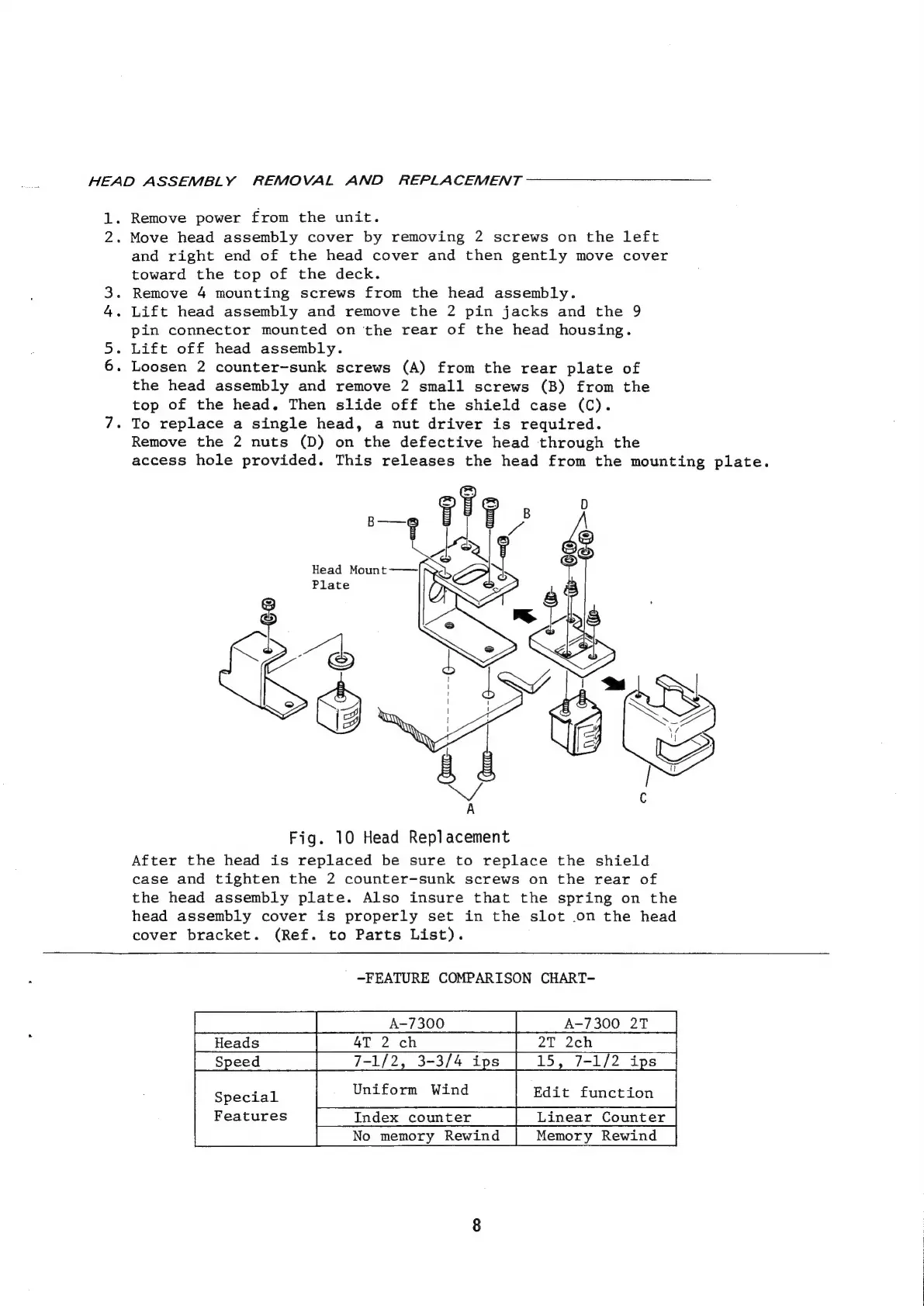
Loosen
2
counter~sunk
screws
(A)
from
the
rear
plate
of
the
head
assembly
and
remove
2
small
screws
(B)
from
the
top
of
the
head.
Then
slide
off
the
shield
case
(C).
-
To
replace
a
single
head,
a
nut
driver
is
required.
Remove
the
2
nuts
(D)
on
the
defective
head
through
the
access
hole
provided.
This
releases
the
head
from
the
mounting
plate.
Fo,
»?
ite
g
Head
Mount
Plate
Fig.
10
Head
Replacement
After
the
head
is
replaced
be
sure
to
replace
the
shield
case
and
tighten
the
2
counter-sunk
screws
on
the
rear
of
the
head
assembly
plate.
Also
insure
that
the
spring
on
the
head
assembly
cover
is
properly
set
in
the
slot
.on
the
head
cover
bracket.
(Ref.
to
Parts
List).
-FEATURE
COMPARISON
CHART-
eee
teresa
A-7300
2T
|
Heads
fieads
GT
2
ch
7-1/2,
3-3/4
ips
15,
7-1/2
ips
Special
Features
Index
counter
No
memory
Rewind
Memory
Rewind

Related product manuals