EasyManua.ls Logo

Teac A-H300 - Troubleshooting Guide; Common Problems and Solutions

Teac A-H300
44 pages
Print Icon
To Next Page IconTo Next Page
To Previous Page IconTo Previous Page
Loading...
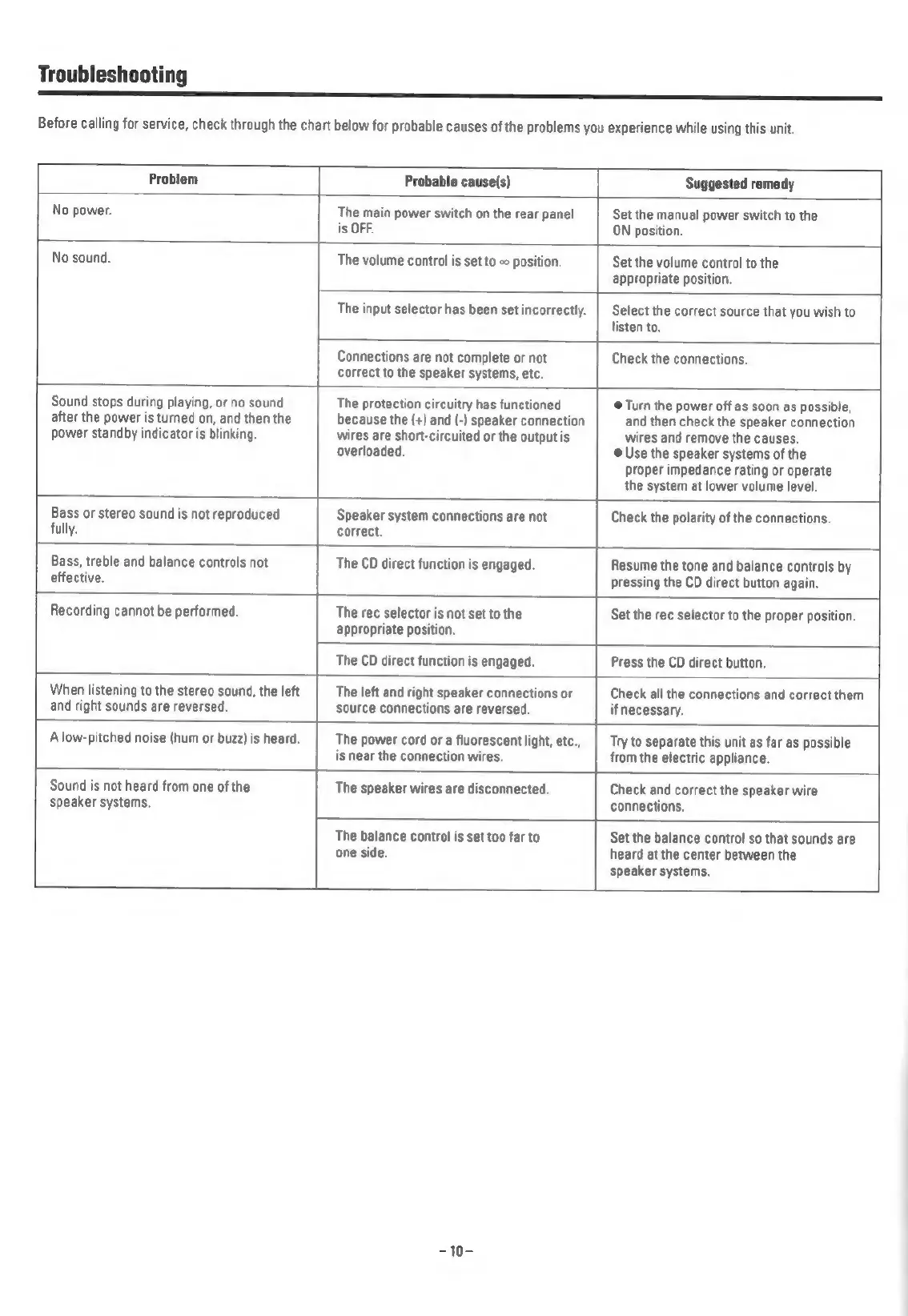
Troubleshooting
a
Before
calling
for
service,
check
through
the
chart
below
for
probable
causes
of
the
problems
you
experience
while
using
this
unit.
Problem
Probable
cause(s)
Suggested
remedy
No
power.
The
main
power
switch
on
the
rear
panel
Set
the
manual
power
switch
to
the
is
OFF.
ON
position.
No
sound.
The
volume
control
is
set
to
-
position.
Set
the
volume
control
to
the
appropriate
position.
The
input
selector
has
been
set
incorrectly.
Select
the
correct
source
that
you
wish
to
listen
to.
Connections
are
not
complete
or
not
correct
to
the
speaker
systems,
etc.
Check
the
connections.
Sound
stops
during
playing,
or
no
sound
after
the
power
is
turned
on,
and
then
the
power
standby
indicator
is
blinking.
The
protection
circuitry
has
functioned
because
the
(+)
and
(-)
speaker
connection
wires
are
short-circuited
or
the
output
is
overloaded.
@
Turn
the
power
off
as
soon
as
possible,
and
then
check
the
speaker
connection
wires
and
remove
the
causes,
@
Use
the
speaker
systems
of
the
proper
impedance
rating
or
operate
the
system
at
lower
volume
level.
Bass
or
stereo
sound
is
not
reproduced
fully.
Speaker
system
connections
are
not
correct.
Check
the
polarity
of
the
connections.
Bass,
treble
and
balance
controls
not
effective.
The
CD
direct
function
is
engaged.
Resume
the
tone
and
balance
controls
by
pressing
the
CD
direct
button
again.
Recording
cannot
be
performed.
The
rec
selector
is
not
set
to
the
appropriate
position.
Set
the
rec
selector
to
the
proper
position.
The
CD
direct
function
is
engaged.
Press
the
CD
direct
button.
When
listening
to
the
stereo
sound,
the
left
and
right
sounds
are
reversed.
The
left
and
right
speaker
connections
or
source
connections
are
reversed.
Check
all
the
connections
and
correct
them
if
necessary.
A
low-pitched
noise
(hum
or
buzz)
is
heard.
The
power
cord
or
a
fluorescent
light,
etc.,
is
near
the
connection
wires.
Try
to
separate
this unit
as
far
as
possible
from
the
electric
appliance.
Sound
is
not
heard
from
one
of
the
speaker
systems.
The
speaker
wires
are
disconnected.
Check
and correct
the
speaker
wire
connections.
The
balance
control
is
set
too
far
to
one
side.
Set
the
balance
control
so
that
sounds
are
heard
at
the
center
between
the
speaker
systems.
-10-

Related product manuals