EasyManua.ls Logo

Teac A-H300 - Remote Control Operation; Remote Control Buttons; Special Function Buttons

Teac A-H300
44 pages
Print Icon
To Next Page IconTo Next Page
To Previous Page IconTo Previous Page
Loading...
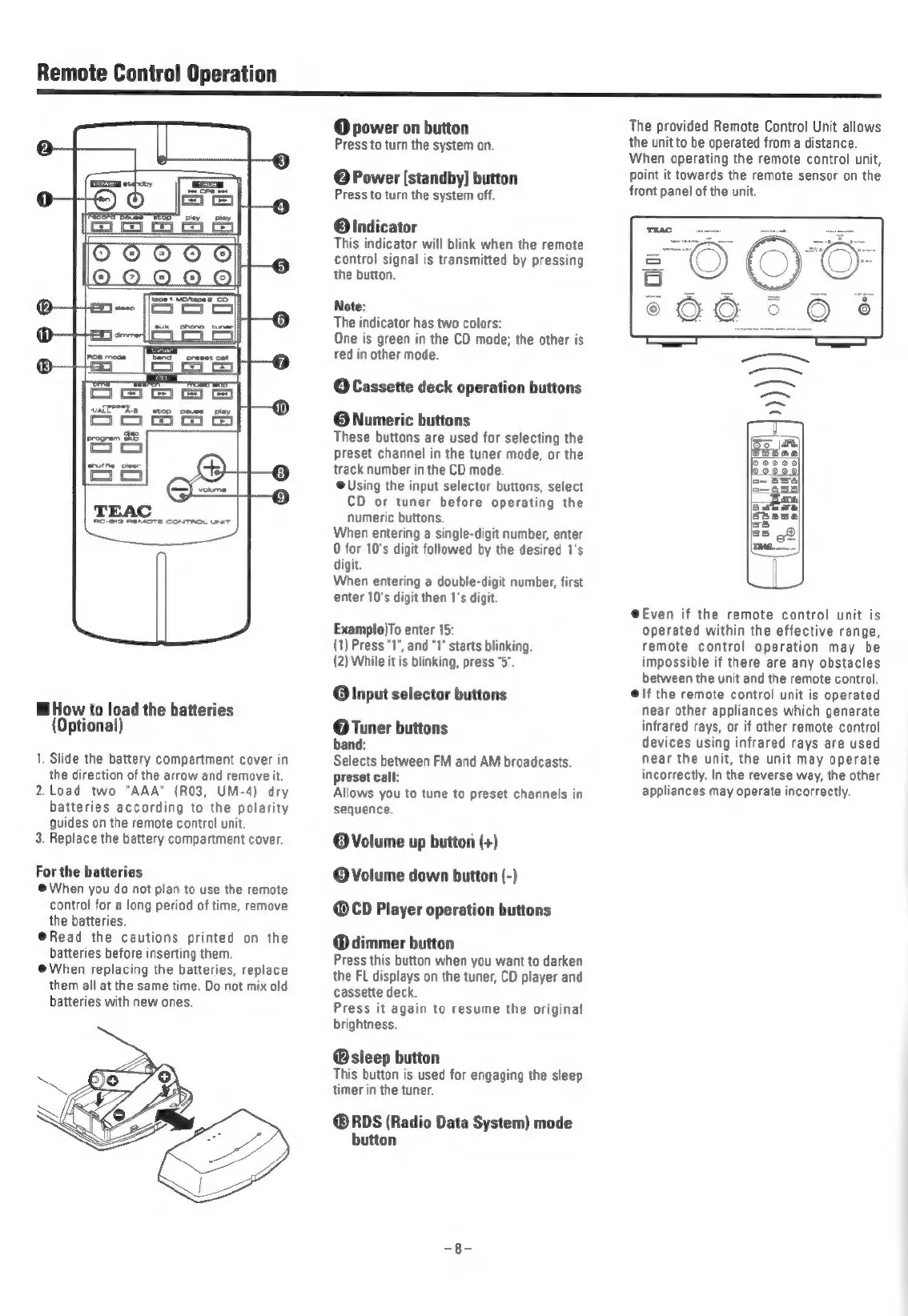
Remote
Control
Operation
H
3
H
>
AG-219
REMOTE
CONTROL
Uns
How
to
load
the
batteries
(Optional)
1,
Slide
the
battery
compartment
cover
in
the
direction
of
the
arrow
and
remove
it.
2.Load
two
"AAA"
(R03,
UM-4)
dry
batteries
according
to
the
polarity
guides
on
the
remote
control
unit.
3.
Replace
the
battery
compartment
cover.
For
the
batteries
@When
you
do
not
plan
to
use
the
remote
control
for
a
long
period
of
time,
remove
the
batteries.
@Read
the
cautions
printed
on
the
batteries
before
inserting
them.
@When
replacing
the
batteries,
replace
them
all
at
the
same
time.
Do
not
mix
old
batteries
with
new
ones.
@
power
on
button
Press
to
turn
the
system
on.
@
Power
[standby]
button
Press
to
turn
the
system
off.
@Olndicator
This
indicator
will
blink
when
the
remote
control
signal
is
transmitted
by
pressing
the
button.
Note:
The
indicator
has
two
colors:
One
is
green
in
the
CD
mode;
the
other
is
red
in
other
mode.
O
Cassette
deck
operation
buttons
©
Numeric
buttons
These
buttons
are
used
for
selecting
the
preset
channel
in
the
tuner
mode,
or
the
track
number
in
the
CD
mode.
@
Using
the
input
selector
buttons,
select
CD
or
tuner
before
operating
the
numeric
buttons.
When
entering
a
single-digit
number,
enter
0
for
10's
digit
followed
by
the
desired
1's
digit.
When
entering
a
double-digit
number,
first
enter
10's
digit
then
1's
digit.
Example)To
enter
15:
(1)
Press
"1",
and
"1"
starts
blinking.
(2)
While
it
is
blinking,
press
"5".
@
Input
selector
buttons
@
Tuner
buttons
band:
Selects
between
FM
and
AM
broadcasts.
preset
call:
Allows
you
to
tune
to
preset
channels
in
sequence.
©
Volume
up
button
(+)
©Volume
down
button
(-)
@CD
Player
operation
buttons
@dimmer
button
Press
this
button
when
you
want
to
darken
the
FL
displays
on
the
tuner,
CD
player
and
cassette
deck.
Press
it
again
to
resume
the
original
brightness.
@sleep
button
This
button
is
used
for
engaging
the
sleep
timer
in
the
tuner.
@®RDS
(Radio
Data
System)
mode
button
The
provided
Remote
Control
Unit
allows
the
unit
to
be
operated
from
a
distance.
When
operating
the
remote
control
unit,
point
it
towards
the
remote
sensor
on
the
front
panel
of
the
unit.
@Even
if
the
remote
control
unit
is
operated
within
the
effective
range,
remote
control
operation
may
be
impossible
if
there
are
any
obstacles
between
the
unit
and
the
remote
control.
@\f
the
remote
control
unit
is
operated
near
other
appliances
which
generate
infrared
rays,
or
if
other
remote
control
devices
using
infrared
rays
are
used
near
the
unit,
the
unit
may
operate
incorrectly.
In
the
reverse
way,
the
other
appliances
may
operate
incorrectly.

Related product manuals