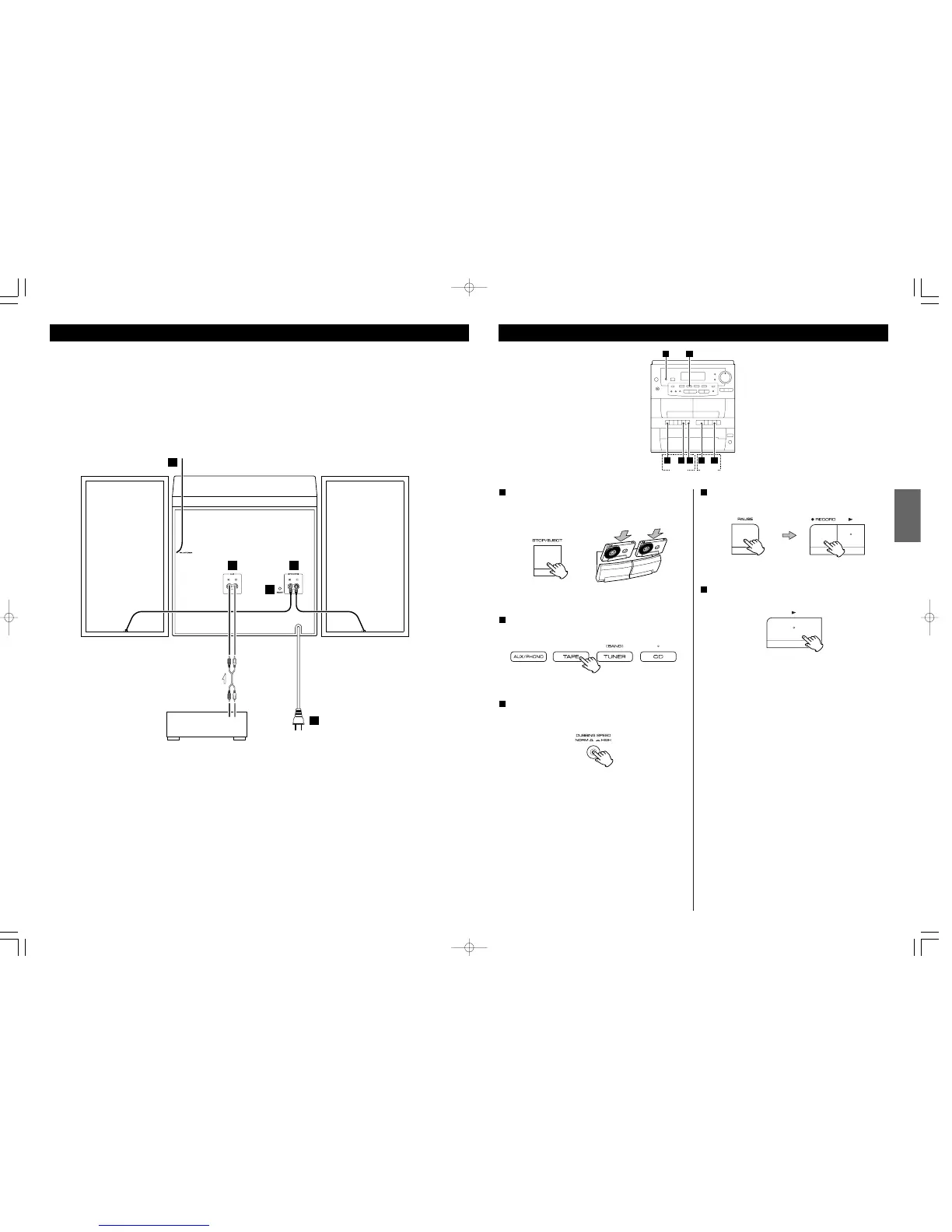
Load a pre-recorded cassette tape into TAPE
!
and a
recordable cassette tape into TAPE
@
.
< You can use normal (Type
!
) tape only.
1
Press the TAPE button or the FUNCTION button to select
“TAPE”.
2
Select the dubbing speed by pressing the DUBBING
SPEED button.
3
HIGH:
Dubbing is performed at high speed.
(You may lose some fidelity during high speed dubbing.
Make a trial recording to verify the audio quality.)
NORMAL:
Dubbing is performed at normal speed.
Press the PAUSE button and the RECORD button of
TAPE
@
.
4
Press the PLAY button of TAPE
!
.
5
The dubbing starts.
< Do not select another source during dubbing, or the dubbing
will be interrupted.
< To stop dubbing, press the STOP buttons of TAPE
!
and
@
.
36
Branchement



 To Next Page