55
FRANÇAIS
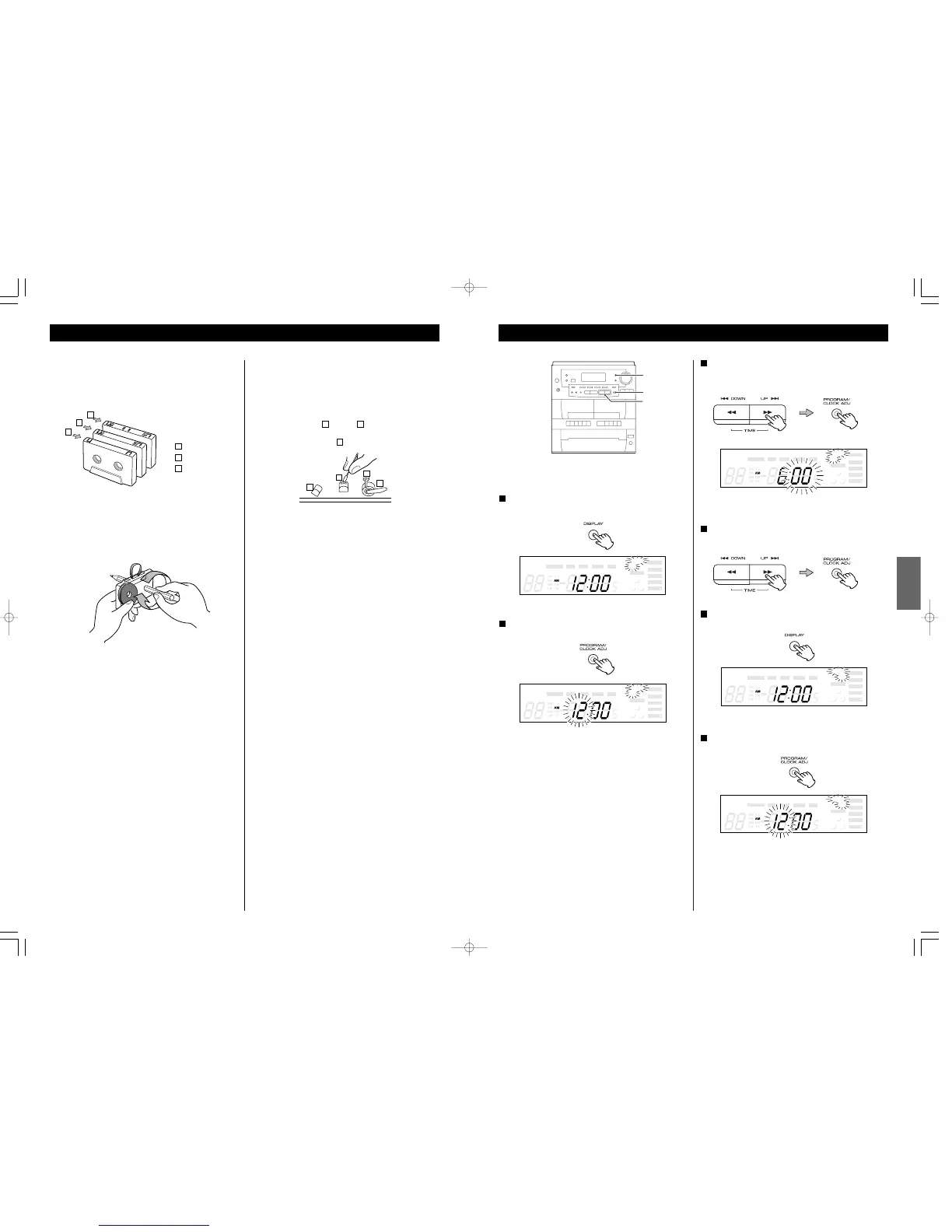
Réglage de la minuterie 1
Réglez l’horloge avant de régler la minuterie
Appuyez sur la touche DISPLAY répététivement jusqu’à
temps que le témoin “TIMER ON” est affiché
1
En dedans de 5 secondes, appuyez sur la touche CLOCK
ADJ.
2
“heure” clignote.
< Si aucune touche est appuyée pour 10 secondes, le réglage
de la minuterie est annulé.
“minute” clignote.
Appuyez sur la touche UP (ou DOWN) pour régler les
minutes de départ et appuyez sur la touche CLOCK ADJ.
4
Appuyez sur la touche DISPLAY.
“TIMER OFF” est affiché
5
En dedans de 5 secondes, appuyez sur la touche CLOCK
ADJ.
6
“heure” clignote
6
Cassette Tape
Tape Handling
Use your finger or a pencil to turn the cassette’s hub and take
up any slack tape.
< Avoid touching the tape. Fingerprints attract dust and dirt.
Do not store tapes in the following places:
< On top of heaters, exposed to direct sunlight or in any other
places with high temperatures.
< Near speakers, on TV sets or amplifiers or where they would
be exposed to strong magnetic fields.
< Where humidity is high and in dirty, dusty places.
< Avoid dropping or subjecting cassettes to excessive shocks.
< As C-120 tapes are physically weak and could become
entangled in the transport mechanism, do not use them.
Tape Selection
Metal and chrome (cobalt) tapes have identification holes.
< This unit can play normal (Type
!
) tape only.
(TAPE
@
only)
Demagnetizing Heads
Be sure that the power is off, then demagnetize the heads
using a demagnetizer. For details of its use, read its
instructions.
Maintenance
The heads and tape path should be cleaned and
demagnetized periodically.
Cleaning Tape Path
< Apply head cleaning fluid to a cotton swab or soft cloth, and
lightly rub the heads , capstan and all metal parts in the
tape path.
< Also clean the pinch roller using rubber cleaning fluid.
C
BA
Normal (Type
!
)
CrO
2
(Type
@
)
Metal (Type
!%
)
c
b
a
A
A
B
C
a
b
c



 To Next Page