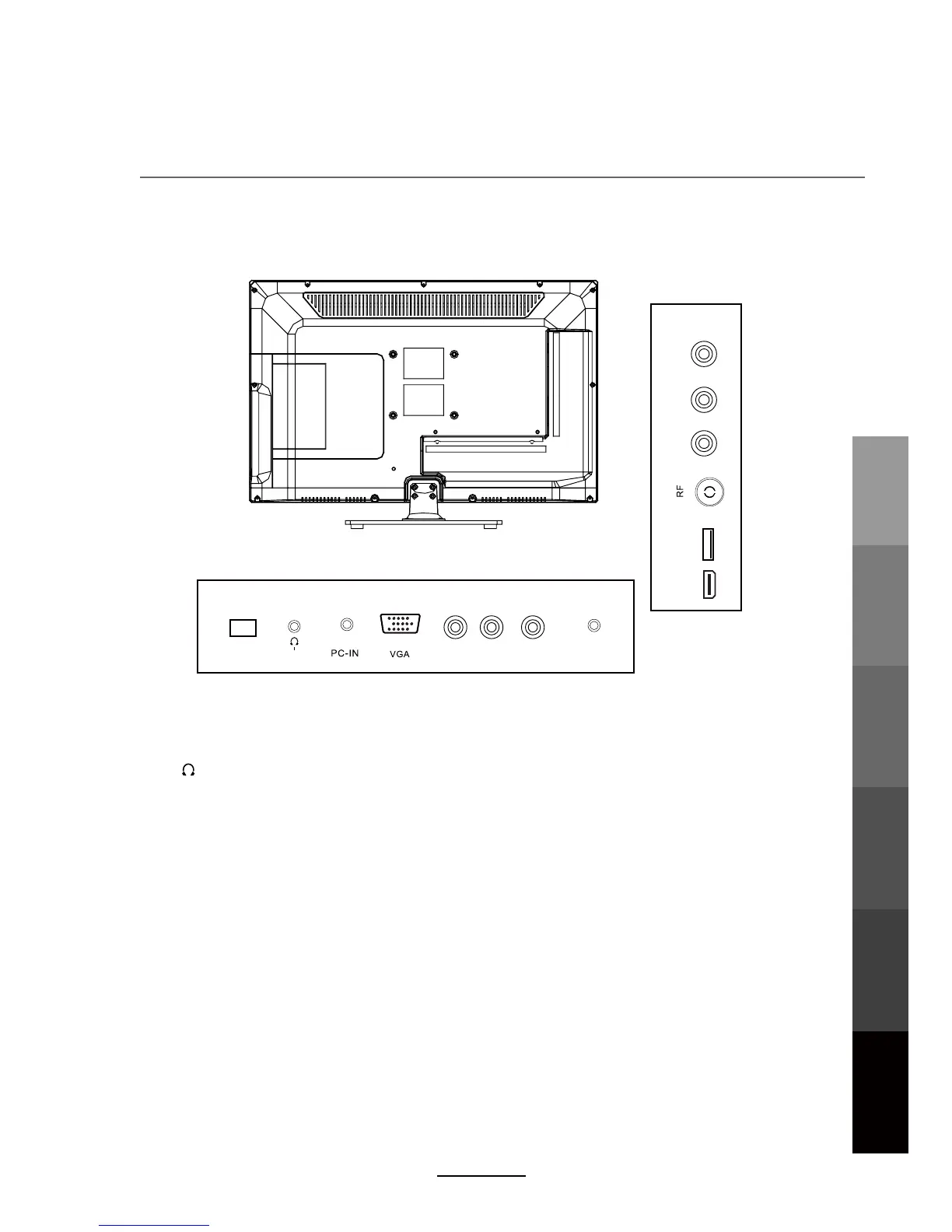
Names of each part
Back View
NOTE: Before making or changing cable connections, please make sure that power to
the unit is completely disconnected by switching off the power supply and unplugging
the power cable from the wall outlet.
POWER: Connect to the power adaptor.
USB: Connect USB storage devices/hard disk drives
.
HDMI : Connect to the HDMI output of external devices like DVD players with a HDMI cable.
YPbPr: Connect to the YPbPr video output sockets of external devices.
PC-IN: Connect to the audio output terminal on the PC.
VGA: For PC video input. Connect to the VGA/RGB plug on the PC.
COAX : Digital output to AV receiver.
Headphone: Connect to your headphones or other audio equipment.
VIDEO: Connect to video output terminal of external devices.
L/R in: Connect to the audio output terminal of external devices.(shared with YPbPr)
RF: Connect an antenna or a 75 Ohm coaxial cable to receive a TV signal.
Y Pb Pr
COAX
USB
HDMI
L-i n R-in
Headphone
VIDEO
POWER
Basic OperationOSD Menu
Multimedia
Operation
Recording
Operation
User Guidance
Information
Maintenance
and Service
9



 To Next Page