99
Stand and wall-mounting instructions (optional)
Only for 55” model
Only for 42” model
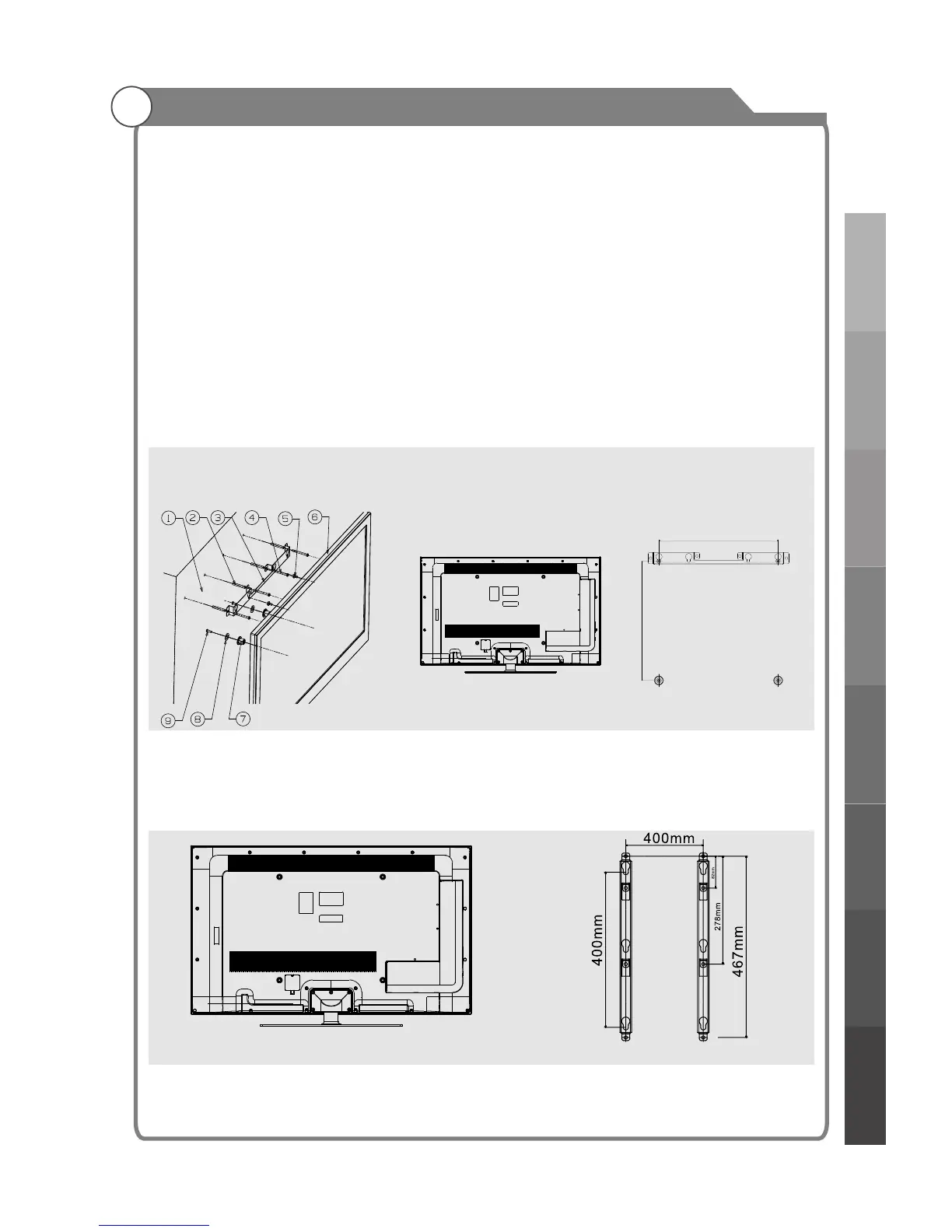
Mounting instruction:(Only for 42” model)
Your LED TV is able to wall mounting with the use of a wall mounting bracket(not supplied with LED
TV), and the mounting holes on the back of the unit. After detaching the stand:
1.Find the four mounting holes where you want to mount according to wall mounting bracket ③
and drill these four mounting holes on the wall.
2.Drive Nylon sleeves ② into the mounting holes on the wall tightly.
3.Fasten wall mounting bracket ③ on the Nylon sleeves with self-tapping screws ④;
4.Fasten screws ⑤ into the two screw holes on the rear cabinet;
5.Tighten bolt ⑦ on the bottom of the rear cabinet with screws ⑨,then put rubber gaskets ⑧ on
the bolt ⑦;
6.Left the TV and hang it on the wall.
400mm
400mm
①.Wall ②.Nylon sleeve (4 piece) ③.Wall mounting bracket(1 piece)
④.Self-tapping screw(4 piece) ⑤.Mounting Screw (2 piece) ⑥.Rear cabinet ⑦.Bolt
⑧.Rubber gaskets (2 piece) ⑨.Screw (2 piece)
(optional)
Your LED TV is able to accommodate wall mounting with the use of a wall mount bracket
(not supplied with LED TV, please contact your local hardware store) and the mounting
holes on the back of the unit. We recommend removing the TV stand prior to wall mounting
the TV. Please
Mounting instruction:(Only for 55” model)
1.After detaching the stand, fasten 4 mounting screws into the 4 screw holes on the rear cover, see the
figure below.
2.Fasten wall mounting bracket with screws on the wall.
3.Carefully check for the strength before releasing the LED TV.
Note:
1. Please ensure that the wall used for mounting can sustain the Tv’s weight.
2. Be careful not to scratch panel and TV cabinet when your fasten the screws on the TV.
Wall mounting instructions
see previous page for instructions on removing the stand.
Introduction
General Description
External Connection
Basic operationMenu system
instruction
Digital Media Player
Troubleshooting
Picture defects and
the reason



 To Next Page