Digital Media Player
40
3. Movie
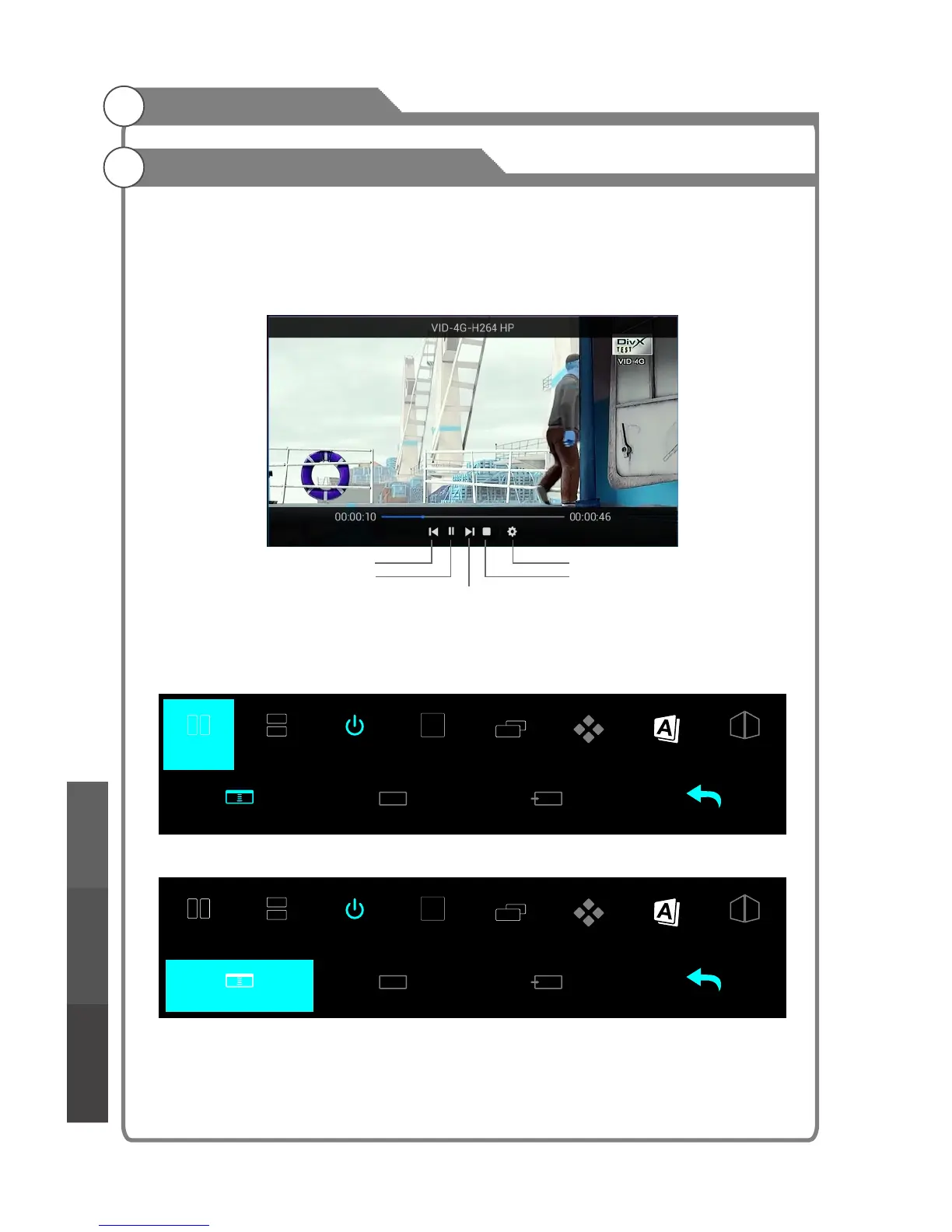
In the file browser, select a desired movie and press OK to start playback.Press menu
button to display/exit the "movie menu".
Those menu items from left to right function as the following in turn:
a.Prev b.Play/Pause c.Next d.Stop e.Advanced setting
Media Playback
Next
Prev
Play/Pause
Advanced setting
Stop
4. Sync View
Press 2D/3D button to open the Sync View menu. This menu has two group functions,
the top row functions use for 3D setting (pg. for details), the bottom row is use for Sync
View. (SyncView Only use in USB mode.)
Select the Sync View item and press OK to enter the Sync View mode.
3D Left Right 3D Up down 3D -Off 3D - 2D 2D - 3D 3D Clarity 3D Auto 3D Engine
Sub Channel Enter Sub Back Main
3D Left Right 3D Up down 3D -Off 3D - 2D 2D - 3D 3D Clarity 3D Auto 3D Engine
Sub Channel Enter Sub Back Main
SyncView
SyncView
Digital Media PlayerTroubleshooting
Picture defects and
the reason



 To Next Page