External Connection
Connecting Digital Audio System
19
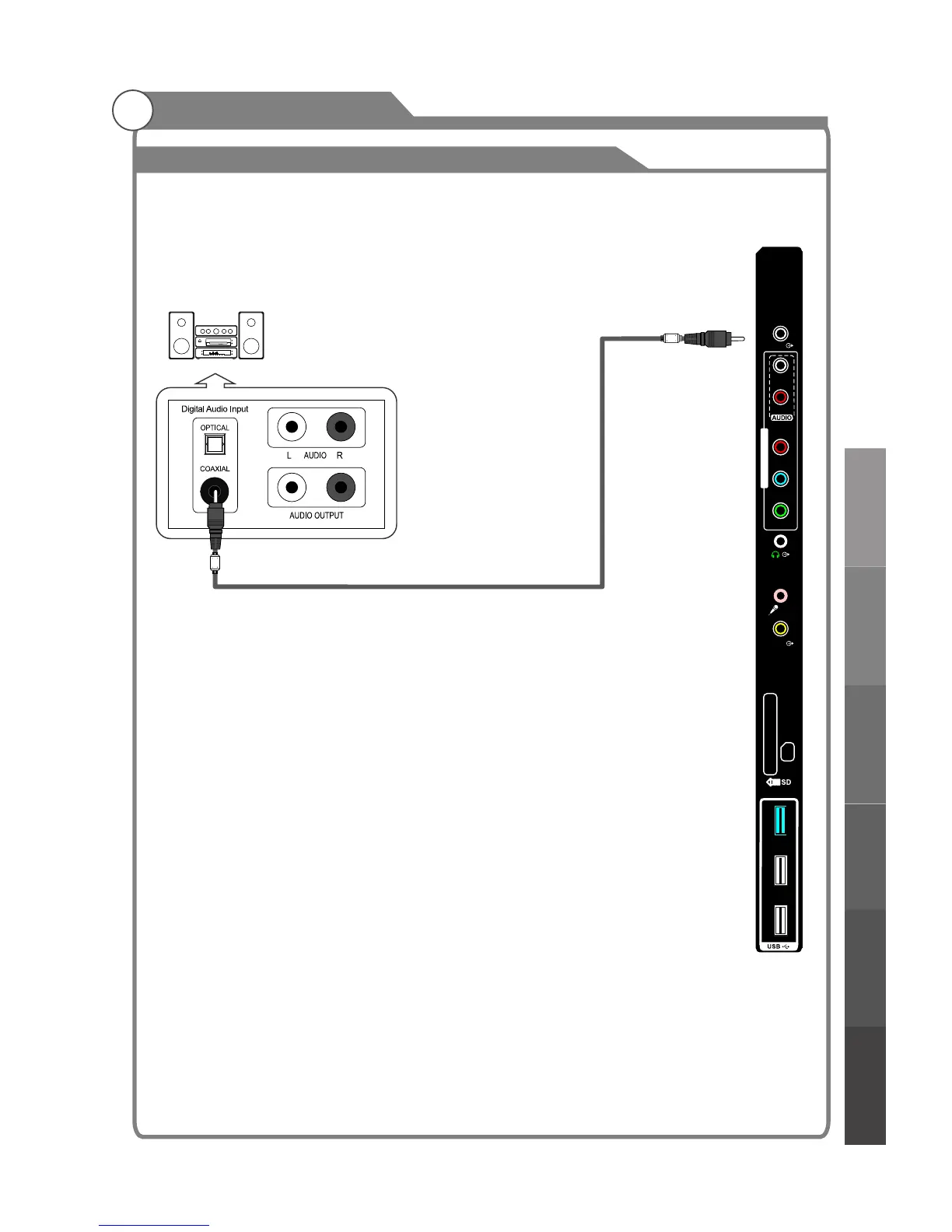
The rear panel jacks on your TV make it easy to connect a Digital Audio System to your TV.
5.1 CH audio is possible when the TV is connected to an external device supporting 5.1 CH.
1. Connect a Coaxial Cable between the SPDIF jacks on the TV and the Digital Audio Input
jacks on the Digital Audio System. When a Digital Audio System is connected to the
SPDIF terminal: Decrease the gain (volume) of the TV, and adjust the volume level with
the volume control.Digital Audio System's
TV Rear Panel
Coaxial Cable (Not supplied)
Digital Audio System
(Black)
USB 1
USB 2
USB 3
(USB 3.0)
SPDIF
Pr
Pb
Y/V
L
R
MIC
VIDEO
COMPONENT/AV IN
External Connection
Basic operationMenu system
instruction
Digital Media Player
Troubleshooting
Picture defects and
the reason



 To Next Page